How to Create Online Training Modules Fast in 2026
Building effective online training used to mean months of instructional design, costly production, and complex LMS configuration. In 2026, that has changed dramatically. AI-powered authoring tools, smarter content frameworks, and clearer design standards have made it possible to create online training modules faster than ever without sacrificing quality. Whether you’re developing onboarding content, compliance training, or role-specific upskilling, the process is more accessible and more powerful than it has ever been. This guide walks through every step, from writing objectives to tracking learner outcomes.
What Makes an Online Training Module Effective in 2026
What separates a module that genuinely builds competence from one that simply gets clicked through comes down to one principle: the best e-learning activates the learner’s brain as efficiently as possible, rather than just presenting information. That principle shapes every design decision, from how long a module runs to what kinds of interactions it includes.
Effective modules share a consistent set of characteristics grounded in instructional design research. Getting these right from the start saves significant rework later and directly improves learning outcomes.
Core Components Every Training Module Needs
Clear Learning Objectives
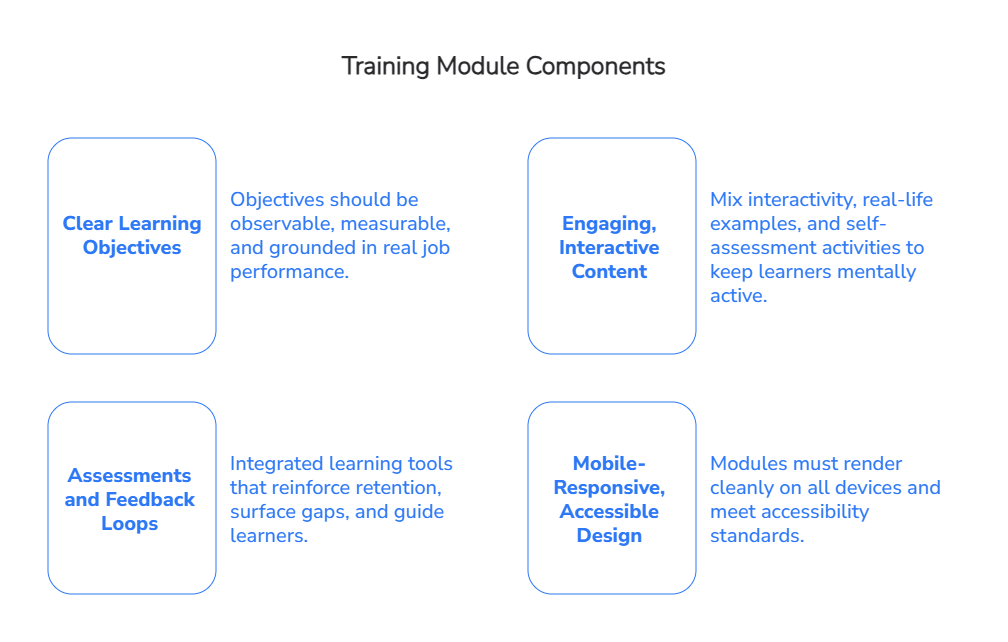
Every strong module begins with a clear answer to one question: what will the learner be able to do after completing this? Objectives should be observable, measurable, and grounded in real job performance, not just subject coverage. Vague objectives like “understand customer service” should be replaced with specific performance statements such as “resolve a customer complaint using the four-step escalation process.” All content, activities, and assessments should align directly to these objectives.
Engaging, Interactive Content
Passive content, scrollable slides with minimal interaction, consistently produces lower retention and higher drop-off. Effective modules mix interactivity, real-life examples, and self-assessment activities to keep learners mentally active. This means incorporating interactive videos, animations, branching scenarios, and simulations that make abstract concepts tangible.
The evidence for online learning’s retention advantages over traditional instruction is well-grounded in peer-reviewed research. A randomized controlled trial in medical education found that students in an online video plus virtual patient format showed significantly higher knowledge scores on both immediate and delayed tests than those attending a traditional face-to-face lecture on the same content. A 2022 large-scale analysis published in the British Journal of Educational Technology found that students in well-designed online sections performed at least as well as, and in some courses better than, students in face-to-face sections when controlling for student characteristics. Widely quoted figures suggesting online learning lifts retention from 8-10% to 25-60% trace back to non-peer-reviewed sources and are not verifiable in current scholarly literature. The more defensible picture, supported by multiple systematic reviews, is that well-designed digital learning is at least equivalent and often measurably superior for knowledge retention compared to traditional classroom delivery.
Assessments and Feedback Loops
Quizzes and knowledge checks should not be an afterthought. Used well, they are integrated learning tools that reinforce retention, surface gaps, and guide learners on what to revisit. Immediate, explanatory feedback after an incorrect answer teaches far more than a final score ever could. Assessments placed throughout a module, rather than only at the end, improve knowledge encoding and give learners a realistic picture of their progress.
Mobile-Responsive, Accessible Design
Mobile learning is one of the fastest-growing segments in e-learning, and for good reason. A 2024 study cited in 2026 trend articles shows that mobile-first learning can reduce time-to-completion by almost half. If your module doesn’t render cleanly on a phone or tablet, you’re losing a significant portion of learner engagement before it even starts. Accessibility is equally non-negotiable. Modules must meet WCAG 2.1 Level AA standards at minimum, covering captions, keyboard navigation, screen reader compatibility, and sufficient color contrast.
How Long Should a Training Module Be?
The evidence on module length points clearly in one direction: shorter is better for completion, retention, and on-the-job application. Microlearning lessons in the 5-10 minute range achieve much higher completion and lower drop-off than hour-long modules. Research comparing micro-content with longer sessions shows learners retain 70-90% of micro-content compared with about 15% for longer, one-off sessions. A good rule of thumb: each module should focus on a single objective or task, run between 5 and 15 minutes, and feel complete on its own while fitting into a broader learning path.
Step 1: Define Your Learning Objectives and Audience
Knowing how to create a training module that actually changes behavior starts here. Before any content is written or any tool is opened, objectives and audience must be clearly defined. Skipping this step is the most common reason training programs fail to produce measurable results.
Writing Objectives That Guide Content Decisions
Objectives work best when they start from the business or performance problem, not from a list of topics. Ask what employees should be doing differently after the training, then build backward from there. Use action verbs that describe observable behavior: configure, prioritize, diagnose, document, negotiate. Avoid verbs like “understand” or “appreciate,” which cannot be measured.
Each objective should map to a business KPI or compliance requirement. When an objective is tied to a real outcome, it becomes possible to evaluate whether training is working at a level beyond completion rates, which is what earns executive support and keeps budgets justified.
Identifying What Your Learners Already Know
A needs analysis should also confirm whether the problem can actually be solved with training. In practice, many training initiatives fail before course development even begins because the organization is trying to fix a process, tooling, communication, or management issue with another e-learning module.
If employees do not follow a procedure because the system is confusing, the workflow is inconsistent, or managers reward a different behavior, training will not solve the root cause. It may explain the right process, but it will not remove the obstacle. That is why this step matters so much: before building a course, L&D teams need to understand whether they are dealing with a real knowledge gap or a broader operational problem.
Step 2: Choose the Right Online Training Course Builder
The right authoring tool can dramatically accelerate how you develop a training module without requiring deep technical skills. In 2026, the market includes enterprise-grade AI-powered platforms and lightweight standalone tools, and choosing between them depends on your content volume, integration needs, and the level of interactivity you require.
Understanding the Tool Landscape
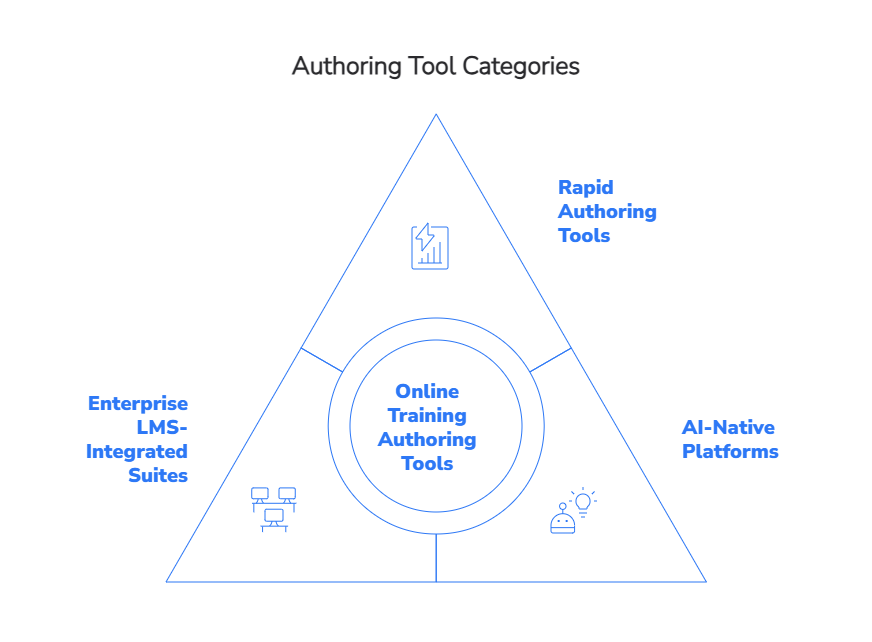
Not every authoring tool is built for the same job, and the differences matter at enterprise scale. It helps to think in three broad categories rather than evaluating individual features in isolation.
Rapid authoring tools such as Articulate Storyline and iSpring Suite work best for L&D teams that need fast, template-driven production without deep AI involvement. BJC HealthCare, a healthcare system with over 35,000 employees, used Articulate Storyline 360 to develop scenario-based blended lessons at scale, reporting improved learner retention and authoring efficiency across their workforce. These tools excel at structured content and have wide LMS compatibility, though they require more manual effort per module and don’t significantly reduce the work of converting raw documentation into finished courses.
AI-native platforms are better suited to enterprises that need to convert existing content at volume and speed. One large customer service organization using an AI-native authoring platform reported that tasks which previously took around a day and a half now took approximately one hour, a more than 12-fold increase in throughput. The trade-off is that AI-generated drafts still require instructional design review, and platform maturity varies considerably between vendors.
Enterprise LMS-integrated suites are the right choice when deep learner management, compliance tracking, certification workflows, and reporting need to sit alongside authoring in a single system. They carry the highest implementation and licensing cost and can constrain content portability if vendor lock-in is not managed carefully.
Understanding which category fits your organization’s needs is the most important decision you’ll make before evaluating specific tools. Once the right category is identified, feature selection becomes much easier.
Key Features to Look For in an Authoring Tool
When evaluating any online training course builder, the tool should support SCORM or xAPI export for LMS compatibility, offer responsive design for mobile learners, and provide templates that enforce consistent structure across modules. Look for built-in quiz and scenario builders, media support for video, audio, and animation, and a workflow that allows subject-matter experts to review and edit content without needing specialized training.
Governance features matter too, particularly for enterprise teams. Version control, approval workflows, and content lifecycle management ensure that modules stay accurate and aligned with current policies. If your organization operates in a regulated environment, the ability to produce audit-ready records of content versions is essential.
AI-Powered Tools That Speed Up Module Creation in 2026
AI has fundamentally changed how fast it’s possible to create online training modules. TTMS’s AI4E-learning platform sits in the AI-native category, built specifically for enterprises that need to convert existing documentation, presentations, audio, and video files into complete SCORM-compliant courses at scale. The platform performs deep content analysis to infer key concepts, structure content around defined learning objectives, and generate quizzes, participant materials, instructor kits, and multilingual versions from the same source upload. An AI voice-over narration feature removes the need for separate recording sessions.
Subject-matter experts retain full editorial control through a Word-based editing interface, which means the workflow doesn’t require instructional design expertise to produce well-structured output. For organizations converting large volumes of compliance policies, onboarding documentation, or process guides into structured training, this kind of automation helps organizations overcome one of the biggest bottlenecks in course production: converting large volumes of existing documentation into training materials.
When to Use an LMS vs. a Standalone Authoring Tool
An authoring tool creates the course. An LMS delivers, tracks, and manages it. Confusing the two is one of the most common mistakes organizations make when evaluating learning technology. Most organizations need both, but the balance depends on what you’re trying to achieve. A standalone authoring tool is sufficient if you need to produce content that will be embedded in a portal, shared via a direct link, or imported into a third-party LMS. If you need centralized learner management, role-based enrollment, compliance tracking, certification management, and analytics dashboards, an LMS is essential.
For enterprises already running complex learning programs, the question is often not which one to use but how to integrate them effectively. TTMS provides LMS administration services alongside content development, which means organizations can manage both sides of the delivery chain through a single partner rather than coordinating multiple vendors.
Step 3: Plan and Structure Your Course Content
Good structure is what makes the difference between a course that feels coherent and one that overwhelms. Planning how to design a training module before writing any content prevents the most common structural mistakes, such as mismatched pacing, redundant sections, and unclear progression.
Breaking Content Into Logical Modules and Lessons
Think of the full course as a series of self-contained building blocks, each focused on a single objective. This modular architecture, sometimes called LEGO-style design, means that individual units can be reused in different programs, updated independently when procedures change, and consumed as standalone resources when learners need a quick reference on the job.
Each module should follow a repeatable arc: activate prior knowledge, present the concept concisely, provide a practice activity, give feedback, and close with an application prompt. This structure reduces cognitive load and helps learners navigate efficiently, because they always know what to expect.
Sequencing Modules for Clarity and Progression
Content should build on itself. Map the skills and knowledge dependencies before deciding on module order, starting with foundational concepts and progressing toward more complex tasks and decision-making scenarios. Learners who encounter advanced material before mastering foundational concepts are more likely to disengage and less likely to transfer learning to the job.
Role-based and skill-gap-based pathways add another layer of progression. Not every learner needs every module. Designing flexible pathways, with a core track aligned to essential outcomes and optional or advanced modules for specific roles, makes training both more efficient and more relevant.
Using a Training Module Template to Save Time
Standardized templates are one of the most underused efficiency tools in e-learning development. A good template encodes the lesson arc, consistent page layouts, interaction patterns, and assessment formats into a reusable framework. Designers plug content into a proven structure rather than rebuilding from scratch each time. When all modules follow the same structural logic, learners spend less cognitive energy figuring out how to navigate and more on the actual content. Over time, a library of tested templates becomes one of the most valuable assets an L&D team can own.
Step 4: Create Engaging Training Content
Creating engaging content is where many training programs either succeed or stall. The goal is to activate the learner’s brain as efficiently as possible, which means making deliberate choices about what information to include, how to present it, and how to require learners to engage with it.
Chunking Information to Prevent Cognitive Overload
Working memory has limited capacity. When too much information is presented at once, learners become overloaded, reducing retention and increasing errors. The solution is progressive disclosure: start with simple, focused content and add complexity only as foundational concepts are established.
Each screen or segment should carry one key message. Supporting details, context, and examples should be organized around that single message rather than layered into long, unbroken blocks of text. Short paragraphs, clear headings, and deliberate use of white space all reduce the cognitive effort required to extract meaning.
Mixing Text, Visuals, Video, and Audio Effectively
Different media serve different learning purposes. Working memory can only handle a limited number of discrete elements at once. Presenting too much information in a single screen or segment forces learners to split attention, which reduces retention and increases errors. Pairing a diagram with spoken narration reduces overload and improves transfer, particularly for complex procedures. Full duplicate text that reads out the same words displayed on screen actually harms retention compared with visuals supported by audio explanation alone. Video is a high-value medium best used for authentic demonstrations, role models, and simulations, not as a replacement for all other formats.
A strong module might use a short text overview to frame the topic, a diagram to show a process, a 90-second video to demonstrate a real-world example, and an audio-guided scenario to let the learner practice a decision. Each format serves a specific function, and together they build understanding more efficiently than any single medium could alone.
Adding Scenarios, Simulations, and Real-World Examples
Scenario-based learning consistently produces stronger performance outcomes than passive content delivery. Placing learners in realistic situations, where they must choose a response, see consequences, and reflect on their decision, builds the kind of judgment that transfers to the job. Simulation-based scenarios are particularly effective for compliance, ethics, sales conversations, and leadership dilemmas, as shown in instructional design research on practice-based learning.
Real-world examples should use authentic workplace artifacts, actual screenshots, forms, dashboards, and tools, rather than generic illustrations. When a learner can recognize the scenario as something they’ll actually encounter, the training feels relevant and the learning sticks. This is one of the core principles TTMS applies in its custom content development: learning should always connect to the real performance environment.
Step 5: Build Assessments and Interactive Elements
Assessments do more than check knowledge. When designed well, they are among the most powerful learning tools in any module. Interactive elements that require learners to make decisions, solve problems, and receive immediate feedback reinforce encoding in long-term memory and build the confidence to apply skills on the job.
Types of Assessments That Reinforce Learning
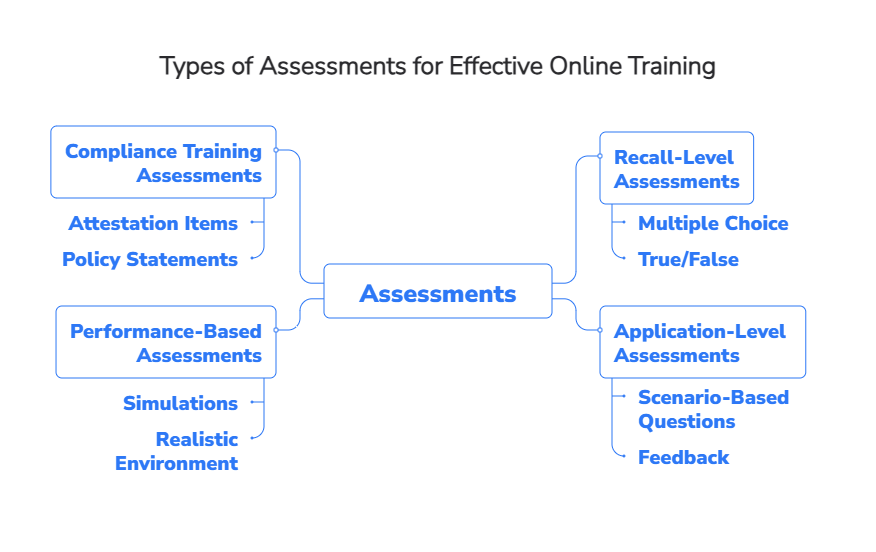
The choice of assessment type should match the learning objective. Recall-level objectives can be tested with multiple choice or true/false questions, but most workplace training requires higher-order thinking. Application-level objectives call for scenario-based questions where learners choose a course of action and receive feedback that explains why the correct answer is correct, not just whether they got it right.
Performance-based assessments, such as simulations where learners complete a task in a realistic environment, are the gold standard for procedural and technical training. They are also significantly more accurate predictors of on-the-job performance than memory tests alone. For compliance training, attestation items that require learners to acknowledge and respond to policy statements are essential for audit trails.
Using Quizzes and Branching Scenarios for Practical Application
Short, frequent quizzes placed throughout a module, rather than only at the end, improve knowledge retention through spaced retrieval. Each quiz item should be directly tied to a stated learning objective, and the feedback for incorrect responses should teach, not just penalize.
Branching scenarios take interactivity further by presenting a realistic situation, offering a set of choices, and leading learners down different paths based on their decisions. Done well, a branching scenario lets learners experience the consequences of a poor decision in a safe environment, which produces the kind of reflective learning that a linear quiz cannot replicate. Scenario-based learning and spaced quizzes are among the most consistently supported design features in the e-learning research literature for improving both engagement and long-term retention.
Step 6: Test, Refine, and Publish Your Module
No module is ready to publish the moment it’s built. A structured pilot process catches usability issues, content gaps, and technical problems before they reach the full audience, saving time and protecting learner experience at scale.
Running a Pilot With a Small Learner Group
A representative pilot group of 10 to 30 learners, drawn from the range of roles and experience levels present in the full audience, is sufficient to surface most significant issues. The pilot should run long enough to observe a complete learning cycle, including course start, activity completion, and, where possible, early indicators of on-the-job application.
Before launching the pilot, the module should be tested in the actual delivery environment, meaning the same LMS, browser types, and device mix that the full audience will use. SCORM packages should be validated for correct bookmarking, score reporting, and completion status. Testing only on a developer machine and assuming production will behave the same way is a common and avoidable mistake.
Gathering Feedback and Making Adjustments
Structured feedback collection inside the module, a short survey covering relevance, clarity, ease of navigation, and confidence to apply the skill, captures learner reactions while the experience is fresh. Manager and subject-matter expert debriefs after the pilot add a different perspective, focused on content accuracy and fit with actual workflows.
Analytics from the pilot reveal where learners drop off, which quiz items produce unexpected failure patterns, and which sections are consuming disproportionate time. These data points drive prioritized iteration. Fix anything that blocks access, completion, or understanding first. Cosmetic improvements can follow.
Publishing and Hosting Your Course
SCORM 1.2 or SCORM 2004 remains the most universally supported standard for LMS-based delivery and is the right choice when the primary requirement is compatibility and basic tracking. For organizations that need richer analytics, tracking across multiple systems, or data that flows to a Learning Record Store, xAPI combined with cmi5 is the more future-proof option. Most modern authoring tools support both.
Publish content as HTML5 with responsive layouts and optimized media to ensure consistent performance across devices. Populate course metadata, including title, version, description, and identifiers, consistently to support long-term reporting and content lifecycle management.
Step 7: Track Learner Progress and Improve Over Time
Publishing a module is not the finish line. The most valuable work often happens after launch, when real learner data starts flowing in and the gap between what was designed and how learners actually behave becomes visible.
Metrics That Reveal Whether Your Module Is Working
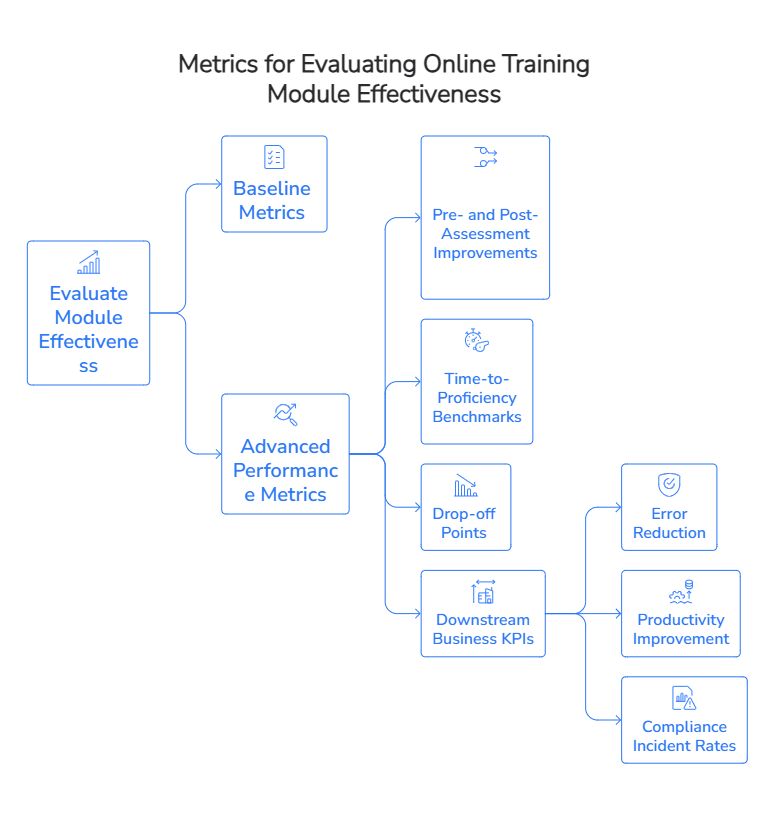
Completion rates and assessment scores are useful baseline metrics but are not sufficient on their own. Most organizations are still at an early maturity stage when it comes to using learning data, and very few are measuring behavioral change or business outcomes. Organizations that move beyond completion rates have a real advantage here.
The metrics that most accurately indicate whether a module is working include pre- and post-assessment score improvements, time-to-proficiency benchmarks, drop-off points within the module, and downstream business KPIs such as error reduction, productivity improvement, or compliance incident rates. These connect learning directly to organizational performance and make it possible to defend training investment at the executive level.
Using Analytics to Update and Optimize Content
Learning analytics dashboards that combine completion data, quiz item analysis, and engagement signals reveal patterns that individual feedback surveys miss. Item-level analytics show which questions are producing unexpected failure rates, which may indicate ambiguous wording or missing prerequisite content. High exit rates from specific screens identify segments that need revision.
TTMS supports enterprise organizations in integrating LMS analytics with tools like Power BI and Power Automate. This includes connecting learning data with CRM, HR, and ERP systems to tie training activity to real business outcomes, so L&D teams have the evidence they need to demonstrate impact, report beyond basic LMS dashboards, and refine future programs.
How TTMS Helps Organizations Create Enterprise-Grade Online Training Modules
Unlike providers focused solely on content production, TTMS delivers end-to-end e-learning solutions that combine course development, AI-powered authoring, LMS integration, and learning system administration. This approach helps organizations streamline both content creation and training delivery through a single partner.
TTMS’s AI4E-learning platform enables companies to transform existing business materials into structured, LMS-ready training courses significantly faster than traditional development methods. Organizations retain full editorial control over generated content while reducing the time required to build, update, and scale training programs.
Beyond course creation, TTMS supports enterprise learning ecosystems through system integrations, analytics, and automation. Learning data can be connected with HR, CRM, ERP, and business intelligence platforms, helping organizations measure training effectiveness beyond completion rates and link learning initiatives to business outcomes.
This is particularly important in regulated industries, where governance, security, and compliance requirements play a central role. TTMS operates under internationally recognized management standards, including ISO/IEC 42001 for AI management, ISO/IEC 27001 for information security, ISO/IEC 27701 for privacy management, ISO 9001 for quality management, ISO/IEC 20000 for IT service management, and ISO 14001 for environmental management. These frameworks help organizations reduce implementation risk while maintaining strong governance over learning and AI-enabled processes.
Common Mistakes to Avoid When Creating Online Training Modules
Even well-resourced teams fall into predictable traps. Knowing what to watch for makes it easier to catch these issues during design rather than after launch.
The most widespread mistake is treating training as a linear “content dump followed by a quiz.” This teach-then-test structure focuses on short-term recall rather than performance change, and it consistently underperforms compared to designs that require active decision-making, practice, and application throughout. Closely related is overloading modules with “nice-to-know” information. More content does not equal better training. Excess material clutters the core message, increases cognitive load, and reduces the probability that learners will transfer what matters to their actual work.
Writing objectives that are disconnected from organizational goals is another significant error. When objectives describe content coverage rather than desired performance, the training feels irrelevant and cannot be evaluated against business outcomes. Every objective should trace to a KPI, a compliance requirement, or a measurable behavior change.
Neglecting accessibility is both a design failure and, in many contexts, a legal risk. Missing captions, poor color contrast, and non-keyboard-navigable interactions systematically exclude learners and reduce the overall effectiveness of the program. Accessibility should be built into templates and workflows from the start, not retrofitted after content is complete.
The “design once, deliver forever” approach is increasingly recognized as a failure mode. Modules that are not regularly reviewed against learner analytics and updated to reflect current policies, technologies, or organizational priorities lose relevance and learner trust over time. Building a content review cadence into the program calendar prevents this.
Do I Need Technical Skills to Create Online Training Modules?
Not in 2026. Modern authoring tools are specifically designed to be accessible to subject-matter experts and L&D generalists without requiring coding or multimedia production expertise. Platforms like TTMS’s AI4E-learning allow users to upload existing content, review a generated scenario, and export a SCORM-compliant course without writing a single line of code. For more complex interactions, simulations, and custom integrations, specialist instructional designers add significant value, but basic to intermediate module creation is genuinely accessible to non-technical authors using current tools.
How Much Does It Cost to Create Online Training Modules?
Costs vary considerably depending on the chosen approach. A simple self-serve authoring process based on existing content will usually be much more affordable than custom e-learning development involving instructional design, simulations, multimedia production, or certification-level requirements. The final budget depends on factors such as course complexity, content volume, level of interactivity, compliance needs, localization, and the amount of expert involvement required. AI-powered tools like AI4E-learning can significantly reduce production time and overall costs by automating content structuring, quiz generation, and multilingual output from existing materials.
How Do I Make My Training Modules Accessible for All Learners?
Start with WCAG 2.1 Level AA as your baseline standard. In practical terms, this means providing accurate captions for all video content and transcripts for audio; adding meaningful alt text to instructional images, diagrams, and icons; ensuring full keyboard operability for all navigation, quizzes, and interactive elements; maintaining a minimum color contrast ratio of 4.5:1 for text; and using clean semantic heading structure that screen readers can interpret correctly. Accessibility should be embedded in your authoring templates so it is part of every module by default, not a checklist item at the end of production. Testing with actual assistive technology, including screen readers and keyboard-only navigation, before publishing is essential for catching issues that visual inspection misses.
What File Formats Should I Use When Publishing an E-Learning Course?
The right format depends on your tracking requirements and deployment environment. SCORM 1.2 offers the widest LMS compatibility and is the practical default for organizations that need a course to run reliably in almost any platform. SCORM 2004 adds more detailed scoring and sequencing options when needed. For organizations that want richer analytics, cross-system tracking, or data stored in a Learning Record Store, xAPI combined with cmi5 is the more capable and future-oriented option. All modern content should be published as HTML5, which replaces Flash and ensures responsive, mobile-compatible delivery. In most cases, your SCORM or cmi5 package will contain HTML5 content, so the formats are complementary rather than competing. If you do not need LMS tracking at all, standalone HTML5 published to a web server or intranet is a lightweight and flexible option.