The biggest challenge in workplace learning is no longer producing training content. It is producing effective training content quickly. AI has dramatically reduced the time needed to create courses, but speed alone does not guarantee learning outcomes. Organizations must now balance efficiency with instructional quality.
The AI in L&D market was valued at USD 9.3 billion in 2024 and is projected to reach nearly USD 97 billion by 2034, growing at a 26% CAGR. The Josh Bersin Company’s 2026 research reports that 74% of companies say they can’t keep pace with demand for new skills across their organizations. Training needs are outpacing traditional production methods, and AI is stepping in to close the gap.
This guide covers how to create a course with AI, what tools to look for, where AI falls short, and how organizations in healthcare, energy, and corporate IT are already using these capabilities to build better training, faster.
1. What It Actually Means to Create a Course with AI
Not all AI-powered course creation tools work in the same way. Before discussing their impact, it’s worth clarifying what “creating a course with AI” actually means in practic
AI-assisted course creation means using artificial intelligence to handle the mechanical, time-consuming parts of instructional design: turning raw materials into structured content, generating learning objectives, drafting quiz questions, and organizing information into a logical learning flow. Handing the entire process to an algorithm and walking away is a different thing entirely, and it tends to end badly.
AI is an accelerator rather than a substitute for expertise. It clears the path so your subject matter experts can focus on what they actually know, rather than spending hours reformatting slides or wrestling with an authoring tool. The expert still defines the goal, validates the content, and approves the final output. AI just dramatically shortens the distance between raw knowledge and a finished course.
This distinction matters because the alternative framing, where AI “does it all,” sets organizations up for problems. Poorly reviewed AI output can contain inaccuracies, misaligned examples, or content that drifts from your compliance requirements. Human oversight is a design principle in any responsible AI course creation workflow, not something you bolt on afterward.
Tools like AI4E-Learning, developed by TTMS, are built around this principle explicitly. The platform guides users step by step through the entire creation process, covering everything from defining training goals to exporting a SCORM package, while keeping the human in control at every decision point. It turns existing internal documents, PDFs, presentations, and even audio or video files into structured, goal-oriented training without requiring instructional design expertise to get started.
That’s what modern AI course creation looks like in practice: guided, structured, and grounded in the organization’s own knowledge rather than generic content pulled from thin air.
2. What to Look for in a Free AI Course Creator
Not all AI course builders are created equal – and free plans make those differences visible very quickly. Some tools let teams genuinely test AI-powered course creation, while others offer only a narrow preview designed to push users toward a paid upgrade. Before investing time in any platform, it is worth checking what the free version actually allows: content import, course structure, quizzes, branding, export options, LMS compatibility, and the level of human editing available.
2.1 Core Features That Matter
The most important feature in any AI course builder is not speed. It is structure.
A useful tool should generate a learning experience with clear objectives, logically sequenced lessons, and assessments that match the expected outcomes. If the output is only a wall of text divided into slides, it is not really a course. It is content packaging.
For corporate training, several capabilities quickly become non-negotiable:
- Pedagogical structure – the course should be built around learning outcomes, not just source materials.
- SCORM export and LMS integration – without standard LMS connectivity, training is difficult to deploy, track, and manage at scale.
- Flexible content import – the tool should work with existing materials such as SOPs, policy documents, slide decks, videos, and onboarding files.
- Quiz and assessment generation – tests should be linked to learning objectives, with editable question types, difficulty levels, and passing thresholds.
- Editorial control – teams must be able to review, edit, reorder, and approve every element before publication.
- Accessibility and localization – mobile-friendly output, translation support, and accessibility standards are essential for global or distributed teams.
This is where the difference between a simple AI content generator and a serious AI course authoring platform becomes clear. The first helps you produce material faster. The second helps you create training that can actually be used, measured, and trusted inside an organization.
| Capability | Why it matters |
| Pedagogical structure | The course should be built around learning outcomes, not just source materials. |
| SCORM export and LMS integration | Enables organizations to deploy, track, and manage training at scale within existing learning ecosystems. |
| Flexible content import | Allows teams to reuse SOPs, policy documents, presentations, videos, and onboarding materials instead of creating content from scratch. |
| Quiz and assessment generation | Ensures knowledge checks are aligned with learning objectives and can be customized to meet training requirements. |
| Editorial control | Gives subject matter experts and training managers the ability to review, edit, reorder, and approve content before publication. |
| Accessibility and localization | Supports multilingual audiences through translation, mobile-friendly delivery, and compliance with accessibility standards. |
2.2 Red Flags in Free Tools
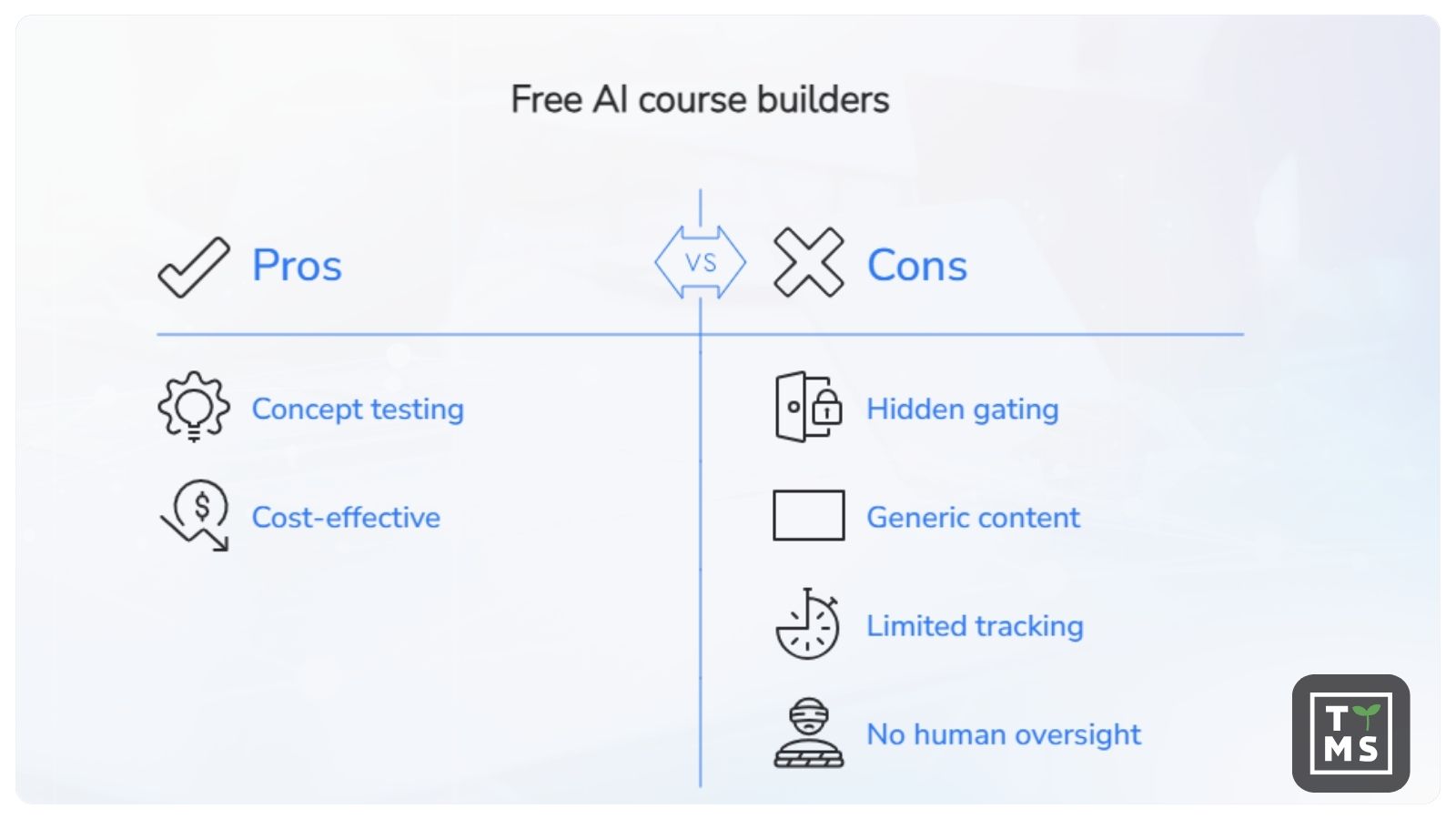
Free AI course builders can be useful for testing the concept, but there are a few warning signs that usually mean the tool will not support serious corporate training.
The first is hidden feature gating. If LMS export, quiz customization, branding, or publishing options are blocked behind a paywall, the free version is closer to a demo than a real course builder.
The second is generic content generation. Tools that create outlines without using your organization’s actual materials often produce courses that feel impersonal, vague, or disconnected from real procedures. In compliance, safety, or technical training, this is more than an inconvenience. It can lead to misleading or incomplete learning content.
The third warning sign is limited tracking. Many free tools offer little or no analytics, completion records, or learner progress data. For organizations that need compliance documentation, engagement insights, or audit-ready training records, this quickly becomes a serious limitation.
Finally, be careful with platforms that allow AI-generated content to be published without a review or approval step. In corporate learning, human oversight is not a bottleneck. It is part of quality control.
3. How to Create a Course with AI: Step-by-Step
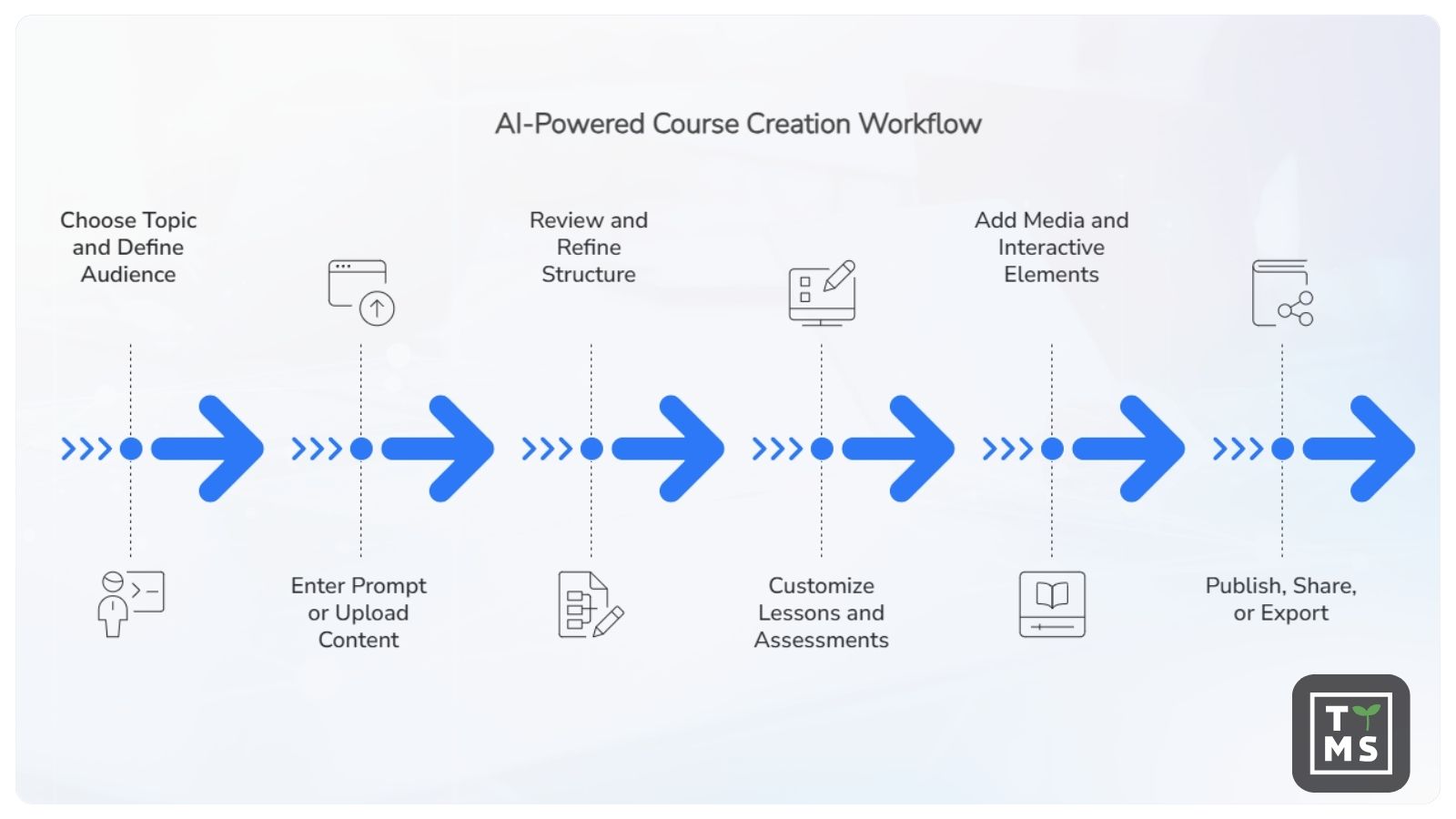
The workflow for building a course with AI is more structured than most people expect. You can’t just type a topic into a prompt and download a finished course five minutes later. The best results come from treating AI as a capable collaborator that needs clear direction.
Step 1: Choose Your Topic and Define Your Audience
Start before you open any AI tool. The most important decisions in course creation happen before a prompt is written or a file is uploaded.
First, define the business problem the training is supposed to solve. Do you want to reduce errors in a support workflow? Onboard new employees to safety procedures? Help a distributed team understand a regulatory update?
That answer shapes everything that follows: learning objectives, content depth, assessment criteria, examples, tone, and the level of detail learners actually need.
Define your audience with similar specificity. A course for frontline warehouse staff requires different language, examples, and pacing than one for senior managers or IT professionals. AI tools work much better when given this context explicitly rather than asked to guess it.
Step 2: Enter a Prompt or Upload Existing Content
Once you’ve defined the goal and audience, bring your source materials into the tool. If your organization has existing documentation, this is where AI earns its efficiency gains most dramatically.
With a platform like AI4E-Learning, you can upload internal materials in DOCX, PDF, PPTX, MP3, or MP4 format. The AI analyzes those files and uses them as the foundation for the training content, so your course is built on your organization’s actual knowledge rather than generic filler.
Starting from scratch works too, provided you write a well-structured prompt that specifies the training topic, target audience, length, and business goal. The more precise you are at this stage, the less editing you’ll need later.
You also set core parameters here: the training mode, the overall length (a short microlearning module versus a full onboarding course), and the interactivity level, meaning how many slides will include active learning tasks versus passive reading.
Step 3: Review and Refine the AI-Generated Structure
After the AI generates an initial structure, your job is to evaluate it critically rather than just accept it.
Check whether the module sequence makes logical sense for a learner encountering this material for the first time. Confirm that the learning objectives match your original business goal. Look for anything that seems off-topic, overly generic, or misaligned with how your organization actually operates.
AI tools suggest learning objectives in a logical order, but those suggestions are starting points. A well-designed platform lets you rearrange, rewrite, add to, or remove objectives before proceeding. This is the stage where your subject matter expert should be involved, if they haven’t been already.
Step 4: Customize Lessons, Quizzes, and Assessments
With the structure confirmed, go deeper into the content itself. Edit slide text to match your organization’s terminology, tone, and accuracy standards. Replace generic examples with real scenarios your learners will recognize.
This is also where you configure assessments. A good AI course builder should let you generate quiz questions automatically, aligned to specific learning objectives, and then modify, add, or remove questions before finalizing. Setting passing thresholds, determining whether the quiz is required for completion, and deciding whether to allow retakes are all decisions that stay with you.
For compliance-heavy environments, such as safety training or healthcare protocols, this human review step is especially critical. AI-generated quiz questions can be a strong starting point, but they require validation against the actual regulatory or procedural standard they’re meant to assess.
Step 5: Add Media and Interactive Elements
A course built entirely from text slides will hold attention for about ten minutes. Adding media and interactive elements changes the learning experience significantly.
Depending on the tool, you may be able to embed videos, images, diagrams, and knowledge-check interactions directly in the authoring environment. Adjusting the interactivity level during setup determines how many slides include active learner tasks, but at this stage you can fine-tune that mix module by module.
The Hitachi Energy “10 Life-Saving Rules” safety training illustrates this well. Hitachi Energy needed to standardize critical safety behaviors across a global workforce, with existing rules spread across internal documentation in multiple formats. TTMS used AI4E-Learning to transform that source material into a structured, multimedia-rich course, with scenario-based interactions built around each life-saving rule. A consistent, visually engaging program was deployed across regions, replacing what had previously required significant manual authoring work for each localized version. In high-stakes environments like this, the visual and interactive design isn’t cosmetic; it directly supports whether safety behaviors transfer to the workplace.
Step 6: Publish, Share, or Export Your Course
Once the content has been reviewed, edited, and approved, the final step is deployment.
For organizations using a corporate LMS, export the course as a SCORM-compliant package and upload it to your existing platform. SCORM compliance ensures that completion data, quiz scores, and time-on-task are tracked automatically and reported back to your LMS dashboard.
If your organization needs courses in multiple languages, an authoring tool with built-in translation support lets you localize content for global teams without rebuilding the course from scratch for each language. This is particularly valuable for multinational organizations that need consistent training standards across regions.
4. What AI Can (and Can’t) Do in Course Creation
Using AI responsibly starts with understanding what it is good at – and where human expertise is still essential.
AI is particularly strong at structure. It can take unorganized materials and turn them into a logical learning sequence. It can generate a first draft of explanatory content, propose learning objectives linked to a defined goal, and create initial assessment questions aligned with those objectives.
It can also produce variations quickly, adapt the tone for different learner groups, and identify structural gaps that a human expert may miss when working with familiar material.
Where AI falls short is specificity. It doesn’t know the particular regulatory environment your organization operates in, the informal knowledge your most experienced employees carry, or the real-world scenarios that actually trip people up on the job. It can produce content that sounds accurate while missing the practical detail that makes training actually change behavior.
Hallucination in domain-specific contexts is a documented and quantified concern. In clinical settings, a 2025 Nature study using a structured safety workflow found a 1.47% hallucination rate and a 3.45% omission rate, even under tightly controlled conditions. In legal research, the numbers are significantly higher: a Stanford HAI finding reported by MIT Sloan EdTech identified hallucination rates of 58 to 82% on general legal queries, and even retrieval-augmented legal AI tools still hallucinated more than 17% of the time in specialized tasks. These figures reflect different task types and grounding levels, but the consistent pattern is clear: AI-generated content in regulated domains requires line-by-line expert review before deployment. TTMS’s work building e-learning for healthcare reflects this directly; training aligned to clinical practice, patient safety, and compliance standards requires SME validation that no AI tool can provide on its own.
Use AI for the parts of course creation where speed and structure add the most value: drafting, organizing, and building starting materials. Keep human experts accountable for accuracy, compliance, and the judgment calls that only experience can supply.

5. Free vs. Paid AI Course Builders: When to Upgrade
For many teams, a free AI course builder is a perfectly reasonable starting point. If you’re exploring whether AI-assisted creation works for your use case, running a pilot program, or building a low-stakes internal resource, free tools can get you there.
When to upgrade really comes down to organizational scale, risk tolerance, and what “good enough” actually means for your training outcomes.
5.1 What You Can Accomplish for Free
Most free tiers allow you to generate a basic course structure, add some customization, and publish or share the result. For small teams, one-off training needs, or exploratory projects, this is often sufficient. You can test whether your subject matter experts are comfortable with the workflow, validate whether AI-generated content aligns with your standards, and get a sense of how much editing the output requires before it’s usable.
Free tools also work reasonably well for asynchronous, informal learning that doesn’t require compliance tracking, certification, or LMS integration.
5.2 How AI4E-Learning Compares to Other AI Course Builders
Several capable AI course builders compete in this space. Mindsmith, Learning Studio AI, and Shiken AI are among the most discussed in 2025. Each has genuine strengths: Mindsmith excels at AI-driven scenario authoring; Learning Studio AI enables rapid one-click course generation with SCORM export; Shiken AI focuses on gamified, assessment-centric experiences. What these tools share, however, is a positioning as content generation utilities rather than enterprise compliance platforms. None prominently offers validated governance workflows, data residency controls, multi-step review processes, or audit trails required in regulated industries such as pharma, healthcare, or financial services.
AI4E-Learning is built for a different tier of requirement. For organizations that need to maintain data sovereignty over proprietary content, demonstrate SCORM conformance, manage content approval at scale, and integrate training records with enterprise LMS reporting, the distinction matters considerably. Which platform can sustain a compliant, auditable training program over time is a more meaningful question than which tool generates the cleanest first draft.
5.3 Features That Justify Upgrading
Free AI course builders are useful for testing ideas, but the limitations become visible when training needs to move into production.
The first upgrade trigger is usually SCORM export and LMS integration. If you need to track who completed a course, when they finished it, and how they scored, the tool must connect with your learning infrastructure.
The second is security and compliance. Once you upload proprietary content, internal procedures, or sensitive operational knowledge, data protection is no longer optional.
Other limitations usually appear when teams start scaling: multiple course projects, consistent branding, team collaboration, learner analytics, and localization. Automatic translation can be especially valuable for organizations operating across countries and languages.
For companies ready to move beyond pilots, AI4E-Learning from TTMS combines a guided authoring workflow with enterprise-ready features, including SCORM compliance, LMS integration, data security, multilingual support, and instructional design experience gained through real training projects.
6. Common Mistakes to Avoid When Building Courses with AI
Even strong AI course creation tools can lead to weak training if the process is not designed properly. Most problems come from the same few mistakes.
The first is treating AI output as a finished product. When teams publish generated content without review, the course may look complete but remain instructionally shallow. Typical signs include generic examples, vague learning objectives, and quiz questions that test recall instead of practical application. The solution is simple: include a structured review stage and involve subject matter experts before anything goes live.
The second mistake is starting without clear learning goals. Asking an AI tool to “create a course about customer service” will produce a very different result than asking it to build a module that helps support agents resolve tier-one technical queries faster, using the organization’s existing troubleshooting documentation. The more specific the input, the more useful the output.
The third mistake is neglecting governance. Many teams start using AI course builders informally, without clear rules on what content can be uploaded, who reviews the output, and what approval process applies before training is deployed. In compliance-heavy industries or organizations working with proprietary procedures, this creates real risk. Clear guidelines should be in place before AI course creation is scaled across the business.
The Safety First case study from TTMS illustrates what structured governance looks like in practice. Safety-critical training requires a consistent standard delivered across all locations, with clear expectations for both managers and employees. That level of consistency doesn’t emerge from an unmanaged AI workflow; it requires careful design, expert review, and a deployment process that ensures every learner receives the same quality of instruction.
Ignoring personalization is a missed opportunity that many organizations discover too late. AI makes it genuinely feasible to adapt scenarios, examples, and pacing for different roles or experience levels, but teams often use it to produce a single uniform course for all learners. Feeding role-specific context into your prompts, or building separate learning paths for different audience segments, significantly improves both engagement and knowledge transfer.
Most AI course creation failures are not caused by the technology itself. They result from poor process design, unclear objectives, and insufficient oversight.
| Common mistake | Why it matters | Best practice |
| Treating AI output as the final product | Courses may appear complete but often contain generic examples, weak learning objectives, and superficial assessments. | Include a structured review process and involve subject matter experts before publication. |
| Starting without clear learning goals | Broad prompts lead to generic content that may not address real business needs. | Define specific business outcomes and learning objectives before generating content. |
| Neglecting governance | Unclear rules around content uploads, reviews, and approvals can create compliance and security risks. | Establish governance policies and approval workflows before scaling AI adoption. |
| Underestimating the need for consistency | Safety, compliance, and operational training require standardized learning experiences across locations and teams. | Use expert review and controlled deployment processes to maintain quality and consistency. |
| Ignoring personalization opportunities | A one-size-fits-all course often reduces engagement and knowledge retention. | Adapt scenarios, examples, and learning paths to different roles, experience levels, and learner groups. |
7. Work With TTMS to Build AI-Driven Training That Delivers Results
AI course builders are becoming genuinely capable. Used well, they help organizations create more training, faster, and at a lower cost than traditional methods allow. But the tool is only part of the equation.
At TTMS, we have been designing and implementing e-learning solutions across healthcare, energy, safety, and corporate IT for years. One pattern is clear: the best results come when capable AI tools are combined with deliberate instructional design, proper governance, and expert review at every stage.
That is what turns a fast course draft into training that changes behavior, supports business goals, and can be trusted at organizational scale.
FAQs About Creating a Course with AI
Do I need technical skills to use an AI course builder?
Not for the platforms designed with organizational adoption in mind. Modern AI course builders, including AI4E-Learning, are built so that HR professionals, training coordinators, and operational managers can create professional training without any background in instructional design or software development. The platform guides you through each stage, suggests learning objectives, and handles the technical formatting automatically.
Where some technical awareness helps is in deployment: understanding how to export a SCORM package, upload it to your LMS, and configure completion settings. Most LMS platforms walk administrators through this process, and it rarely takes more than an hour to learn.
Knowing your content and your audience well enough to review what the AI produces matters far more than software proficiency. Domain expertise is the skill that actually determines output quality.
How long does it take to create a course with AI?
The initial generation of a course structure can happen in minutes once your materials are uploaded and your parameters are set. A complete, ready-to-deploy module, including editing, review, media addition, and final approval, typically takes a few hours for straightforward topics with existing source materials.
For more complex programs, particularly those involving compliance requirements, regulated industries, or multiple audience segments, plan for a longer cycle. The AI handles the mechanical work quickly, but expert review, SME validation, and stakeholder approval take the time they take. TTMS’s experience across sectors including enterprise safety training and healthcare consistently shows that the review and quality assurance phase is where the real value is added, and that phase should never be rushed.
Compare this to traditional course development, where scripting, design, and authoring might take weeks before a first draft is ready. AI compresses the early stages dramatically, which means your experts spend more time on judgment and less time on formatting.
Can AI course creators generate quizzes and assessments automatically?
Yes, and it’s one of the stronger practical capabilities in current AI authoring tools. When the AI has a clear view of your learning objectives and source content, it can generate aligned quiz questions, including multiple-choice items with plausible distractors, scenario-based questions, and knowledge checks embedded at the lesson level.
The critical caveat is alignment. Auto-generated questions should be reviewed to confirm they test the right skill or knowledge at the right level, not just surface-level recall of keywords from the content. For certification or compliance purposes, every question should be validated against the actual standard it’s meant to assess.
AI4E-Learning includes an optional end-of-course quiz that you can configure during the setup phase, with full editorial control over questions before the course is published.
Can I import existing materials into an AI course builder?
Yes, and for most organizations this is the primary value driver. Starting from existing materials, whether that’s a procedural document, a slide deck from a live training session, a recorded interview with a subject matter expert, or a policy PDF, is dramatically more efficient than building from scratch.
AI4E-Learning supports uploads in DOCX, PDF, PPTX, MP3, and MP4 formats. The AI analyzes the uploaded files and uses them as the foundation for the course structure, which means the content is grounded in your organization’s actual knowledge and terminology from the start. This is particularly important for organizations that want full control over their content and need training that reflects their specific processes rather than generic best practices.
How is an AI course creator different from a traditional course builder?
A traditional course builder is essentially a sophisticated content editor. It gives you templates, formatting tools, and an authoring environment, but every structural decision, learning objective, quiz question, and lesson flow is written manually by a human. The workflow is linear, front-loaded, and time-intensive.
An AI course builder automates the drafting, structuring, and alignment stages. You define the goals and provide the source materials; the AI builds a structured course from that input. You then review, edit, and approve what the AI has produced. Human effort moves away from raw creation and toward curation and quality control.
The practical difference in production speed is significant. The practical difference in output quality depends almost entirely on how seriously you take the review stage. AI generates fast; humans make sure it’s right.