Ads in ChatGPT give businesses a new way to reach potential customers. They can appear when users compare products, plan trips, or look for solutions to business problems. Early advertisers are already exploring whether these ads attract customers and increase sales. Their experiences offer insights into how much to spend on ChatGPT ads and when to include them in a marketing budget.
In this article, we:
- examine campaign results shared by early advertisers;
- explain what ChatGPT ads look like and which campaign settings are available;
- compare costs and targeting with Google Ads and other channels;
- show how to measure performance and determine whether ChatGPT ads can be profitable for your business.
What do ads in ChatGPT look like?
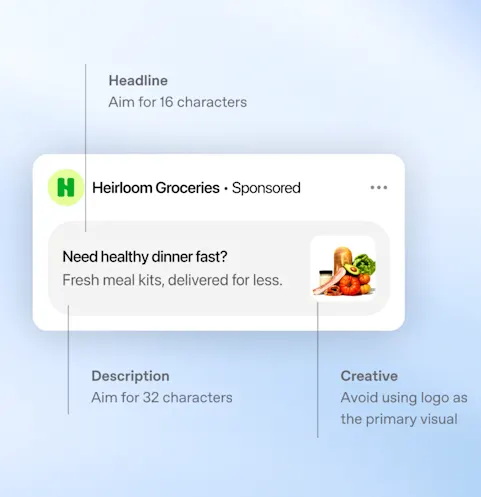
A standard ad appears as a separate, labeled placement below a ChatGPT response. It includes the advertiser’s name, logo, headline, short description, image, and a link to a landing page. It may look like a product or service card relevant to the topic the user is exploring.
For example, a user asks ChatGPT to help them choose an application for creating training courses. They describe their company’s size, the languages the courses need to support, and how frequently the content needs updating. An ad for a relevant application may appear below the response. Advertisers can describe situations in which their product would be useful, while the system decides whether to display the ad. According to OpenAI, ads do not influence ChatGPT’s responses. Businesses pay for an advertising placement, which does not buy a recommendation from the AI. An ad unit can contain one or more images. OpenAI is also testing multi-image ads displayed while users wait for an image to be generated.
Product ads and chats with an AI brand representative
Online retailers can upload a file containing product information and use it to create ads. These ads can include images, product names, prices, and promotional offers. Uploading a catalog supports paid advertising; it does not guarantee that ChatGPT will recommend those products in its responses.
OpenAI is also testing a format called Sponsored Agents. It lets users move from an ad into a chat with an AI brand representative and ask questions about the company’s offering. The feature is in an early testing phase and available only to selected advertisers. Before including it in your first campaign, check whether your account has access.
How much traffic does ChatGPT send to websites?
When planning to advertise in ChatGPT, it helps to understand how small a share of website visits currently comes from the tool. In an Ahrefs analysis covering more than 115,000 websites, ChatGPT accounted for 0.34% of all visits in September 2026, compared with 23.96% for Google and 1.13% for Bing. That amounts to roughly three to four visits from ChatGPT per 1,000 website visits. These figures reflect the websites in the sample and use all visits, including paid traffic, as the denominator. The share attributable to each source can vary by industry. ChatGPT’s popularity has yet to translate into a comparable volume of visits to business websites. That matters when considering its potential to generate sales at scale. These figures do not establish how effective ads will be: their ability to acquire customers needs to be assessed through paid campaign results.
What have early advertisers learned? Four examples
We found early reports from businesses and agencies that have shared their ChatGPT advertising results. Some disclosed only part of their spending and sales data, but their experiences offer insights into what worked and where they encountered difficulties. These individual examples provide limited evidence of what a typical business in any given industry can expect.
1. Hostinger: nearly $70,000 spent, with profitability still unclear
Hostinger spent nearly $70,000 on a ChatGPT advertising trial lasting several weeks. Hüseyin Ograk, who leads the company’s paid advertising team, shared several observations on LinkedIn. The cost per 1,000 impressions exceeded $65, and users clicked ads less frequently than in Google Search. Some visitors showed interest in the offering, while other visits brought no noticeable business benefits. Ads explaining how the product could address a specific need performed best. The landing page also mattered: it needed to address the same need as the ad. General messaging and links to a broad range of offerings produced weaker results.
Was the campaign profitable? The published data does not provide a definitive answer. Ograk noted, however, that some visitors purchased later or returned to buy additional products. Assessing the value of those customers requires tracking their purchases beyond the campaign itself.
2. SE Ranking: 1,263 clicks, but too few sign-ups to continue advertising
SE Ranking, a provider of tools that help improve website visibility in search engines, ended its trial because it generated few sign-ups. Over roughly two weeks, its ads received more than 97,000 impressions and 1,263 clicks. The click-through rate, or CTR—the percentage of impressions that resulted in a click—was 1.30%. The company ran three campaigns across the United States, Canada, Australia, and New Zealand.
The authors suspect that the ads failed to reach the right audience. SEO professionals may use ad-free ChatGPT plans such as Plus, Pro, or Business. This is the company’s hypothesis rather than an established explanation for the weak results. The timing of the trial also matters. In June, SE Ranking set click bids manually, and the system had no sign-up data to use for campaign optimization. Advertisers now have a broader range of campaign capabilities.
3. Opascope: approximately $60,000 in spend and $89,000 in revenue
Opascope disclosed results from 15 days of advertising for one client. Approximately $60,000 in ad spend generated $89,000 in attributed revenue. The average cost per click was $1.72, and the conversion rate was 2.35%. The agency reported a return on ad spend, or ROAS, of 1.49. This means that each dollar spent on advertising generated $1.49 in attributed revenue. Assessing profitability also requires margin data: that revenue must cover the cost of the product or service and other expenses.
The selection of campaigns included in the report also matters. Opascope presented campaigns whose budgets had been increased after promising initial results. The figures therefore did not cover every trial. Results varied considerably from day to day, with daily ROAS ranging from approximately 0.2 to 2.9. The client’s name and profit margin were not disclosed.
4. InterTeam Marketing: a 60% lower cost per lead than Google Ads
InterTeam Marketing shared more encouraging experiences from campaigns for three clients offering subscription-based business software. According to the agency, the ads generated more than 150 leads considered valuable by sales teams. The average cost per click was approximately $5, while the cost per lead was about 60% lower than in Google Ads. What did the campaigns promote? Among other things, e-books and webinars relevant to people looking for solutions to specific problems. The agency also sought to reach users comparing vendors or looking for an alternative to their existing software. Ads directed them to landing pages addressing those same topics. This is an encouraging result for B2B businesses, although a full assessment requires information about what happened to those leads. The agency did not disclose the number of signed contracts or each client’s full budget. It also did not explain its lead qualification criteria in detail.
The value of advertising depends on the qualified leads and sales it generates. Other businesses’ results can help inform your own campaign, but they need to be considered alongside your offering, customers, and margins.
How much do ChatGPT ads cost, and how do they compare with Google Ads?
What does the advertiser pay for?
When creating a campaign, you choose what you want to achieve: ad impressions, website visits, or specific actions such as purchases. The system adjusts ad delivery to support your chosen goal. Charges are based on clicks or impressions.
| Goal | Billing model | What does the system aim to increase? |
|---|---|---|
| Views | CPM: payment per 1,000 impressions | Ad visibility |
| Clicks | CPC: payment per valid click | Website traffic |
| Conversions | oCPC or oCPM: payment for clicks or impressions, depending on the available option | A selected action, such as a purchase or form submission |
With the “Conversions” goal, the system optimizes ad delivery to increase the likelihood of a purchase, sign-up, or form submission. You pay for clicks or impressions. Before launching the campaign, set up tracking for your chosen action so the system receives data on ad performance.
How much should you budget for your first ChatGPT campaign?
According to OpenAI’s documentation, the minimum daily budget is $25 for accounts billed in USD or €15 for accounts billed in EUR. Plan your campaign budget around the number of leads or purchases you want to generate and how much you can afford to pay for each. Your daily budget sets your average daily spending. With a $25 daily budget, the system can spend up to $50 on a single day and less on other days. If the budget remains unchanged, total spending from Sunday through Saturday will not exceed $175. You can also set a lifetime budget to control spending over the full campaign period.
Include ad creation, landing page development, and measurement tools in your budget. If an agency or independent specialist manages the campaign, factor in their fees as well. For smaller campaigns, preparation and management can account for a substantial share of the total cost.
How much does a website visit from a ChatGPT ad cost?
For manual bidding, OpenAI suggests starting with a maximum cost-per-click bid of $3–$5. This sets the amount you are willing to pay for a click. Your actual cost depends on factors including the ad’s relevance to the user’s needs and competing advertisers’ bids. You can find it in your campaign results.
Search advertising costs provide a useful reference point. WordStream and LocaliQ analyzed 13,474 US campaigns run in Google Ads and Microsoft Ads between April 2025 and March 2026. The results show what advertisers paid in that market. The reported figures are medians: half the results were lower and half were higher. Compare these benchmarks with your own campaign costs or forecasts for your industry and target market.
| Data source | Figure | How should you interpret it? |
|---|---|---|
| OpenAI: manual CPC bidding | $3–$5 | Recommended starting bid limit, rather than an average cost per click |
| WordStream/LocaliQ: Google and Microsoft Search | CPC: $5.42; CPL: $66.69 | Benchmarks from a study of US campaigns |
| The same report: business services | CPC: $5.87 | Benchmark for one broad industry category |
Sources: OpenAI documentation and the WordStream/LocaliQ report.
To assess whether ChatGPT advertising costs less than Google advertising, compare campaigns promoting similar offerings in the same country. Measure the same outcome in both, such as submitting a service inquiry form. When evaluating new customer acquisition, analyze campaigns targeting existing customers and searches for your company name separately.
The cost per lead also depends on how many website visitors submit an inquiry. For illustration, suppose each ad click costs $10 and two out of every 100 visitors complete the form. You would spend $1,000 on 100 clicks and receive two inquiries, costing $500 each. If a click costs $15 but five out of every 100 visitors complete the form, you would spend $1,500 and receive five inquiries. Each would then cost $300.
How do you set up an advertising campaign in ChatGPT?
Start by creating an Ads Manager account, entering your business details, adding a payment method, and completing the required verification. The campaign builder then guides you through choosing your goal, budget, and audience settings.
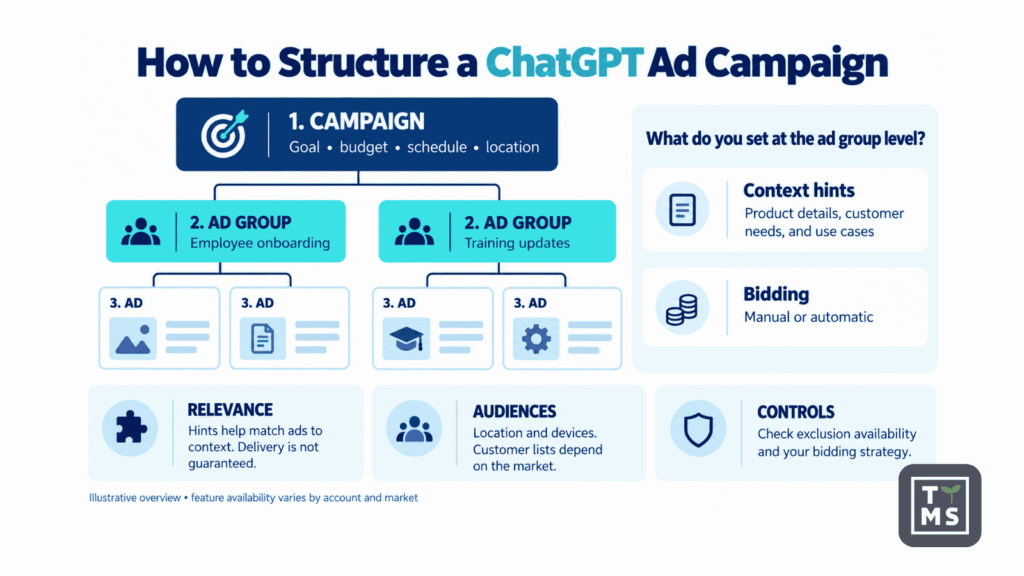
Within each campaign, you create ad groups, for example, for different products or customer needs. Each group contains ads with a headline, description, image, and link to a relevant landing page. OpenAI reviews ads for compliance with its advertising policies before they begin running.
| Level | Settings | Practical use |
|---|---|---|
| Campaign | Goal, budget, dates, locations, and supported platforms | Separating countries, products, or business goals |
| Ad group | Topic, context hints, and bidding strategy | Addressing distinct needs, such as choosing a product or switching vendors |
| Ad | Headline, description, image, and landing page URL | Testing different messages addressing the same customer need |
Source: OpenAI’s campaign setup guide.
How do you explain who your product is for and when it is useful?
In your ad group settings, you can add context hints to help the system match your ads to users’ needs. These describe what your product does, who it helps, and when someone might use it.
For a training authoring application, context hints might include:
- “An application for businesses creating employee onboarding courses from their own documents.”
- “Creating and updating multilingual courses when company procedures change.”
- “Creating courses that can be published in a company’s learning management system (LMS).”
Provide specific information that accurately reflects the application’s capabilities. The system uses these hints when selecting ads to display. Adding a hint does not guarantee that your ad will appear alongside a particular question or reach someone with a specific job title.
If you promote several use cases, create a separate ad group for each. Each group should direct users to a landing page explaining how the product addresses that particular need.
Where can your ads appear, and who can you reach?
You select the country where you want your ads to run. Depending on the market, you may also be able to choose a region, city, or ZIP code. For new campaigns created from product catalogs, location targeting is currently limited to the country level.
You can also choose whether ads appear in the iOS app, the Android app, or a desktop browser. Some new accounts initially allow advertising only in the country where the business is registered. Access to additional markets requires meeting further conditions.
In markets that support this feature, you can upload your own list of customers or prospects. You can use it to show ads to those people, exclude them from campaigns, or adjust bids to reach them. To target this audience, the system must match at least 25,000 people on your list to ChatGPT users. A database containing 25,000 contacts may therefore be too small.
Ad personalization remains unavailable in the European Economic Area and Switzerland. OpenAI recommends avoiding custom audience lists in campaigns targeting these markets. When planning campaigns in these regions, focus on location and matching your ads to the user’s topic and needs.
How do you control where ads appear and set bids?
The Negative Phrases feature allows selected advertisers to specify phrases associated with topics where they want to avoid showing ads. Check your account for availability and details. For bidding, you can use the Maximize results strategy. The system automatically adjusts bids to generate as many clicks or conversions as possible within your budget, depending on the campaign goal. This option may be enabled by default in some new ad groups. Before launching, check whether you are setting bids manually or letting the system adjust them. With automated bidding, regularly monitor your cost per website visit, lead, and sale. These costs can change throughout the campaign.
ChatGPT, Google, Meta, or LinkedIn: which advertising channel should you choose?
The choice depends on who you want to reach and when they are likely to be interested in your offer. In ChatGPT, an ad can appear while someone is looking for a solution or comparing products. Google lets you reach people entering specific search queries, while LinkedIn makes it easier to select audiences by job title or company.
| Channel | How do you select your audience? | When should you consider it? |
|---|---|---|
| ChatGPT Ads | Based on the topic and needs described by the user, information about your offering, and location | When a purchase involves understanding a product, comparing options, or finding a solution that meets specific requirements |
| Google Search | Using keywords, match settings, locations, and exclusions | When customers are already searching for a product, service, or solution to a specific problem |
| Meta Ads | Using factors such as location, interests, behaviors, and custom audiences, depending on campaign settings | When an image, video, or product demonstration could interest people browsing Facebook and Instagram |
| LinkedIn Ads | Using factors such as job title, company, industry, and professional experience | When your offering targets people in specific roles at particular types of organizations |
One important difference between Google and ChatGPT is how much you can learn about what triggered an ad. In Google, the search terms report shows some of the queries that led to your ads appearing. You can use this information to exclude irrelevant searches. In ChatGPT, advertisers cannot see users’ questions or conversations. You therefore assess audience relevance primarily through website activity and the inquiries people submit.
Both platforms use AI to match ads to users. Google is expanding these capabilities through tools such as AI Max, which uses information from keywords, ads, and landing pages. It also offers bidding strategies based on a target cost per conversion or return on ad spend. In ChatGPT, the available settings depend on your campaign goal and billing method. When comparing results, account for how each campaign is configured and managed.
Ads in Google’s AI Overviews are a separate consideration. In supported markets, ads from Search, Shopping, and Performance Max campaigns can appear in these responses. However, Google does not provide a separate report for their performance. This makes it difficult to compare the effectiveness of ads appearing exclusively within the two companies’ AI experiences.
How do you measure ChatGPT ad performance?
1. Decide which outcomes you want to measure
For an online store, focus primarily on paid orders. Account for margins and returns when assessing their value. For a business selling services to other companies, track inquiries, meetings, and signed contracts separately. An e-book download can serve as an early sign of interest. Agree with your sales team on what makes an inquiry valuable. Does it come from the type of company you serve? Does it concern a need your offering addresses? Is the person involved in choosing a vendor? Apply the same criteria to leads generated through ChatGPT, Google, and LinkedIn. This lets you compare the cost of acquiring similar prospects across channels.
2. Tag your links to identify visits from ads
Add UTM parameters to your ad links. These short tags allow analytics tools such as Google Analytics 4 to identify the traffic source, campaign, and specific ad version. Use a consistent naming convention for campaigns and ads. This makes results easier to compare and prevents data for the same campaign from being split across several similar names. Before launching, open a tagged link and submit a test inquiry through your form. Check that your analytics tool records the correct traffic source and campaign name. Make sure this information is also saved with the inquiry in your customer relationship management system. These tags help distinguish paid ad traffic from visits through links in ChatGPT responses. They also help identify which ads generate inquiries and purchases.
3. Check that purchases and inquiries are being recorded
To assess campaign performance, you need to know what people do after clicking an ad. OpenAI Pixel, a piece of code installed on your website, collects this information. It can record actions such as purchases, sign-ups, and form submissions. You can also send data directly from your business systems through the Conversions API. Ask the person responsible for your website or analytics to handle the implementation. They should ensure that actions are correctly attributed to ads and that the same purchase cannot be counted twice. It is also important to preserve the oppref parameter, a click identifier added to the page URL. Redirects should not remove it. Data collection and transmission must also account for appropriate user notices and required consent. Before launching the campaign, place a test order or submit a form. Check that the action is recorded, the amount and currency are correct, and reopening the confirmation page does not record another purchase.
OpenAI also offers a beta integration between Ads Manager and Google Analytics 4 to help compare results across the two tools. Access requires contacting your account representative. You can track visits from UTM-tagged links in GA4 independently of this integration.
4. Understand what the reported results include
Ads Manager shows impressions, clicks, conversions, and spending. You can also check the average cost per click and per thousand impressions. Results are available at the campaign, ad group, and individual ad levels, and you can export them to a CSV file. Reporting is delayed. Clicks and impressions typically update about every 15 minutes, costs may take 7–8 hours to appear, and conversions may take 24–48 hours. Results from the most recent hours may therefore be incomplete. The time between an ad click and a purchase or inquiry also matters. In the reporting settings, you choose whether to include actions taken within 7, 14, or 30 days after a click. Separately, you can enable reporting for conversions that occur within one day after an ad impression, even without a click. This is part of attribution: the rules used to credit ads with results. For example, a customer might see an ad in ChatGPT, later find the company through Google, and then make a purchase. Both systems could claim credit for that purchase. Confirm order counts and revenue in your store or sales system. When comparing channels, use the same evaluation period and rules for counting results.
5. Calculate customer acquisition costs and profitability
Compare campaign spending with inquiry and sales data. Check how many leads met your criteria and how many became customers.
| What do you want to measure? | How do you calculate it? |
|---|---|
| Cost per lead, or CPL | Divide ad spend by the number of leads generated |
| Cost per qualified lead | Divide ad spend by the number of leads meeting your agreed sales criteria |
| Full customer acquisition cost | Divide the marketing and sales costs associated with the campaign by the number of new customers acquired |
| Revenue generated per dollar of ad spend, or ROAS | Divide revenue attributed to ads by ad spend |
Profitability depends on how much revenue remains after covering costs. Suppose that $100 in revenue leaves $40 after paying for the product, order fulfillment, payment processing, and returns. If acquiring that order costs $40, the entire remaining amount goes toward advertising. This corresponds to a ROAS of 2.5: every $40 spent on ads generates $100 in revenue. To make a profit, the campaign must also cover ad creation, campaign management, and the share of business overhead allocated to those sales.
For subscription sales, include subsequent customer payments and the cost of serving those customers. Base your calculations on actual data about how long customers continue using the service. Also check how many months it takes to recover the money spent acquiring them. In B2B, revisit the results after the campaign ends to include contracts signed following longer negotiations.
How do you plan your first ChatGPT campaign?
Decide what you want to learn, how much you can spend, and what results would justify continuing. Keep the initial campaign focused so its performance is easier to assess.
- Choose one offering and one market. Decide whether you want purchases, product demo bookings, or sales inquiries. Check ad availability in your target market and the policies that apply to your industry.
- Build a landing page that expands on the ad. If you are promoting an application that helps update training courses, show how that feature works. Visitors should be able to find the information they need and understand how to book a demo or contact your company.
- Test your measurement setup. Check link tags, purchase or form tracking, and the recording of lead sources. Agree with sales on which inquiries will count as qualified leads.
- Set your budget and an acceptable cost per lead. If you can pay $200 for a qualified inquiry and want to generate 20, your starting ad budget would be $4,000. The campaign will show whether that cost is achievable. Budget separately for preparation and management.
- Explore several product use cases. Prepare two or three ad groups, each addressing a different customer need. Match the ad copy and landing pages to each one. Choose the number of variations to suit your budget so each can collect enough data to assess its performance.
- Set a review date and conditions for pausing the campaign. Account for the time customers need to make a decision. Monitor spending and lead quality throughout the campaign. Pause it if tracking fails or spending reaches your agreed limit without delivering the expected results.
- Compare performance with other campaigns. If you use Google Ads, compare the cost of acquiring similar leads and customers. Include the value of sales and the work required to handle inquiries.
With a larger budget, you can also assess how much additional sales your ads generate. This requires a carefully designed test: run the campaign for some comparable audiences or markets and leave others as a control group. Comparing their results helps estimate how many purchases the advertising generated.
Is advertising in ChatGPT worth it?
The strongest case for ChatGPT advertising is for businesses whose customers compare products against specific requirements. Hostinger’s and InterTeam’s experiences suggest that these situations offer better opportunities to generate qualified inquiries and purchases. Advertisers need to show exactly what their product can do. General brand promotion or ads covering an entire product range may make less effective use of this opportunity.
The early results also reveal the limits of the channel’s promise. Users may describe their needs in detail while still gathering information. SE Ranking generated more than 1,200 clicks but very few sign-ups. A detailed description of someone’s needs helps match an ad, but that person may still be a long way from buying.
ChatGPT deserves consideration as an additional source of customers, particularly for products that involve comparison and explanation. The available reports offer little basis for moving budget away from profitable Google campaigns. A lower cost per inquiry at one company and ad-attributed revenue at another provide limited evidence for judging ChatGPT a more profitable sales channel.
Talk to us about using AI in your business
At TTMS, we help businesses implement AI solutions and integrate them with their existing systems. We were the first company in Poland to obtain accredited certification for an artificial intelligence management system compliant with ISO/IEC 42001. If you want to use AI in marketing, organize your data, or improve how your team works, talk to TTMS experts about your business needs.

What are ChatGPT ads?
ChatGPT ads are paid placements displayed alongside answers to users’ questions. They can feature products or services related to the topic a user is exploring. Ads are labeled as sponsored and include a link to the advertiser’s website.
How can I advertise my business in ChatGPT?
You can create a campaign in OpenAI’s Ads Manager. After setting up and verifying your account, you add a payment method, choose your campaign goal and budget, and create your ads. You can also describe the customer needs your offering addresses to help the system match your ads to relevant questions.
How much does advertising in ChatGPT cost?
Costs depend on your billing model, competition, and how relevant your ads are to users’ needs. You can pay for clicks or impressions. Minimum daily budgets vary by account currency, so check the requirements for your account before planning a campaign. Include ad creation, landing page development, and campaign management in your total budget.
Does paying for ads make ChatGPT recommend my business?
According to OpenAI, advertising does not influence ChatGPT’s answers. Ads appear as separate, clearly labeled placements. To support your business’s visibility in answers, make reliable information about your products and services available online. Advertising spend does not guarantee recommendations.
Are ChatGPT ads more effective than Google Ads?
Early campaign results vary. Some advertisers report a lower cost per lead than Google Ads, while others received few inquiries despite generating many clicks. Compare campaigns promoting similar offerings in the same market. Focus on the cost of acquiring qualified leads and paying customers, along with the sales those campaigns generate.