In 2025, ChatGPT could search the web, analyse documents, create great-looking visuals and help write code. Even then, the pace of development was staggering: over the course of a single year, OpenAI released five major GPT versions, from GPT-4.5 to GPT-5.2. Some of us, users of one of the world’s most popular language models, were already struggling to identify what else could be significantly improved.
This article is for everyone else, especially those who still wanted:
- to delegate an entire task to ChatGPT
- to let it work freely across applications and on a computer
- to have it deliver a finished result without being guided through every stage of the process.
These are precisely the missing elements that began to appear in 2026. Below, I have collected more than a dozen new ChatGPT capabilities, some of which I had not even heard of until recently, that best illustrate how much the way we work with this tool has changed. Not all the capabilities described below belong to the GPT-5.6 model itself. Some are part of ChatGPT Work, Codex, the desktop app or the Responses API, which provide the environments and tools through which the model completes its work. Readers interested in GPT’s evolution over previous years can also read The Evolution of AI: From GPT-1 to GPT-4o.
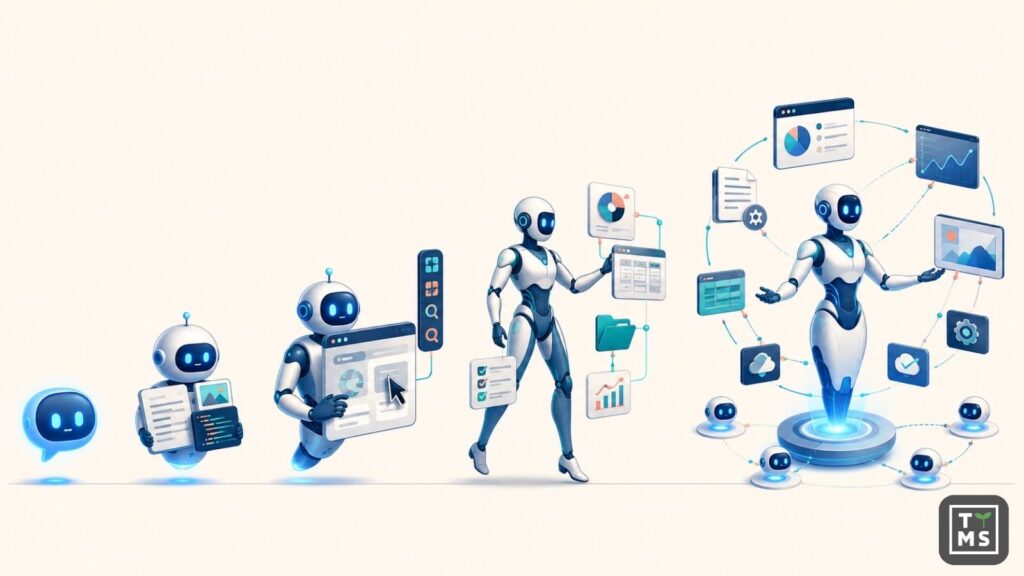
Users could already choose models designed for more demanding reasoning tasks in 2025. GPT-5.6 provides greater control over this process: the Max level allocates more resources to analysis, while Pro mode allows the model to do additional work before presenting a single final answer. The two settings can be combined for tasks in which the importance of the decision justifies a longer wait and higher token usage, such as selecting a technology, assessing risk or comparing several business scenarios. I have written more about how to manage this “slider” and match GPT modes to specific tasks in the article GPT-5.6 from OpenAI: What Has Changed? Pricing, Capabilities and Business Applications.
1. ChatGPT Can Operate Your Computer for You
Behind this slightly clickbait-style heading is a practical situation in which you want to check something that a website does not describe explicitly, meaning that a language model cannot simply read the answer from the page. Normally, you would need to open the website and navigate its interface yourself. With the Computer Use skill, ChatGPT can do this for you: launch a browser or application, click the appropriate controls, enter data and observe the results of each action. You define the scope of the task, approve access to the website or application and retain control over actions that require confirmation. The first capabilities of this kind appeared in 2025 with Operator and later ChatGPT agent. In 2026, they were extended to applications running on macOS and Windows computers, local browser sessions and broader use with ChatGPT Work and Codex.
I recently tested this with a very simple example. I wanted to find out whether the free version of a particular VOD service interrupted a specific film with advertisements, something that would have taken me at least several minutes to check manually. I delegated the task to GPT, which, after receiving my permission, opened the website, started the film, scrubbed through the entire video and reassured me that it contained no advertising breaks. The whole process took a minute and a half and ran entirely in the background.
Since August 2026, ChatGPT Work has also been able to continue a task on a supported website that requires the user to sign in. When it encounters a login screen, it hands control to the user through a secure form for entering a username, password and 2FA code. According to OpenAI, the model neither sees nor stores these details. Once the user has signed in, ChatGPT returns to the task, and the session can remain active for subsequent instructions. You can therefore ask ChatGPT to find an invoice in a customer portal, check a bill or compare plans that become visible only after signing in. More information is available in the official ChatGPT browser documentation.
2. ChatGPT Can Combine Information from Several Business Applications
A client meeting begins in an hour, and you need to review the latest email arrangements, important Slack messages, the current proposal stored on the company drive and the status of the sales opportunity in your CRM. Gathering this information manually means opening one tab after another, reconstructing the project history and dealing with unnecessary stress before the meeting.
ChatGPT can search approved sources, select the information related to the client and prepare a one-page brief covering the current situation, open issues, risks and suggested next steps. With the appropriate permissions, it can also save a note in the CRM or prepare tasks for approval. In 2025, ChatGPT could already search and combine information from connected applications. In 2026, ChatGPT Work can gather information from several sources, turn it into a finished deliverable and then perform actions for which it has received permission. Access to each application and the ability to save changes depend on the installed integrations, granted permissions and workspace settings.
3. You Can Create an Agent for a Specific Business Process
Imagine an agent assigned to support your most important clients. A new request can automatically trigger its work. The agent collects previous correspondence, checks similar cases and finds the appropriate procedure in the company’s documentation. It then prepares a response and, if it has the necessary permissions, creates a task for the appropriate team. The message to the client remains pending until an employee approves it.
In 2025, a similar assistant could be built as a custom GPT equipped with instructions, knowledge and integrations. Workspace Agents, introduced in 2026, expand this concept into a saved process that includes data sources, actions in applications, required approvals and the format of the finished deliverable.
An agent can be shared with a team and started manually, according to a schedule or through a signal sent by a company system. During configuration, you define which applications and sources the agent can use, which actions it is allowed to perform and when it should stop and ask a person to make a decision. This allows the same process to follow a consistent set of rules every time a new request arrives.
4. ChatGPT Can Learn a Process by Observing Your Work
Some procedures are difficult to describe. You may know exactly where to click and what to change, yet writing down every step would take longer than completing the task again. A good example is a monthly report prepared in a legacy system: you select the appropriate filters, export the data, organise the spreadsheet and save the file in the correct folder.
Record & Replay, introduced in 2026, allows you to complete the process once with recording enabled. ChatGPT or Codex observes the required actions and uses them to create a skill describing the workflow, its variable data and the method for checking the result. You can review it, make corrections, add your own rules and then use it when preparing the next report. This is particularly useful when process knowledge exists mainly in employees’ heads and a proper set of instructions has never been created. I personally cannot wait to try this feature while editing a video in DaVinci Resolve. I will show ChatGPT how I remove unsuccessful takes, organise the audio track and conceal visible cuts with a short zoom-in. I am curious to see how much of this repetitive work can be turned into a reusable skill for future recordings.
5. ChatGPT Can Help You Resume Interrupted Work
Human memory is unreliable. It was probably Tuesday, after a conversation with your manager, when you made changes to an important spreadsheet. You cannot remember its name or location, or even whether it was open in the desktop version of Excel or in a browser. A standard file search is not much help.
This is where Computer History can help. You can ask ChatGPT, for example: “Find the spreadsheet I edited after my conversation with Krzysztof.” Your activity history can connect the sequence of applications you opened, the actions you performed and the available context, and then identify the material you probably have in mind. If ChatGPT has access to the appropriate source, it can also open the file directly. You can ask what you were working on before a break, request a summary of the previous day’s work or identify activities that occur regularly and could be turned into a skill or automation. You choose which applications and websites are included in the history, and you can pause data collection at any time.
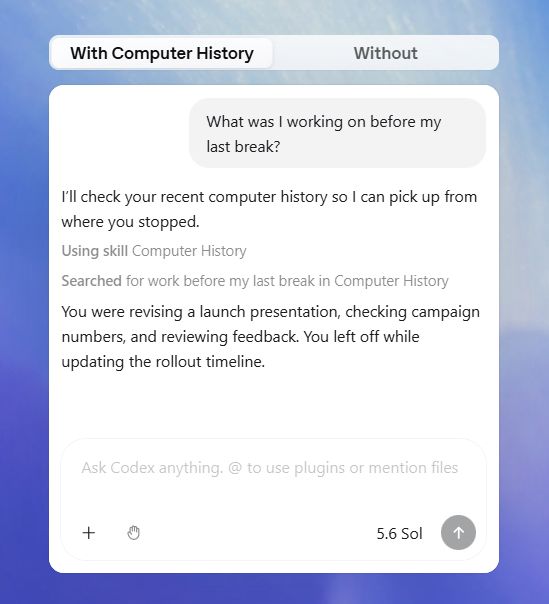
Computer History records information including clicks, typed text, keyboard shortcuts, application changes and context provided by macOS. Temporary event data is deleted after no more than 48 hours, while local memories created from that data remain until the user deletes them. The feature is currently available in the ChatGPT app for macOS, requires Memories to be enabled and is turned off by default. In Business and Enterprise workspaces, an administrator must first grant access, after which each employee can decide whether to enable it.
6. ChatGPT Can Design, Test and Publish a Web Application
How many good ideas have become stuck in the IT department’s backlog because something more urgent always came up? Suppose the administration team needs a simple tool for reporting faults, with a form, a list of cases, their statuses and a separate view for the person responsible for repairs. With Sites, you can describe the tool in your own words and provide sample data, company materials or a screenshot of a similar system. GPT-5.6 will prepare a working prototype, and you can ask it to simplify the form, add filters or adapt the design to your brand identity. ChatGPT or Codex can then test the application in a browser, fix any identified issues and publish the finished version at a specified address.
Websites and simple applications were being created with GPT long before 2026. This year’s change concerns the entire process: GPT-5.6 is better at designing usable interfaces, while Sites provides a single place to launch a prototype, make changes, save subsequent versions and publish the finished application. The same process can be used to create calculators, dashboards and small internal tools. Before they are deployed in a real business environment, their security, permissions, data storage and regulatory compliance still need to be reviewed.
7. ChatGPT Can Work Directly in Excel and Google Sheets
Consider a simple example. You open a spreadsheet containing campaign results and notice that some formulas are outdated, several cells are empty and the cost per lead has suddenly increased in two campaigns. Instead of checking everything one item at a time, you ask ChatGPT to analyse the data, complete the calculations, identify unusual results and prepare a chart for the monthly summary. ChatGPT performs this work directly in Excel or Google Sheets. You can see the changes it makes, review the formulas and immediately request another adjustment, such as changing the chart range, adding a comparison with the previous month or highlighting campaigns that exceed the target cost.
In 2025, a similar analysis usually required uploading a spreadsheet to ChatGPT and then downloading the modified file. ChatGPT for Excel and Google Sheets, introduced in May 2026, allows you to work on the spreadsheet where the data is stored and where you will later use it. This makes the conversation with the model part of the document workflow instead of a separate stage outside it.
8. ChatGPT Can Create and Refine Content in Its Final Format
The board meeting is one day away, and the information needed for the presentation is scattered across meeting minutes, a spreadsheet of results and several project documents. There is also a company template that must be followed. ChatGPT Work can collect these materials, organise them into a coherent story, prepare the slides, add charts and identify figures or conclusions that are not supported by the source data. You receive an editable PowerPoint or Google Slides presentation that can retain the structure, visual style and brand elements of the provided template.
In 2025, GPT could already generate editable PowerPoint, Word and Excel files. In 2026, ChatGPT Work combined document creation with previews, targeted revisions, saved templates and final material checks. The entire process can therefore take place within one conversation, from gathering the sources to preparing subsequent versions of the document.
9. Codex Can Manage Long-Running Work as a Persistent Goal
You have a large audit of a company website ahead of you. There are hundreds of pages to review, along with outdated information, broken links and differences between language versions. Finally, all the issues must be grouped and converted into a list of specific changes.
Codex could already perform tasks in the background in 2025. Goal Mode, introduced in 2026, allows you to delegate much longer assignments and manage them across successive stages. You can monitor progress, change the direction of the work when necessary and access the active project from your phone. Several such assignments can run in parallel while you return to them whenever your input or decision is required.
10. You Can Talk to ChatGPT While It Works on Your Screen
Voice messages have become part of everyday communication, while assistants such as Siri and Google Assistant have accustomed us to controlling technology by voice (“Hey Siri”, “OK Google”). We increasingly expect the same from the tools we use at work, especially when a dashboard, document or application is already open and pointing something out is easier than describing it in detail. Needless to say, OpenAI has kept pace with this trend. Imagine that, hypothetically, your screen displays a sales dashboard showing a clear drop in performance in one region. You only need to say: “Find out what happened.” ChatGPT can see the report, compare the relevant periods and, if it has access to the source data, investigate the cause and prepare a comment for the results presentation.
Voice conversations and screen sharing were already available in 2025. In 2026, voice also became a way to direct work performed by ChatGPT Work. Instructions such as “compare these two periods”, “check the data in the application” or “improve this section” refer directly to the material visible on the screen. Part of the task can then continue in the background.
11. A Recurring Report Can Be Generated Without Repeating the Prompt
Imagine that every Monday in your company begins with the preparation of a sales report. Each time, someone has to retrieve the latest results, compare them with the plan, identify the largest variances and turn them into a short summary for management.
ChatGPT could already run simple tasks at a specified time in 2025. In 2026, an entire repeatable process can be placed on a schedule. Once configured, the task accesses the specified available sources, performs the analysis and leaves the completed report for your review. The same approach can be used to prepare a morning briefing, review new requests, summarise changes in documents or monitor competitors regularly. Each run has its own status and history, allowing you to review the result, refine the instructions and improve the process based on subsequent reports.
12. You Can Combine Company Skills and Tools in a Single Plugin
Imagine that several teams regularly prepare materials for clients. They should always use current service descriptions, approved case studies, company templates and the same communication guidelines. They also need access to the content management system, the asset library and the tool in which documents are submitted for approval.
An Agent Plugin allows these elements to be combined into a single package available in the company workspace. Once installed, ChatGPT can use the appropriate instructions, sources and permitted actions when preparing a presentation, proposal, service description or website content. When the company template or approval process changes, the plugin can be updated once instead of modifying the configuration of every agent separately. In 2025, a similar solution required custom GPTs, instructions and integrations to be connected and configured separately. Agent Plugins, introduced in 2026, allow them to be distributed as a single installable package. A plugin is not a separate agent and does not start work by itself. It extends ChatGPT, Codex or a Workspace Agent with the company knowledge, rules and tools needed to complete a task.
13. GPT-5.6 Can Divide a Task Among Several Agents
You are considering entering a foreign market, which requires an analysis from several perspectives. You need to research the competition, compare prices, estimate costs, assess demand for the services offered and prepare an initial list of potential partners.
GPT-5.6 can divide these areas among several subagents. Each subagent handles its own part of the analysis, and the work can proceed in parallel. The main agent collects the results, compares the findings and combines them into a single recommendation with sources and a list of issues requiring further verification. Multi-agent solutions were already being developed in 2025, but they required the system to be designed independently. In GPT-5.6, the mechanism for dividing work has been built into the Responses API and is currently available as a beta feature. It works best when a task can be divided into independent parts assessed according to shared criteria. Parallel work by several agents can reduce the time required for the analysis, although it usually increases token usage.
14. GPT-5.6 Can Combine Multiple Operations into a Single Program
Consider a hypothetical scenario: a CRM migration is only a few weeks away, and before it begins, 800 records must be checked, missing information located and data requiring correction identified. GPT-5.6 can write a JavaScript program that retrieves successive records through an available tool, checks the required fields, compares the data against defined criteria and creates a list of missing information. Loops, conditions and result processing are handled within the runtime environment, so the model does not need to analyse each of the 800 records separately. Tool calling was already possible in 2025, but successive operations usually required the results to be sent back to the model or the necessary logic to be written within the application. Programmatic Tool Calling allows GPT-5.6 to prepare code that combines multiple predictable operations. This can reduce processing time and token usage.
The company decides which tools and data the program can access and which actions require approval. The feature operates through the API, so it must be implemented within a company application or process. It is not an option available directly in the ChatGPT window.
15. ChatGPT Can Turn Data into an Interactive Visualisation
Before a meeting, you receive a table containing the results of an employee survey. A standard chart shows the average scores, but it does not allow you to explore how responses differ between departments, locations and seniority groups. ChatGPT can prepare an interactive visualisation in which you select the criteria you are interested in, change the data range and observe how these choices affect the results.
In 2025, GPT could already create charts and analyse data. Visualize, introduced in August 2026, makes it possible to build interactive diagrams, maps, timelines, simulations and information exploration tools directly within a conversation. The finished visualisation can be filtered, adjusted and used to investigate additional questions that arise during the analysis.
GPT and ChatGPT Features in 2026: Availability by Plan and Device
The table below summarises the availability of the features described in this article. Information accurate as of 31 August 2026.
| Feature | Free / Go | Plus / Pro | Business / Enterprise / Edu | Where is it available? | Key limitations |
|---|---|---|---|---|---|
| GPT-5.6 | Yes, GPT-5.6 Luna is the default model | Yes, with access to the Sol, Terra and Luna family | Yes, depending on workspace settings | Web, desktop app, Codex and iOS; also through the API | Usage limits and the choice of model variant depend on the plan and environment. |
| ChatGPT Work | Yes, with lower usage limits | Yes | Yes, with additional administrator controls | Web and desktop app; some capabilities are also available on mobile | It shares usage limits with Codex. Tool availability depends on the plan, region and workspace settings. |
| Computer Use | Full availability has not been clearly confirmed | Yes, in supported regions | Yes, if permitted by workspace settings | Desktop app on macOS and Windows | Work running on a computer can be monitored remotely from iOS. Linux does not yet support this feature. |
| Browser and website interaction | Limited availability | Yes | Yes, although some capabilities may be disabled by an administrator | Web, desktop app and partially on mobile | Signing in to websites through the cloud browser is available on Plus and Pro, but is not currently available on Enterprise and Edu. |
| Plugins, skills and application integrations | Depends on the individual plugin | Yes | Yes, after administrator approval | Web, desktop, iOS and Android; also Codex CLI | Plugins do not work in the Codex IDE extension. The availability of a specific integration may depend on the plan and region. |
| Workspace Agents | No | No | Yes, on Business, Enterprise and Edu plans | Company ChatGPT workspace | An administrator must enable agents and grant permissions to create, publish and connect them to applications. |
| Computer History | No | Pro only | Yes, on Business and Enterprise | ChatGPT desktop app on macOS only | The feature is disabled by default, requires Memories and needs administrator approval in a company workspace. It is available in the EEA, Switzerland and the United Kingdom. |
| Creating documents, spreadsheets and presentations | Yes, with lower usage limits | Yes | Yes | ChatGPT Work on the web and in the desktop app | The scope of editing depends on the format, available plugins and permissions for the source files. |
| ChatGPT for Excel and Google Sheets | Availability has not been confirmed | Yes | Yes | Directly within a supported spreadsheet | The feature uses ChatGPT Work limits. It is not provided through API-key authentication alone. |
| Sites | No | Yes | Yes | ChatGPT on the web and in the desktop app | The feature remains in public beta. Limits depend on the plan, and full Sites management is not described as a mobile app capability. |
| Long-running tasks and Goal Mode | The available scope depends on plan limits | Yes | Yes | ChatGPT Work on the web, the desktop app, Codex CLI and the IDE extension | Tasks that work with local files require the application to remain running and the computer to be available. |
| Voice control for tasks | Not in the ChatGPT Work form described here | Yes | Yes | Desktop app; on iOS through Remote after pairing with a computer | Voice conversation limits depend on the plan. Tasks started by voice also use the Codex allowance. |
| Scheduled tasks and automations | Availability depends on the account | Yes | Yes, if enabled by an administrator | Web and desktop app; event triggers are also available on iOS and Android | Triggers can respond to supported events in Gmail, Slack and GitHub. |
| Subagents and Ultra mode | Full access has not been confirmed | Yes, depending on the available model and reasoning level | Yes | ChatGPT Work, the desktop app and Codex CLI | In most modes, the user must explicitly request delegation. Ultra can launch subagents automatically and consumes more of the usage allowance. |
| Interactive visualisations | Depends on whether the feature has reached the account | Yes, on supported accounts | Yes, if the workspace allows the plugin to be used | Web; currently rolling out on desktop and mobile | Visualisations are not rendered in Codex CLI or the IDE extension. |
| Programmatic Tool Calling | Not available as a ChatGPT interface feature | Available through paid API usage | Available through the API | Responses API | This feature is intended for developers building their own applications. It allows GPT-5.6 to coordinate tools through executed JavaScript code. |
| Persisted Reasoning and Pro and Max modes | Not available as separate settings for Free users | Partially available in the interface; full configuration through the API | Depends on workspace settings; full configuration through the API | Responses API and selected ChatGPT and Codex surfaces | GPT-5.6 can retain compatible reasoning elements between successive calls. Pro mode can improve quality at the cost of additional time and token usage. |
The availability of OpenAI features changes with subsequent updates. It may depend on the plan, region, operating system, application version, selected model and permissions granted by the administrator of a company workspace.
How Do You Turn GPT’s Capabilities into a Solution That Works for Your Business?
These fifteen examples are enough to illustrate the scale of the change. Companies still need to make the most important decisions: which processes should be delegated to GPT, which data it may access, which actions it is allowed to perform and when human approval is required.
At TTMS, we begin with these questions. We analyse the process, its objective, the systems involved and the acceptable level of risk. We then select the appropriate solution, whether ChatGPT Work, Codex or an integration through the OpenAI API, design the permissions and connect GPT to the company’s applications. We test the finished solution using real cases and measure its quality and costs. Following the launch, we provide monitoring, maintenance and further development.
We have delivered projects of this kind.
For Stäubli, we integrated ChatGPT with Adobe Experience Manager, while for Takeda, we created an AI solution supporting document analysis in Salesforce. This experience is backed by more than 800 TTMS specialists and an approach to AI management and security confirmed by ISO/IEC 42001 and ISO/IEC 27001 certifications.
Would you like to find out which process could deliver real value to your company with GPT? Discuss it with the TTMS experts.

Are all new GPT features available to every user?
Access to individual features may depend on the subscription plan, region, operating system, and workspace settings. Some capabilities are initially released to selected users or require administrator approval. In a business environment, availability also depends on user permissions and access to specific applications. Before planning a process, it is worth checking which features are supported in your organisation’s current setup.
How can you identify a process that is suitable for GPT?
A good candidate is a process that is performed regularly, uses digital data, and follows rules that can be clearly described. A practical starting point is a time-consuming task such as gathering information from several sources, preparing reports, comparing documents, or completing missing data. The process should also have a clearly defined outcome, making it possible to evaluate the quality of GPT’s work, the time saved, and the number of errors.
Can GPT-5.6 work securely with company data?
Yes, provided that access to the data is properly designed and controlled. The organisation should define which sources the model can use, which actions it is allowed to perform, and when human approval is required. Data storage policies, permission management, monitoring, and regulatory compliance also need to be considered. For processes involving confidential information or personal data, security should be built into the implementation from the beginning.
How can a company measure the benefits of implementing GPT?
The most reliable approach is to compare the process before and after implementation. Useful metrics include task completion time, operating costs, the number of errors, the percentage of cases requiring manual correction, and the quality of the final output. It is also worth checking whether employees actually use the solution and whether it makes their everyday tasks easier to complete. A pilot involving a limited number of cases can help measure these results before the implementation is expanded.