Key Takeaways
- Microsoft Copilot works best in Microsoft 365-centric organizations. It is designed for companies where daily work happens mainly in Outlook, Teams, Word, Excel, PowerPoint, and SharePoint.
- ChatGPT Enterprise is better suited to broader, cross-platform workflows. It can support research, analysis, writing, coding, deep research, and AI-powered work across multiple tools and data sources.
- The main difference between ChatGPT and Copilot is their operating model. Copilot is more deeply grounded in Microsoft Graph and Microsoft 365 permissions, while ChatGPT relies more on enabled connectors, apps, workspace controls, and user authentication.
- Copilot is stronger as an in-flow productivity assistant. ChatGPT is stronger as a flexible AI workspace for cross-functional reasoning, experimentation, and custom workflows.
- For many companies, the best answer is not Copilot or ChatGPT, but both. A hybrid approach can combine Microsoft-native productivity with broader AI capabilities for research, analysis, automation, and custom enterprise use cases.
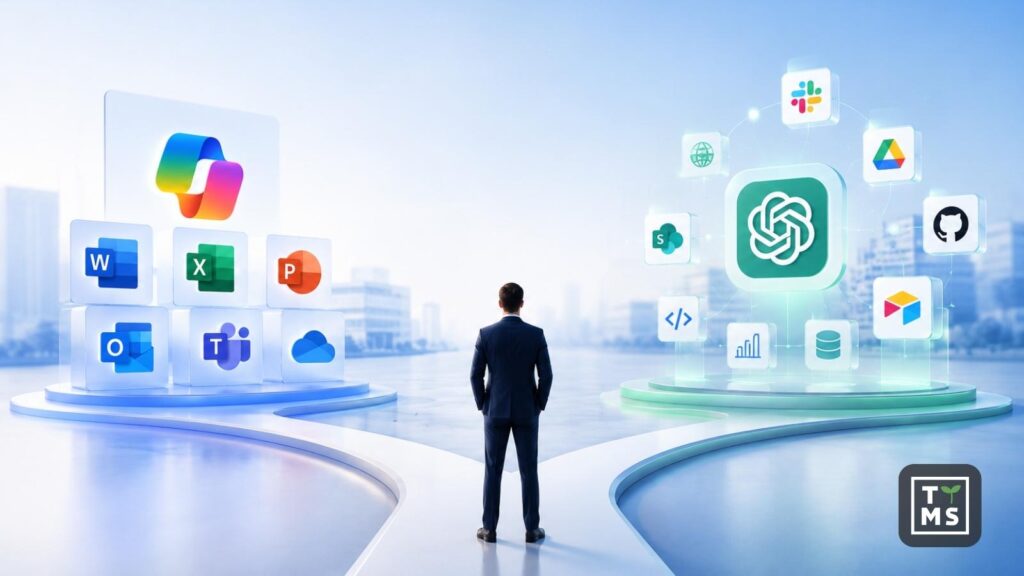
When companies compare Copilot vs ChatGPT, they are not just comparing two chat interfaces. They are comparing two different enterprise AI operating models. Microsoft 365 Copilot is designed to work inside Microsoft 365 apps and can ground answers in organizational context through Microsoft Graph, while ChatGPT Enterprise is a broader AI workspace built around advanced models, data analysis, deep research, apps, and agents that connect to company systems.
For many firms, that distinction is more important than raw prompt quality. Microsoft positions Copilot around secure work inside Word, Excel, Outlook, Teams, search, and agents, while OpenAI positions ChatGPT around cross-functional AI work such as writing, analysis, coding, research, deep research, and connected workflows through apps and agents. That suggests a simple rule of thumb: if the center of gravity is Microsoft 365, Copilot usually feels more native; if the goal is a flexible AI workspace across many tools and tasks, ChatGPT usually feels broader. That conclusion is an inference from how both vendors describe their products and enterprise architectures.

1. What Is the Difference Between ChatGPT and Copilot?
- The first difference between ChatGPT and Copilot is where each product lives. Microsoft 365 Copilot is embedded in the applications people already use for daily work, including Word, Excel, PowerPoint, Outlook, and Teams. Microsoft’s documentation says it can generate responses grounded in organizational data such as documents, emails, calendar items, chats, meetings, and contacts through Microsoft Graph. ChatGPT Enterprise, by contrast, is a managed ChatGPT workspace for organizations with centralized administration, security controls, and access to advanced ChatGPT capabilities.
- The second difference is the data-access and knowledge model. Microsoft distinguishes between web-based Copilot Chat and the licensed Microsoft 365 Copilot experience: web chat can be included at no extra cost for eligible Microsoft 365 organizations, while work-based chat and full Microsoft 365 Copilot experiences rely on a Copilot license and deeper grounding in Microsoft Graph data. Microsoft also says Copilot uses an advanced lexical and semantic index over organizational data and respects the same user permission boundaries already enforced in Microsoft 365. ChatGPT handles enterprise knowledge access differently. OpenAI’s company knowledge and apps rely on enabled integrations, existing permissions, and user authentication. OpenAI says ChatGPT can only access what each user is already allowed to view, while Enterprise admins can manage apps, require SSO and SCIM, and control access using RBAC. In practice, one of the biggest differences between ChatGPT and Copilot is that Copilot is more natively grounded in the Microsoft work graph, while ChatGPT is more connector- and app-driven.
- The third difference is workflow style. Copilot is strongest when the task starts inside Microsoft 365: summarizing a meeting, drafting an email, refining a PowerPoint, or generating formulas and insights in Excel. ChatGPT is broader by design: OpenAI describes it as a workspace for writing, research, coding, data analysis, deep research, and agentic tasks, and OpenAI’s own enterprise adoption data shows early usage clustering around writing, research, programming, and analysis across departments. In short, copilot ai vs chatgpt is often a choice between an in-flow productivity layer and a more general AI operating environment.
- The fourth difference is extensibility. Microsoft offers Copilot Studio and Agent Builder for organizations that want custom agents grounded in business data and published across employee or customer channels. OpenAI offers apps, custom MCP-powered apps, and workspace agents that can connect to tools, run on schedules, and operate inside ChatGPT or Slack. That means the difference between ChatGPT and Copilot is not only about the base assistant, but also about the ecosystem you want to build around it.
2. Microsoft Copilot for Business – Use Cases
In practice, microsoft copilot for business starts with two entry points. Microsoft says eligible organizations can use web-based Copilot Chat at no extra cost, while paid Microsoft 365 Copilot unlocks work-based chat, app experiences, and deeper organizational grounding. Microsoft also sells Microsoft 365 Copilot Business for organizations of up to 300 users, which gives smaller and mid-sized companies a packaged way to adopt the same in-app Copilot experience.
The most obvious use case is productivity inside familiar apps. In Word, Copilot helps draft and edit documents; in Excel, it supports formula suggestions, trend analysis, and visualizations; in Outlook, it summarizes email threads and drafts messages; and in Teams, it summarizes meetings and helps create action items. This is where Microsoft has its clearest advantage: employees do not need to leave the workflow surface they already know.
Sales and commercial teams are another strong fit. Microsoft’s scenario library highlights use cases such as accelerating customer research and sales preparation, creating customized pitches, and responding to RFPs. Some of those workflows can be handled directly in Microsoft 365 Copilot, while others can be extended through Copilot Studio or Copilot for Sales, where agents can connect to line-of-business systems through connectors and APIs.
Finance, operations, and service workflows are also central to the Microsoft story. Microsoft’s official scenario pages describe Copilot use cases for budgeting, forecasting, financial analysis, planning, risk management, customer service problem resolution, issue diagnosis, and frontline assistance in financial services. That makes enterprise copilot especially attractive in environments where internal policies, structured records, and regulated processes matter as much as content generation.
Finally, Microsoft positions Copilot as more than a personal assistant. Copilot Studio lets organizations build and manage custom agents connected to business data, while Microsoft 365 Copilot includes access to built-in and custom agents and Microsoft provides Copilot analytics and usage reporting for adoption tracking. For companies that want AI to move from experimentation into governed process automation, that combination of app-native assistance, agent building, and admin reporting is a major selling point.
3. Copilot Enterprise vs ChatGPT Enterprise: Which One Fits Larger Organizations?
To keep terminology precise, it is worth clarifying that copilot enterprise is usually a shorthand for Microsoft 365 Copilot and Copilot Chat deployed in a commercial or enterprise Microsoft tenant. Microsoft’s enterprise materials present those workplace offerings as the relevant enterprise Copilot layer, rather than a separate standalone product with a different name. That framing matters because companies often compare “Copilot Enterprise” with ChatGPT Enterprise even though Microsoft’s official product naming centers on Microsoft 365 Copilot.
On privacy and compliance, both vendors make strong enterprise commitments, but the language is different. Microsoft says enterprise use of Microsoft 365 Copilot and Copilot Chat is covered by its Data Protection Addendum and Product Terms, with Microsoft acting as a data processor; prompts and responses are protected by enterprise data protection, and Microsoft says that prompts, responses, and Microsoft Graph data are not used to train its foundation models. OpenAI says organizations own and control their business data, OpenAI does not train models on business data by default, and ChatGPT Enterprise adds encryption at rest and in transit, custom data-retention policies, and support for data residency in ten regions.
On governance, Microsoft and OpenAI emphasize different strengths. Microsoft’s big advantage is inheritance from the Microsoft 365 security and permissions model: Copilot only surfaces content the current user is already authorized to access, and its grounding is tied to Microsoft Graph and semantic indexing. OpenAI’s enterprise advantage is administrative breadth inside its own workspace: domain verification, SSO, SCIM, role-based access controls, user analytics, and a Global Admin Console that can span multiple ChatGPT workspaces and API organizations under one tenant.
On integrations and knowledge access, the trade-off is depth versus breadth. Microsoft’s workplace strength is native depth in Outlook, Teams, Word, Excel, PowerPoint, SharePoint, and Microsoft Search, plus agent creation through Copilot Studio and Agent Builder. OpenAI’s strength is cross-platform connectivity: ChatGPT supports apps for tools such as SharePoint, Slack, Airtable, Google Drive, GitHub, and more; OpenAI also supports company knowledge, deep research with internal connectors, custom MCP-powered apps, and workspace agents for repeatable workflows.
That leads to the most useful business interpretation of copilot enterprise vs chatgpt enterprise. If your organization already runs most collaboration, files, meetings, and internal knowledge discovery in Microsoft 365, Copilot will usually feel lower-friction and more native. If your teams work across Microsoft, Google, Slack, GitHub, CRM, analytics tools, and external research at the same time, ChatGPT Enterprise will often feel more flexible as a central AI workspace. That is an inference, but it follows directly from the integration patterns and admin models described in the official documentation.
4. Is Copilot Better Than ChatGPT for Companies?
The honest answer to is copilot better than chatgpt is no, not universally. The better fit depends on where work happens, how sensitive the data is, which systems employees use all day, and whether the company wants AI embedded in existing software or centralized in a new AI workspace. In other words, chatgpt vs microsoft copilot is not a single winner-takes-all decision for every enterprise.
Copilot is often better for Microsoft-first organizations. If employees live in Outlook, Teams, Word, Excel, PowerPoint, and SharePoint, Microsoft 365 Copilot offers a highly natural adoption path because it works inside those products, uses Microsoft Graph context, and respects the existing permission model. It is particularly compelling for meeting-heavy organizations, document-centric operations, and teams that want AI embedded directly in everyday processes rather than accessed through a separate destination.
ChatGPT is often better for cross-functional reasoning and mixed-tool environments. OpenAI’s own enterprise usage data shows that early adoption spans writing, research, programming, and analysis, while the product itself combines advanced models, data analysis, deep research, apps, and agent features. For strategy teams, product teams, analysts, marketers, researchers, and software groups that constantly move between internal sources, external information, and multiple software stacks, ChatGPT can offer a broader working environment than Copilot alone.
In many companies, the best answer is hybrid rather than binary. A practical setup is to use Copilot for Microsoft-native productivity such as email, meetings, documents, spreadsheets, and internal knowledge retrieval, while using ChatGPT Enterprise or OpenAI-based custom solutions for deep research, coding, experimentation, agentic workflows, and broader cross-system reasoning. For firms evaluating microsoft copilot vs chatgpt, that layered approach is often the most realistic way to capture the strengths of both platforms without forcing one tool to do everything. That recommendation is an inference grounded in the official feature sets of both ecosystems.
5. How Can Companies Turn AI Comparison Into Real Business Value?
If your company is deciding between Copilot, ChatGPT, or a hybrid setup, the real challenge is rarely the tool alone. The real challenge is identifying the right business workflows, connecting AI to the right systems, and turning experimentation into measurable operational value. That is exactly the space where TTMS AI Solutions for Business positions its offer: TTMS describes its services as AI solutions aimed at improving operational efficiency and decision-making, ranging from intelligent chatbots to advanced analytics, and its published case studies include enterprise implementations such as AI-supported tender analysis integrated with Salesforce and Azure AI-based sales automation. Contact us!

Can a company use both Microsoft Copilot and ChatGPT Enterprise at the same time?
Yes, and in many organizations this may be the most practical approach. Copilot can support employees directly inside Microsoft 365, while ChatGPT Enterprise can serve broader tasks such as research, analysis, coding, content work, or cross-tool workflows. The key is to define clear usage policies, so teams know which tool should be used for which type of task.
Which tool is easier to adopt across non-technical teams?
Microsoft Copilot may be easier for teams that already work mainly in Outlook, Teams, Word, Excel, and PowerPoint, because it appears inside familiar applications. ChatGPT Enterprise may require more onboarding, but it can also be more flexible for teams that need a general AI workspace. Adoption depends less on the tool itself and more on training, governance, and real use-case mapping.
Does ChatGPT Enterprise replace Microsoft Copilot?
Not necessarily. ChatGPT Enterprise and Microsoft Copilot solve overlapping but different business problems. Copilot is closer to a productivity layer inside Microsoft 365, while ChatGPT Enterprise is closer to a flexible AI workbench. In many companies, one will not fully replace the other.
What should companies check before choosing an enterprise AI assistant?
They should review where employees actually work, what data the assistant needs to access, which systems must be integrated, what compliance requirements apply, and how success will be measured. A good choice should be based on business processes, not only on model quality or brand recognition.
Which AI assistant is better for custom business workflows?
It depends on the workflow. If the process is strongly connected to Microsoft 365 data and applications, Copilot Studio may be a natural fit. If the workflow spans many tools, external research, code, documents, and custom agents, ChatGPT Enterprise or a custom OpenAI-based solution may be more suitable.