In 2026, generative AI has reached a tipping point in the enterprise. After two years of experimental pilots, large companies are now rolling out GPT-powered solutions at scale – and the results are astonishing. An OpenAI report shows ChatGPT Enterprise usage surged 8× year-over-year, with employees saving an average of 40-60 minutes per day thanks to AI assistance. Venture data indicates enterprises spent $37 billion on generative AI in 2026 (up from $11.5 billion in 2024), reflecting a threefold investment jump in just one year. In short, 2026 is the moment GPT is moving from promising proof-of-concepts to an operational revolution delivering millions in savings.
1. 2026: From GPT Pilot Projects to Full-Scale Deployments
Recent trends confirm that generative AI is no longer confined to innovation labs – it’s becoming business as usual. Early fears of AI “hype” were tempered by reports that 95% of generative AI pilots initially struggled to show value, but enterprises have rapidly learned from those missteps. According to Menlo Ventures’ 2026 survey, once a company commits to an AI use case, 47% of those projects move to production – nearly double the conversion rate of traditional software initiatives. In other words, successful pilots aren’t dying on the vine; they’re being unified into firm-wide platforms.
Why now? In 2023-2024, many organizations dabbled with GPT prototypes – a chatbot here, a document analyzer there. By 2026, the focus has shifted to integration, governance and scale. For example, Unilever’s CEO noted the company had already deployed 500 AI use cases across the business and is now “going deeper” to harness generative AI for global productivity gains. Companies are recognizing that scattered AI experiments must converge into secure, cost-effective enterprise platforms – or risk getting stuck in “pilot purgatory”. Leaders in IT and operations are now taking the reins to standardize GPT deployments, ensure compliance, and deliver measurable ROI at scale. The race is on to turn last year’s AI demos into this year’s mission-critical systems.

2. Most Profitable Use Cases of GPT in Enterprise Operations
Where are large enterprises actually saving money with GPT? The most profitable applications span multiple operational domains. Below is a breakdown of key use cases – from procurement to compliance – and how they’re driving efficiency. We’ll also highlight real-world examples (think Shell, Unilever, Deloitte, etc.) to see GPT in action.
2.1 Procurement: Smarter Sourcing and Spend Optimization
GPT is transforming procurement by automating analysis and communication across the sourcing cycle. Procurement teams often drown in data – RFPs, contracts, supplier profiles, spend reports – and GPT models excel at digesting this unstructured information. For instance, a generative AI assistant can summarize a 50-page supplier contract in seconds, flagging key risks or deviations in plain language. It can also answer ad-hoc questions like “Which vendors had delivery delays last quarter?” without hours of manual research. This speeds up decision-making dramatically.
Enterprises are leveraging GPT to draft RFP documents, compare supplier bids, and even negotiate terms. Shell, for example, has experimented with custom GPT models to make sense of decades of internal procurement and engineering reports – turning that trove of text into a searchable knowledge base for decision support. The result? Procurement managers get instant, data-driven insights instead of spending weeks sifting spreadsheets and PDFs. According to one AI procurement vendor, these capabilities let category managers “ask plain-language questions, summarize complex spend data, and surface supplier risks” on demand. The ROI comes from cutting manual workload and avoiding costly oversights in supplier contracts or pricing. In short, GPT helps procurement teams do more with less – smarter sourcing, faster analyses – which directly translates to millions saved through better supplier terms and reduced risk.
2.2 HR: Recruiting, Onboarding and Talent Development
HR departments in large enterprises have embraced GPT to streamline talent management. One high-impact use case is AI-driven resume screening and candidate matching. Instead of HR staff manually filtering thousands of CVs, a GPT-based tool can understand job requirements and evaluate resumes far beyond simple keyword matching. For example, TTMS’s AI4Hire platform uses NLP and semantic analysis to assess candidate profiles, automatically summarizing each resume, extracting detailed skillsets (e.g. distinguishing “backend vs frontend” development experience), and matching candidates to suitable roles . By integrating with ATS (Applicant Tracking) systems, such a solution can shortlist top candidates in minutes, not weeks, reducing time-to-hire and even uncovering hidden “silver medalist” candidates who might have been overlooked. This not only saves countless hours of recruiter time but also improves the quality of hires.
Employee support and training are another area where GPT is saving money. Enterprises like Unilever have trained tens of thousands of employees to use generative AI tools in their daily work, for tasks like writing performance reviews, creating training materials, or answering HR policy questions. Imagine a new hire onboarding chatbot that can answer “How do I set up my 401(k)?” or “What’s our parental leave policy?” in seconds, pulling from HR manuals. By serving as a 24/7 virtual HR assistant, GPT reduces repetitive inquiries to human HR staff. It can also generate customized learning plans or handle routine admin (like drafting job descriptions and translating them for global offices). The cumulative effect is huge operational efficiency – one study found that companies using AI in HR saw a significant reduction in administrative workload and faster response times to employees, freeing HR teams to focus on strategic initiatives.
A final example: internal mobility. GPT can analyze an employee’s skills and career history to recommend relevant internal job openings or upskilling opportunities, supporting better talent retention. In sum, whether it’s hiring or helping current staff, GPT is acting as a force-multiplier for HR – automating the mundane so humans can focus on the personal, high-value side of people management.
2.3 Customer Service: 24/7 Support at Scale
Customer service is often cited as the “low-hanging fruit” for GPT deployments – and for good reason. Large enterprises are saving millions by using GPT-powered assistants to handle customer inquiries with greater speed and personalization. Unlike traditional chatbots with canned scripts, a GPT-based support agent can understand free-form questions and respond in a human-like manner. For Tier-1 support (common FAQs, basic troubleshooting), AI agents now resolve issues end-to-end without human intervention, slashing support costs. Even for complex cases, GPT can assist human agents by drafting suggested responses and highlighting relevant knowledge base articles in real time.
Leading CRM providers have already embedded generative AI into their platforms to enable this. Salesforce’s Einstein GPT, for example, auto-generates tailored replies for customer service professionals, allowing them to answer customer questions much more quickly. By pulling context from past interactions and CRM data, the AI can personalize responses (“Hi Jane, I see you ordered a Model X last month. I’m sorry you’re having an issue with…”) at scale. Companies report significant gains in efficiency – Salesforce noted its Service GPT features can accelerate case resolution and increase agent productivity, ultimately boosting customer satisfaction.

We’re seeing this in action across industries. E-commerce giants use GPT to power live chat assistants that handle order inquiries and returns processing automatically. Telecom and utility companies deploy GPT bots to troubleshoot common technical problems (resetting modems, explaining bills) without making customers wait on hold. And in banking, some firms have GPT-based assistants that guide customers through online processes or answer product questions with compliance-checked accuracy. The savings come from deflecting a huge volume of calls and chats away from call centers – one generative AI pilot in a financial services firm showed the potential to reduce customer support workloads by up to 40%, translating to millions in annual savings for a large operation.
Importantly, these AI agents are available 24/7, ensuring customers get instant service even outside normal business hours. This “always-on” support not only saves money but also drives revenue through better customer retention and upselling opportunities (since the AI can seamlessly suggest relevant products or services during interactions). As generative models continue to improve, expect customer service to lean even more on GPT – with human agents focusing only on truly sensitive or complex cases, and AI handling the rest with empathy and efficiency.
2.4 Shared Services & Internal Operations: Knowledge and Productivity Co-Pilots
Many large enterprises run Shared Services Centers for functions like IT support, finance, and internal knowledge management. Here, GPT is acting as an internal “co-pilot” that significantly enhances productivity. A prime example is the use of GPT-powered assistants for internal knowledge retrieval. Global firms have immense repositories of documents – policies, SOPs, research reports, financial records – and employees often waste hours searching for information or best practices. By deploying GPT with Retrieval-Augmented Generation (RAG) on their intranets, companies are turning this glut of data into a conversational knowledge base.
Consider Morgan Stanley’s experience: they built an internal GPT assistant to help financial advisors quickly find information in the firm’s massive research library. The result was phenomenal – now over 98% of Morgan Stanley’s advisor teams use their AI assistant for “seamless internal information retrieval”. Advisors can ask complex questions and get instant, compliant answers distilled from tens of thousands of documents. The AI even summarizes lengthy analyst reports, saving advisors hours of reading. Morgan Stanley reported that what started as a pilot handling 7,000 queries has scaled to answering questions across a corpus of 100,000+ documents, with near-universal adoption by employees. This shows the power of GPT in a shared knowledge context: employees get the information they need in seconds instead of digging through manuals or waiting for email responses.

Shared service centers are also using GPT for tasks like IT support (answering “How do I reset my VPN?” for employees), finance (generating summary reports, explaining variances in plain English), and legal/internal audit (analyzing compliance documents). These AI assistants function as first-line support, handling routine queries or producing first-draft outputs that human staff can quickly review. For instance, a finance shared service might use GPT to automatically draft monthly expense commentary or to parse a stack of invoices for anomalies, flagging any outliers to human analysts.
The key benefit is scale and consistency. One central GPT service, integrated with corporate data, can serve thousands of employees with instant support, ensuring everyone from a new hire in Manila to a veteran manager in London gets accurate answers and guidance. This not only cuts support costs (fewer helpdesk tickets and emails) but also boosts productivity across the board. Employees spend less time “hunting for answers” and more time executing on their core work. In fact, OpenAI’s research found that 75% of workers feel AI tools improved the speed and quality of their output – heavy users saved over 10 hours per week. Multiply that by thousands of employees, and the efficiency gains from GPT in shared services easily reach into the millions of dollars of value annually.
2.5 Compliance & Risk: Monitoring, Document Review and Reporting
Enterprises face growing compliance and regulatory burdens – and GPT is stepping up as a powerful ally in risk management. One lucrative use case is automating compliance document analysis. GPT 5.2 and similar models can rapidly read and summarize lengthy policies, laws, or audit reports, highlighting the sections that matter for a company. This helps legal and compliance teams stay on top of changing regulations (for example, parsing new GDPR guidelines or industry-specific rules) without manually combing through hundreds of pages. The AI can answer questions like “What are the key obligations in this new regulation for our business?” in seconds, ensuring nothing critical is missed.
Financial institutions are particularly seeing ROI here. Take adverse media screening in anti-money-laundering (AML) compliance: historically, banks had analysts manually review news articles for mentions of their clients – a tedious process prone to false positives. Now, by pairing GPT’s text understanding with RPA, this can be largely automated. Deutsche Bank, for instance, uses AI and RPA to automate adverse media screening, cutting down false positives and improving compliance efficiency. The GPT component can interpret the context of a news article and determine if it’s truly relevant to a client’s risk profile, while RPA handles the retrieval and filing of those results. This hybrid AI approach not only reduces labor costs but also lowers the risk of human error in compliance checks.
GPT is also being used to monitor communications for compliance violations. Large firms are deploying GPT-based systems to scan emails, chat messages, and reports for signs of fraud, insider trading clues, or policy violations. The models can be fine-tuned to flag suspicious language or inconsistencies far faster (and more consistently) than human reviewers. Additionally, in highly regulated industries, GPT assists with generating compliance reports. For example, it can draft sections of a risk report or generate a summary of control testing results, which compliance officers then validate. By automating these labor-intensive parts of compliance, enterprises save costs and can reallocate expert time to higher-level risk analysis and strategy.
However, compliance is also an area that underscores the importance of proper AI oversight. Without governance, GPT can “hallucinate” – a lesson Deloitte learned the hard way. In 2026, Deloitte’s Australian arm had to refund part of a $290,000 consulting fee after an AI-written report was found to contain fake citations and errors. The incident, which involved a government compliance review, was a wake-up call: GPT isn’t infallible, and companies must implement strict validation and audit trails for any AI-generated compliance content. The good news is that modern enterprise AI deployments are addressing this. By grounding GPT models on verified company data and embedding audit logs, firms can minimize hallucinations and ensure AI outputs hold up to regulatory scrutiny. When done right, GPT in compliance delivers a powerful combination of cost savings (through automation) and risk reduction (through more comprehensive monitoring) – truly a game changer for keeping large enterprises on the right side of the law.

3. How to Calculate ROI for GPT Projects (and Avoid Pilot Pitfalls)
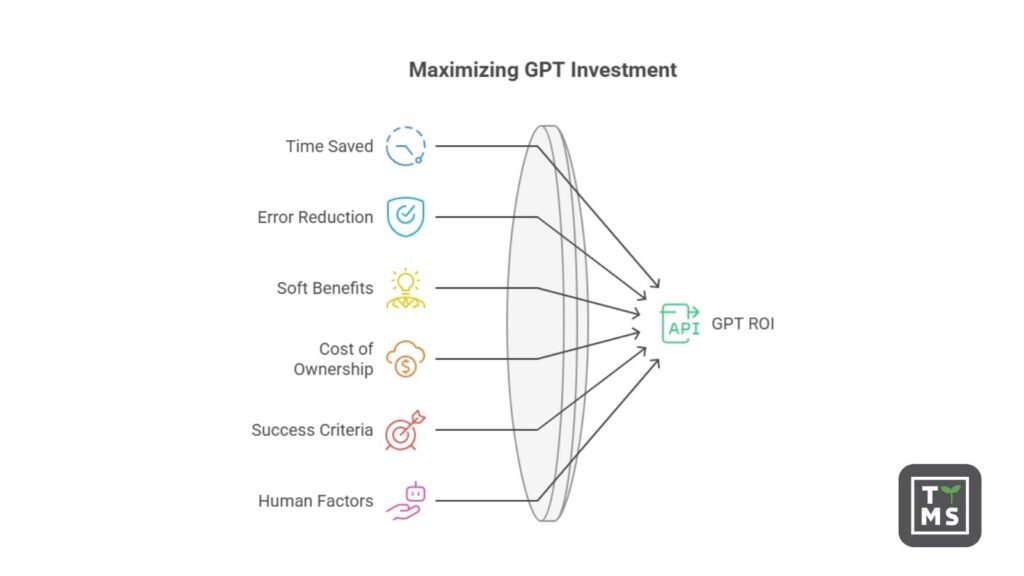
With the excitement around GPT, executives rightly ask: How do we measure the return on investment? Calculating ROI for GPT implementations starts with identifying the concrete benefits in dollar terms. The two most straightforward metrics are time saved and error reduction.
- Time Saved: Track how much faster tasks are completed with GPT. For example, if a customer support agent normally handles 50 tickets/day and with a GPT assistant they handle 70, that’s a 40% productivity boost. Multiply those saved hours by fully loaded labor rates to estimate direct cost savings. OpenAI’s enterprise survey found employees saved up to an hour per day with AI assistance – across a 5,000-person company, that could equate to roughly 25,000 hours saved per week!
- Error Reduction & Quality Gains: Consider the cost of errors (like compliance fines, rework, or lost sales due to poor service) and how GPT mitigates them. If an AI-driven process cuts document processing errors by 80%, you can attribute savings from avoiding those errors. Similarly, improved output quality (e.g. more persuasive sales content generated by GPT) can drive higher revenue – that uplift is part of ROI.
Beyond these, there are softer benefits: faster time-to-market, better customer satisfaction, and innovation enabled by AI. McKinsey estimates generative AI could add $2.6 trillion in value annually across 60+ use cases analyzed, which gives a sense of the massive upside. The key is to baseline current performance and costs, then monitor the AI-augmented metrics. For instance, if a GPT-based procurement tool took contract analysis time down from 5 hours to 30 minutes, record that delta and assign a dollar value.
Common ROI pitfalls: Many enterprises stumble when scaling from pilot to production. One mistake is failing to account for the total cost of ownership – treating a quick POC on a cloud GPT API as indicative of production costs. In reality, production deployments incur ongoing API usage fees or infrastructure costs, integration work, and maintenance (model updates, prompt tuning, etc.). These must be budgeted. Another mistake is not setting clear success criteria from the start. Ensure each GPT project has defined KPIs (e.g. reduce support response time by 30%, or automate 1,000 hours of work/month) to objectively measure ROI.
Perhaps the biggest pitfall is neglecting human and process factors. A brilliant AI solution can fail if employees don’t adopt it or trust it. Training and change management are critical – employees should understand the AI is a tool to help them, not judge them. Likewise, maintain human oversight especially early on. A cautionary example is the Deloitte case mentioned earlier: their consultants over-relied on GPT without adequate fact-checking, resulting in embarrassing errors. The lesson: treat GPT’s outputs as suggestions that professionals must verify. Implementing review workflows and “human in the loop” checkpoints can prevent costly mistakes while confidence in the AI’s accuracy grows over time.
Finally, consider the time-to-ROI. Many successful AI adopters report an initial productivity dip as systems calibrate and users learn new workflows, followed by significant gains within 6-12 months. Patience and iteration are part of the process. The reward for those who get it right is substantial: in surveys, a majority of companies scaling AI report meeting or exceeding their ROI expectations. By starting with high-impact, quick-win use cases (like automating a well-defined manual task) and expanding from there, enterprises can build a strong business case that keeps the AI investment flywheel spinning.
4. Integrating GPT with Core Systems (ERP, CRM, ECM, etc.)
One reason 2026 is different: GPT is no longer a standalone toy – it’s woven into the fabric of corporate IT systems. Seamless integration with core platforms (ERP, CRM, ECM, and more) is enabling GPT to act directly within business processes, which is crucial for large enterprises. Let’s look at how these integrations work in practice:
ERP Integration (e.g. SAP): Modern ERP systems are embracing generative AI to make enterprise applications more intuitive. A case in point is SAP’s new AI copilot Joule. SAP reported that they have infused their generative AI copilot into over 80% of the most-used tasks across the SAP portfolio, allowing users to execute actions via natural language. Instead of navigating complex menus, an employee can ask, “Show me the latest inventory levels for Product X” or “Approve purchase order #12345” in plain English. Joule interprets the request, fetches data from SAP S/4HANA, and surfaces the answer or action instantly. With 1,300+ “skills” added, users can even chat on a mobile app to get KPIs or finalize approvals on the fly. The payoff is huge – SAP notes that information searches are up to 95% faster and certain transactions 90% faster when done via the GPT-powered interface rather than manually. Essentially, GPT is simplifying ERP workflows that used to require expert knowledge, thus saving time and reducing errors (e.g. ensuring you asked the system correctly for the data you need).
Behind the scenes, such ERP integrations use APIs and “grounding” techniques. The GPT might be an OpenAI or Azure service, but it’s securely connected to the company’s SAP data through a middleware that enforces permissions. The model is often prompted with relevant business context (“This user is in finance, they are asking about Q3 revenue by region, here’s the data schema…”) so that the answers are accurate and specific. Importantly, these integrations maintain audit trails – if GPT executes an action like approving an order, the system logs it like any other user action, preserving compliance.
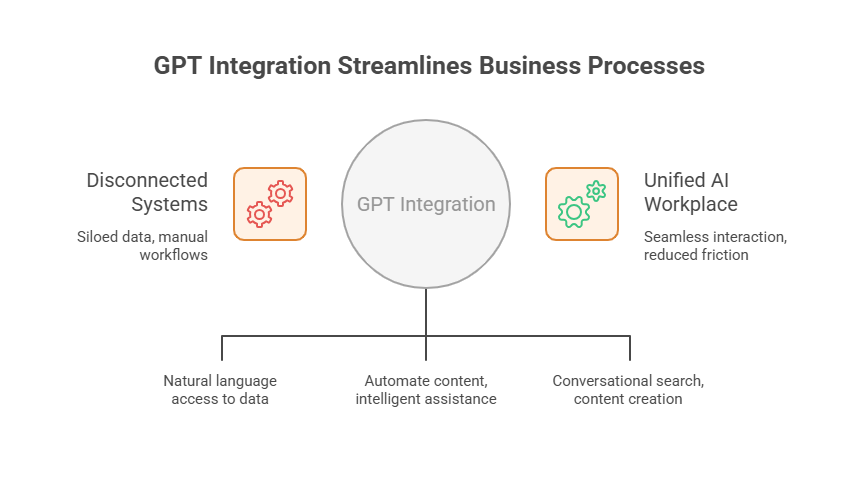
CRM Integration (e.g. Salesforce): CRM was one of the earliest areas to marry GPT with operational data, thanks to offerings like Salesforce’s Einstein GPT and its successor, the Agentforce platform. In CRM, generative AI helps in two big ways: automating content generation (emails, chat responses, marketing copy) and acting as an intelligent assistant for sales/service reps. For example, within Salesforce, a sales rep can use GPT to auto-generate a personalized follow-up email to a prospect – the AI pulls in details from that prospect’s record (industry, last products viewed, etc.) to craft a tailored message. Service agents, as discussed, get GPT-suggested replies and knowledge articles while handling cases. This is all done from within the CRM UI – the GPT capabilities are embedded via components or Slack integrations, so users don’t jump to an external app.
Integration here means feeding the GPT model with real-time customer data from the CRM (Salesforce even built a “Data Cloud” to unify customer data for AI use). The model can be Salesforce’s own or a third-party LLM, but it’s orchestrated to respect the company’s data privacy settings. The outcome: every interaction becomes smarter. As Salesforce’s CEO said, “embedding AI into our CRM has delivered huge operational efficiencies” for their customers. Think of reducing the time sales teams spend on administrative tasks or the speed at which support can resolve issues – these efficiency gains directly lower operational costs and improve revenue capture.
ECM and Knowledge Platforms (e.g. SharePoint, OpenText): Enterprises also integrate GPT with Enterprise Content Management (ECM) systems to unlock the value in unstructured data. OpenText, a leading ECM provider, launched OpenText Aviator which embeds generative AI across its content and process platforms. For instance, Content Aviator (part of the suite) sits within OpenText’s content management system and provides a conversational search experience over company documents. An employee can ask, “Find the latest design spec for Project Aurora” and the AI will search repositories, summarize the relevant document, and even answer follow-up questions about it. This dramatically reduces the time spent hunting through folders. OpenText’s generative AI can also help create content – their Experience Aviator tool can generate personalized customer communication content by leveraging large language models, which is a boon for marketing and customer ops teams that manage mass communications.
The integrations don’t stop at the platform boundary. OpenText is enabling cross-application “agent” workflows – for example, their Content Aviator can interact with Salesforce’s Agentforce AI agents to complete tasks that span multiple systems. Imagine a scenario: a sales AI agent (in CRM) needs a contract from the ECM; it asks Content Aviator via an API, gets the info, and proceeds to update the deal – all automatically. These multi-system integrations are complex, but they are where immense efficiency lies, effectively removing the silos between corporate systems using AI as the translator and facilitator. By grounding GPT models in the authoritative data from ERP/CRM/ECM, companies also mitigate hallucinations and security risks – the AI isn’t making up answers, it’s retrieving from trusted sources and then explaining or acting on it.
In summary, integrating GPT with core systems turns it into an “intelligence layer” across the enterprise tech stack. Users get natural language interfaces and AI-driven support within the software they already use, whether it’s SAP, Salesforce, Office 365, or others. The technology has matured such that these integrations respect access controls and data residency requirements – essential for enterprise IT approval. The payoff is a unified, AI-enhanced workplace where employees can interact with business systems as easily as talking to a colleague, drastically reducing friction and cost in everyday processes.
5. Key Deployment Models: From Assistants to Autonomous Agents
As enterprises deploy GPT in operations, a few distinct models of implementation have emerged. It’s important to choose the right model (or mix) for each use case:
5.1 GPT-Powered Process Assistants (Human-in-the-Loop Co-Pilots)
This is the most common starting point: using GPT as an assistant to human workers in a process. The AI provides suggestions, insights or automation, but a human makes final decisions. Examples include:
- Advisor Assistants: In banking or insurance, an internal GPT chatbot might help employees retrieve product info or craft responses for clients (like the Morgan Stanley Assistant for wealth advisors we discussed). The human advisor gets a speed boost but is still in control.
- Content Drafting Co-Pilots: These are assistants that generate first drafts – whether it’s an email, a marketing copy, a financial report narrative, or code – and the employee reviews/edits before finalizing. Microsoft 365 Copilot and Google’s workspace AI functions fall in this category, allowing employees to “ask AI” for a draft document or summary which they then refine.
- Decision Support Bots: In areas like procurement or compliance, a GPT assistant can analyze data and recommend an action (e.g., “This supplier contract has high risk clauses, I suggest getting legal review”). The human user sees the recommendation and rationale, and then approves or adjusts the next step.
The process assistant model is powerful because it boosts productivity while keeping humans as the ultimate check. It’s generally easier to implement (fewer fears of the AI going rogue when a person is watching every suggestion) and helps with user adoption – employees come to see the AI as a helpful colleague, not a replacement. Most companies find this hybrid approach critical for building trust in GPT systems. Over time, as confidence and accuracy improve, some tasks might shift from assisted to fully automated.
5.2 Hybrid Automations (GPT + RPA for End-to-End Automation)
Hybrid automation marries the strengths of GPT (understanding unstructured language, making judgments) with the strengths of Robotic Process Automation (executing structured, repetitive tasks at high speed). The idea is to automate an entire workflow where parts of it were previously too unstructured for traditional automation alone. For example:
- Invoice Processing: An RPA bot might handle downloading attachments and entering data into an ERP system, while a GPT-based component reads the invoice notes or emails to classify any special handling instructions (“This invoice is a duplicate” or “dispute, hold payment”) and communicates with the vendor in natural language. Together, they achieve an end-to-end AP automation beyond what RPA alone could do.
- Customer Service Ticket Resolution: GPT can interpret a customer’s free-form issue description and determine the underlying problem (“It looks like the customer cannot reset their password”). Then RPA (or API calls) can trigger the password reset workflow automatically and email the customer confirmation. The GPT might even draft the email explanation (“We’ve reset your password as requested…”), blending seamlessly with the back-end action.
- IT Operations: A monitoring system generates an alert email. An AI agent reads the alert (GPT interprets the error message and probable cause), then triggers an RPA bot to execute predefined remediation steps (like restarting a server or scaling up resources) if appropriate. Gartner calls this kind of pattern “AIOps,” and it’s a growing use case to reduce downtime without waiting for human intervention.
This hybrid approach is exemplified by forward-thinking organizations. One LinkedIn case described an AI agent receiving a maintenance report via email, using an LLM (GPT) to parse the fault description and extract key symptoms, then querying a knowledge base and finally initiating an action – all automatically. In effect, GPT extends RPA’s reach into understanding intent and content, while RPA grounds GPT by actually performing tasks in enterprise applications. When implementing hybrid automation, companies should ensure robust error handling: if the GPT model isn’t confident or an unexpected scenario arises, it should hand off to a human rather than plow ahead. But when tuned properly, these GPT+RPA workflows can operate 24/7, eliminating entire chunks of manual work (think: processing thousands of emails, forms, requests that used to require human eyes) and saving millions through efficiency and faster cycle times.
5.3 Autonomous AI Agents and Multi-Agent Workflows
Autonomous AI agents — or “agentic AI” — are pushing the boundaries of enterprise automation. Unlike traditional assistants, these systems can autonomously execute multi-step tasks across tools and departments. For example, an onboarding agent might simultaneously create IT accounts, schedule training, and send welcome emails, all with minimal human input.
Platforms like Salesforce Agentforce and OpenText Aviator show where this is heading: multi-agent orchestration that automates not just tasks, but entire workflows. While still early, constrained versions are already delivering value in marketing, HR, and IT support. The potential is huge, but requires guardrails — clearly defined scopes, oversight mechanisms, and error handling. Think of it as upgrading from an “AI assistant” to a trusted “AI colleague.”

Most enterprises adopt a layered approach: starting with co-pilots, then hybrid automations (GPT + RPA), and gradually introducing agents for high-volume, well-bounded processes. This strategy ensures control while scaling efficiency. Partnering with experienced AI solution providers helps navigate complexity, ensure compliance, and accelerate value. The competitive edge now belongs to those who scale GPT smartly, securely, and strategically. Interested in harnessing AI for your enterprise? As a next step, consider exploring how our team at TTMS can help. Check out our AI Solutions for Business to see how we assist companies in deploying GPT and other AI technologies at scale, securely and with proven ROI. The opportunity to transform operational processes has never been greater – with the right guidance, your organization could be the next case study in AI-driven success.
FAQ: GPT in Operational Processes
Why is 2026 considered the tipping point for GPT deployments in enterprises?
In 2026, we’ve seen a critical mass of generative AI adoption. Many companies that experimented with GPT pilots in 2023-2024 are now rolling them out company-wide. Enterprise AI spend tripled from 2024 to 2026, and surveys show the majority of “test” use cases are moving into full production. Essentially, the technology proved its value in pilot projects, and improvements in governance and integration made large-scale deployment feasible in 2026. This year, AI isn’t just a buzzword in boardrooms – it’s delivering measurable results on the ground, marking the transition from experimentation to execution.
What operational areas deliver the highest ROI with GPT?
The biggest wins are in functions with lots of routine data processing or text-heavy work. Customer service is a top area – GPT-powered assistants handle FAQs and support chats, cutting resolution times and support costs dramatically. Another is knowledge work in shared services: AI co-pilots that help employees find information or draft content (reports, emails, code) yield huge productivity boosts. Procurement can save millions by using GPT to analyze contracts and vendor data faster and more thoroughly, leading to better negotiation outcomes. HR gains ROI by automating resume screening and answering employee queries, which speeds up hiring and reduces administrative load. And compliance and finance teams see value in AI reviewing documents or monitoring transactions 24/7, preventing costly errors. In short, wherever you have repetitive, document-driven processes, GPT is likely to drive strong ROI by saving time and improving quality.
How do we measure the ROI of a GPT implementation?
Start by establishing a baseline for the process you’re automating or augmenting – e.g., how many hours does it take, what’s the error rate, what’s the output quality. After deploying GPT, measure the same metrics. The ROI will come from differences: time saved (multiplied by labor cost), higher throughput (e.g. more tickets resolved per hour), and error reduction (fewer mistakes or rework). Don’t forget indirect benefits: for instance, faster customer service might improve retention, which has revenue implications. It’s also important to factor in the costs – not just the GPT model/API fees, but integration and maintenance. A simple formula is ROI = (Annual benefit achieved – Annual cost of AI) / (Cost of AI). If GPT saved $1M in productivity and cost $200k to implement and run, that’s a 5x ROI or 400% return. In practice, many firms also measure qualitative feedback (employee satisfaction, customer NPS) as part of ROI for AI, since those can translate to financial value long-term.
What challenges do companies face when scaling GPT from pilot to production?
A few big ones: data security & privacy is a top concern – ensuring sensitive enterprise data fed into GPT is protected (often requiring on-prem or private cloud solutions, or scrubbing of data). Model governance is another – controlling for accuracy, bias, and appropriateness of AI outputs. Without safeguards, you risk errors like the Deloitte incident where an AI-generated report had factual mistakes. Many firms implement human review and validation steps to catch AI mistakes until they’re confident in the system. Cost management is a challenge as well; at scale, API usage can skyrocket costs if not optimized, so companies need to monitor usage and consider fine-tuning models or using more efficient models for certain tasks. Finally, change management: employees might resist or misuse the AI tools. Training programs and clear usage policies (what the AI should and shouldn’t be used for) are essential so that the workforce actually adopts the AI (and does so responsibly). Scaling successfully means moving beyond the “cool demo” to robust, secure, and well-monitored AI operations.
Should we build our own GPT models or buy off-the-shelf solutions?
Today, most large enterprises find it faster and more cost-effective to leverage existing GPT platforms rather than build from scratch. A recent industry report noted a major shift: in 2024 about half of enterprise AI solutions were built in-house, but by 2026 around 76% are purchased or based on pre-trained models. Off-the-shelf generative models (from OpenAI, Microsoft, Anthropic, etc.) are very powerful and can be customized via fine-tuning or prompt engineering on your data – so you get the benefit of billions of dollars of R&D without bearing all that cost. There are cases where building your own makes sense (e.g., if you have very domain-specific data or ultra-stringent data privacy needs). Some companies are developing custom LLMs for niche areas, but even those often start from open-source models as a base. For most, the pragmatic approach is a hybrid: use commercial or open-source GPT models and focus your efforts on integrating them with your systems and proprietary data (that’s where the unique value is). In short, stand on the shoulders of AI giants and customize from there, unless you have a very clear reason to reinvent the wheel.