Choosing between AEM as a Cloud Service and AEM On-Premise is no longer just a technical consideration. In 2026, it is a strategic decision that shapes how digital teams operate, how quickly organizations can respond to market demands, and how sustainable their technology stack will be over the coming years. As Adobe continues to invest heavily in its cloud-native platform, the gap between modern and legacy deployment models has grown increasingly pronounced.
1. AEM Cloud vs AEM On-Premise: What’s Actually Different in 2026
At the most fundamental level, this debate comes down to a trade-off: control versus agility. It directly impacts how quickly teams can deliver content, how much operational overhead IT must carry, and how future-proof your digital experience platform is.
The fundamental trade-off remains the same:
- On-premise provides maximum control over infrastructure, customization, and data
- AEM as a Cloud Service (AEMaaCS) prioritizes scalability, automation, and reduced operational burden
In 2026, however, Adobe’s product strategy, support timelines, and architectural direction have made this decision more consequential than in the past.
2. Architecture Differences That Define Each Model
The architectural differences between these deployment models go far beyond where the application is hosted. They directly influence how systems perform under load, how updates are delivered, and how resilient the platform is in production environments.
2.1 Infrastructure and Scalability Design
In traditional on-premise deployments, AEM runs as a monolithic application on a Java Virtual Machine. Scaling the environment requires provisioning additional servers or reconfiguring existing ones, often involving manual processes and downtime. While this approach can be highly customized, it introduces complexity and can limit responsiveness during peak demand.
By contrast, AEM as a Cloud Service operates on a distributed, container-based architecture. Resources can scale automatically in response to traffic fluctuations, and the platform is designed to maintain high availability without manual intervention. This difference is particularly important for organizations running global campaigns or handling unpredictable traffic spikes, where performance reliability directly impacts business outcomes.
2.2 Release Cadence and Updates
Another important distinction lies in how updates are handled. On-premise environments depend on scheduled maintenance cycles, with updates applied manually and typically accompanied by testing and downtime.
AEM as a Cloud Service, on the other hand, follows a continuous delivery model. Adobe manages updates in the background, introducing new features and security improvements without requiring customers to plan upgrades or interrupt service.
Do you want to learn more about AEM Architecture? Read our article: Adobe AEM Architecture: Essential Guide for Experts
3. Head-to-Head Comparison: AEM Cloud vs AEM On-Premise
3.1 Scalability and Performance
AEM as a Cloud Service is engineered for high availability. The platform includes 24/7 global monitoring, a five-minute incident contact goal, enterprise-grade SLAs (typically ≥99.9%, depending on setup), and automatic traffic rerouting during outages.
On-premise deployments can struggle during high-traffic events because scaling requires manual hardware or configuration changes, which directly increases downtime risk during critical windows.
3.2 Security and Compliance Responsibilities
AEM as a Cloud Service includes built-in encryption, identity management, and automatic security patching. Adobe continuously monitors infrastructure and resolves vulnerabilities proactively. That said, organizations in heavily regulated industries may have data residency requirements (GDPR-specific regional rules, defense-sector mandates) that cloud environments don’t always satisfy by default.
AEM on-premise gives your security team full control over the network, compute layer, data access, and audit trails. For organizations where complete infrastructure control is a regulatory requirement rather than a preference, this carries real weight.
3.3 Customization and Development Flexibility
AEM on-premise allows deep infrastructure-level customization. Teams can install packages directly, modify server configurations, and build highly specific integrations tied to the underlying OS or network environment.
AEM as a Cloud Service restricts deployment to code and pipeline operations through Cloud Manager. Direct package installs and server-level tweaks aren’t available. While that can feel limiting at first, it enforces better development discipline and pushes customizations into the /apps layer, where they’re more maintainable and upgrade-safe over time.
3.4 Maintenance, Upgrades, and Operational Overhead
On-premise teams carry 24/7 responsibility for monitoring, patching, backups, and upgrades.
AEM as a Cloud Service automates all of this. Adobe handles backups, infrastructure monitoring, and rolling updates without requiring downtime or customer involvement. That frees internal teams to focus on content strategy, personalization, and digital experience work rather than operational firefighting.

4. AEM as a Cloud Service: Key Advantages for Enterprise Teams
AEM as a Cloud Service brings together capabilities that are genuinely difficult to replicate in on-premise. The cloud-native design introduces structural advantages that change how digital teams operate day to day.
AEM Cloud is usually the stronger option when:
- Rapid scaling and global availability are required
- Teams want to reduce infrastructure overhead
- Continuous innovation and new features are priorities
- Customizations can be implemented at the application level
It aligns closely with modern digital experience strategies focused on agility and speed.
You can find more about benefits of AEM as a Cloud Service in our article: What is AEM as a Cloud Service? Benefits and Insights. Find all answers in one place
5. AEM On-Premise: When It Still Makes Sense in 2026
Despite the clear momentum toward AEM as a Cloud Service, on-premise deployments remain appropriate in specific scenarios. Organizations in defense, government, or highly regulated pharmaceutical sectors may operate under data governance frameworks that require complete infrastructure control, including where data is processed, who can access it, and how it’s audited.
Legacy system integration is another real factor. If your AEM deployment is deeply tied to custom infrastructure components, proprietary databases, or on-premise ERP systems that can’t easily connect to cloud services, the cost and risk of migration may outweigh the benefits in the short term.
6. Migrating from AEM On-Premise to AEM Cloud: What to Expect
AEM migration from on-premise to AEM as a Cloud Service is a structured process rather than a simple lift-and-shift. Because the cloud platform is built on a cloud-native architecture, certain code patterns and configurations that worked in AEM 6.5 will not function the same way-or at all-in the new environment. This often requires code refactoring, adjustments to deployment practices, and careful validation of integrations.
To reduce risk and ensure a smooth transition, many organizations choose to work with experienced partners. Providers such as TTMS offer secure, end-to-end migration services that cover codebase assessment, content migration, integration validation, and post-launch optimization, helping teams modernize their AEM stack without disrupting ongoing operations.
7. Which AEM Deployment Model Is Right for Your Organization?
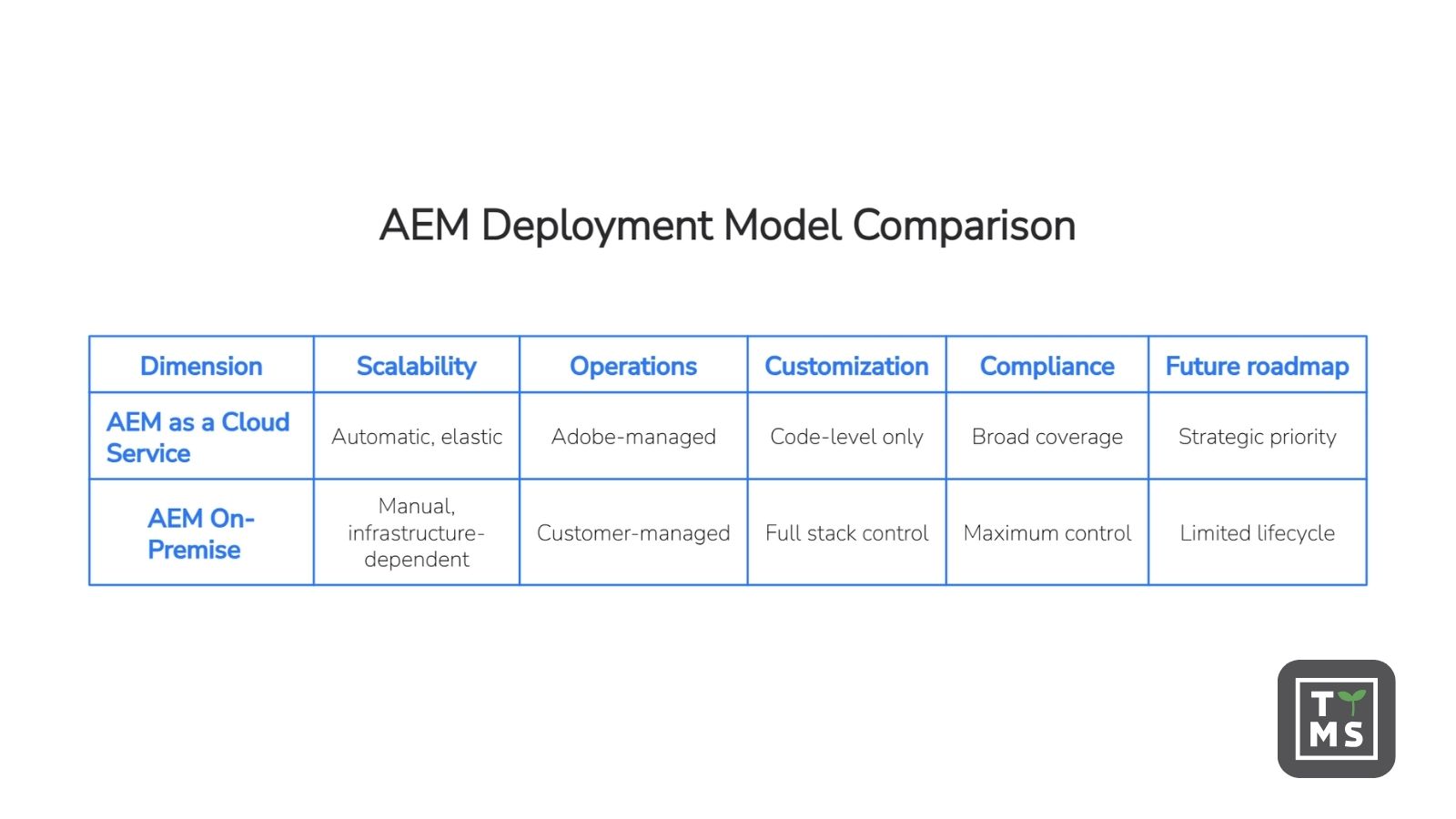
There’s no universal answer, but there is a useful framework. The table below scores each model across five decision-critical dimensions to give your team a scannable reference for planning conversations.
8. How TTMS Can Help You Choose the Right AEM Solution and Manage Migration
At TTMS, an official Adobe Bronze Partner, we support organizations at every stage of the AEM decision and migration journey-from strategic evaluation to post-launch optimization. By combining technical expertise with practical migration experience, we help ensure that both the platform choice and the transition process align with long-term business goals.
How TTMS can help your organisation:
- Assessment and strategy: we evaluate your current AEM environment, codebase, and compliance requirements to recommend the right deployment model
- Migration planning: we define a structured roadmap to move from on-premise or AMS to AEM as a Cloud Service
- Code refactoring: we adapt existing components and configurations for cloud compatibility
- Content migration: we securely transfer assets, metadata, and repository structures
- Integration support: we validate and reconfigures connections with systems like Salesforce, Marketo, and analytics platforms
- Testing and deployment: we ensure performance, stability, and workflow accuracy before go-live
- Post-launch optimization: we provide support, and performance tuning
With this end-to-end approach, at TTMS we help organizations modernize their AEM environment in a controlled, efficient way-reducing risk while accelerating time to value.
What is the main difference between AEM Cloud and AEM On-Premise?
AEM Cloud is Adobe-managed, auto-scaling, and continuously updated. On-premise is customer-managed and requires manual operations.
Is AEM as a Cloud Service the same as Adobe Managed Services?
No. AMS uses traditional VM-based hosting, while AEM Cloud is fully cloud-native with continuous delivery and auto-scaling.
How long does an AEM migration from on-premise to cloud typically take?
Timelines vary based on codebase complexity and content volume so for accurate estimate contact our AEM team.
Can I customize AEM as a Cloud Service the way I can with AEM on-premise?
AEM as a Cloud Service supports code-based customizations deployed through Cloud Manager pipelines. However, it doesn’t allow direct server access, manual package installs outside of standard processes, or server-level configuration changes.
When does AEM on-premise still make sense in 2026?
On-premise remains appropriate for organizations with strict data residency requirements, compliance frameworks that mandate full infrastructure control, or deeply embedded legacy integrations that aren’t cloud-compatible in the near term.
What does AEM cloud migration cost compared to staying on-premise?
AEM cloud migration requires an upfront investment for refactoring, content transfer, and testing, but it eliminates ongoing infrastructure and maintenance costs. After few years, most organizations see lower total cost of ownership compared to staying on-premise due to reduced DevOps effort and automatic updates.
How does TTMS support AEM cloud migration?
TTMS provides end-to-end migration support as a certified Adobe Experience Manager partner, including codebase assessment, code refactoring for cloud compatibility, content migration, integration validation with platforms like Salesforce and Marketo, environment testing, go-live coordination, and ongoing post-launch optimization. For more information contact our AEM team.