Copilot can speed up data analysis, visual creation and work with semantic models. It does not replace well-managed data sources, correct relationships or agreed metric definitions. If a model contains several similar sales measures, technical column names and ambiguous relationships, the AI assistant inherits the same problems that already affect report users. The difference is that a natural-language answer may sound convincing even when it relies on the wrong metric.
To prepare data for Power BI Copilot, organisations need to improve model quality, provide business context and define how the data may be used. Enabling Copilot alone will not make an inconsistent model unambiguous. The model needs clear names, validated measures, a controlled data scope, appropriate permissions and a test set based on questions that users actually ask.
This guide explains how to prepare Power BI data and semantic models for Copilot, how to use Prep data for AI and how to assess readiness before making the solution available to employees. It focuses on implementation and ongoing quality control. The broader capabilities of the assistant are covered in a separate TTMS article about AI and Copilot in Power BI.
1. Power BI model readiness for AI
An AI-ready model allows users to ask questions in business language without knowing the technical names of tables and columns. This does not mean that Copilot knows the organisation or can discover every internal rule on its own. It can use the information provided through the model, its metadata, the AI feature configuration and the report context. The quality of this layer determines whether a question about sales is mapped to the official net revenue measure, order value or another similarly named field.
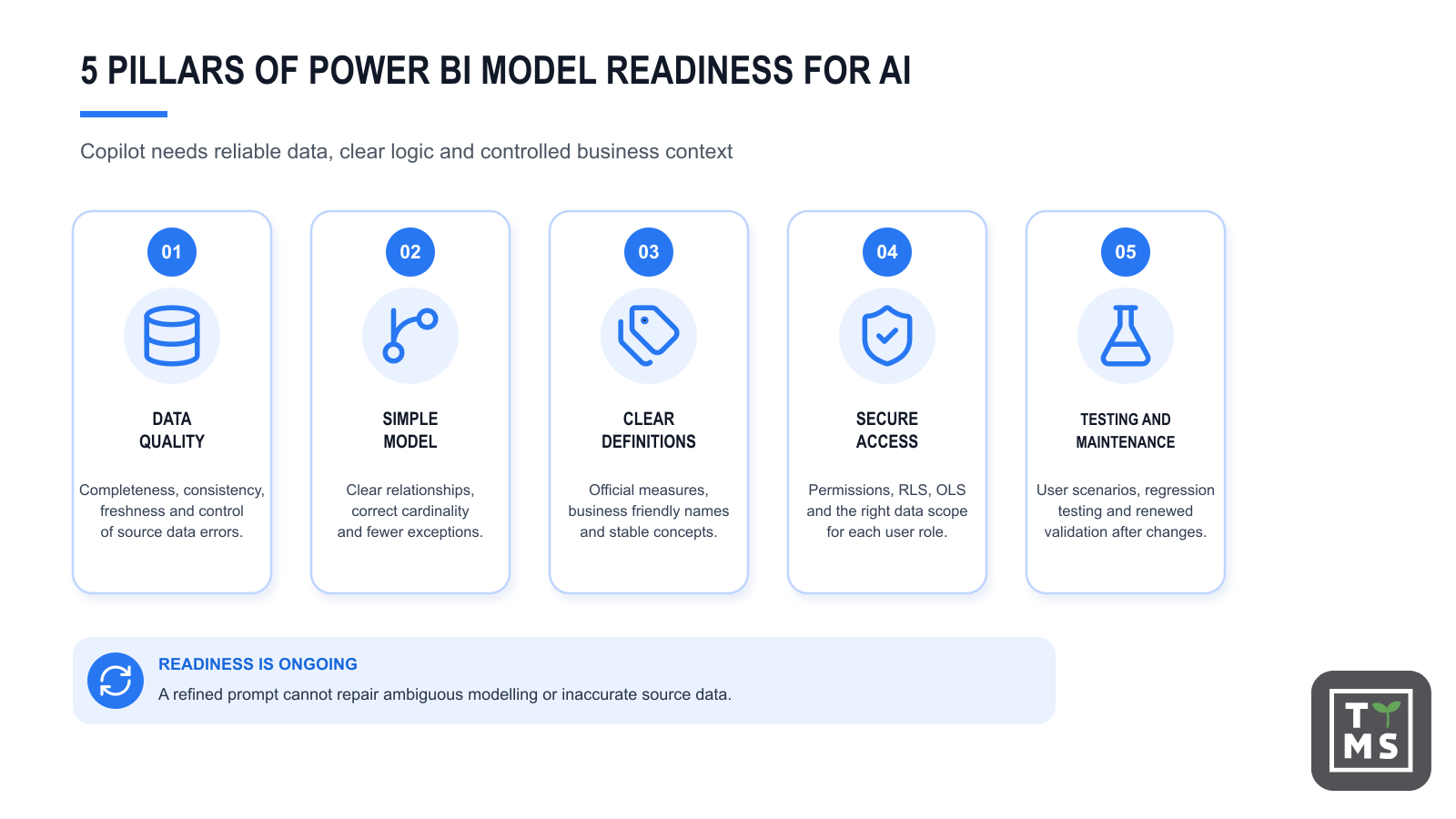
Assess model readiness across five areas:
- the quality and freshness of source data;
- the accuracy and simplicity of the semantic model;
- unambiguous business concepts, names and measures;
- data security, permissions and ownership;
- a repeatable process for testing Copilot answers.
If one of these areas is weak, refining prompts will have limited value. A user may phrase a question more precisely but still cannot know which of three margin measures is official or why one table uses the order date while another uses the invoice date.
2. Why the semantic model determines answer quality
The semantic model sits between source data and the report user. It contains tables, columns, measures, relationships, formats, hierarchies and security rules. For Copilot, it is the main source of information about how data is organised and how it should be interpreted.
The assistant may use the model schema, relationships, object properties, data types, formats and selected metadata. It should not be expected to infer definitions that carry a specific meaning within the organisation. If an active customer is defined as a customer who purchased something in the past 90 days, that definition should be implemented in the model and used by the official measure. Leaving several plausible interpretations increases the risk that Copilot will select the wrong one.
2.1 An example of an ambiguous model
Suppose a model contains measures called Sales, Total Sales, Net Sales and Sales Adjusted. An analyst familiar with the project may understand the differences. A business user and Copilot see four plausible answers to the question, “What were sales last quarter?”
The fix is not simply to add an instruction telling Copilot to choose one measure. First, the organisation should agree the official definition, give it a clear name, describe the calculation, hide technical fields and remove unused objects. An AI instruction can then clarify the context, but it should not compensate for disorder in the model.
3. Technical requirements before work begins
Before redesigning the model, confirm that the environment meets Microsoft’s current requirements. Copilot availability depends on tenant settings, permissions, the workspace and the assigned capacity. Requirements can vary between Power BI Desktop, the Power BI service and individual Copilot experiences.
At the time of writing, Microsoft’s documentation for Copilot in Power BI identifies requirements that include enabling the relevant tenant setting and using supported paid Fabric capacity or Power BI Premium capacity. Model authors also need the appropriate permissions for the workspace and semantic model. Prep data for AI is currently a preview feature. Before implementing it, account for current limitations, including the requirement to enable Power BI Q&A and the connection types supported in Power BI Desktop.
| Area | What to check | Why it matters |
| Capacity | Whether the workspace uses supported paid Fabric or Power BI Premium capacity | Without the required capacity, some Copilot experiences may be unavailable |
| Tenant settings | Whether the administrator has enabled Copilot and Azure OpenAI based features for the relevant groups | Access should be granted deliberately and in line with organisational policy |
| Permissions | Whether the author can edit the model and publish to the target workspace | Model configuration requires permissions appropriate to the environment |
| Connection type | Whether the connection is supported by the feature used in Desktop or the service | Support differs between tools and may change |
| Power BI Q&A | Whether Q&A is enabled for the model | This is currently one of the requirements for Prep data for AI |
Licensing and feature requirements should not be copied into an internal procedure and treated as permanent. Microsoft continues to develop Copilot and change the availability of individual experiences. Check the latest documentation and the organisation’s tenant settings before implementation.
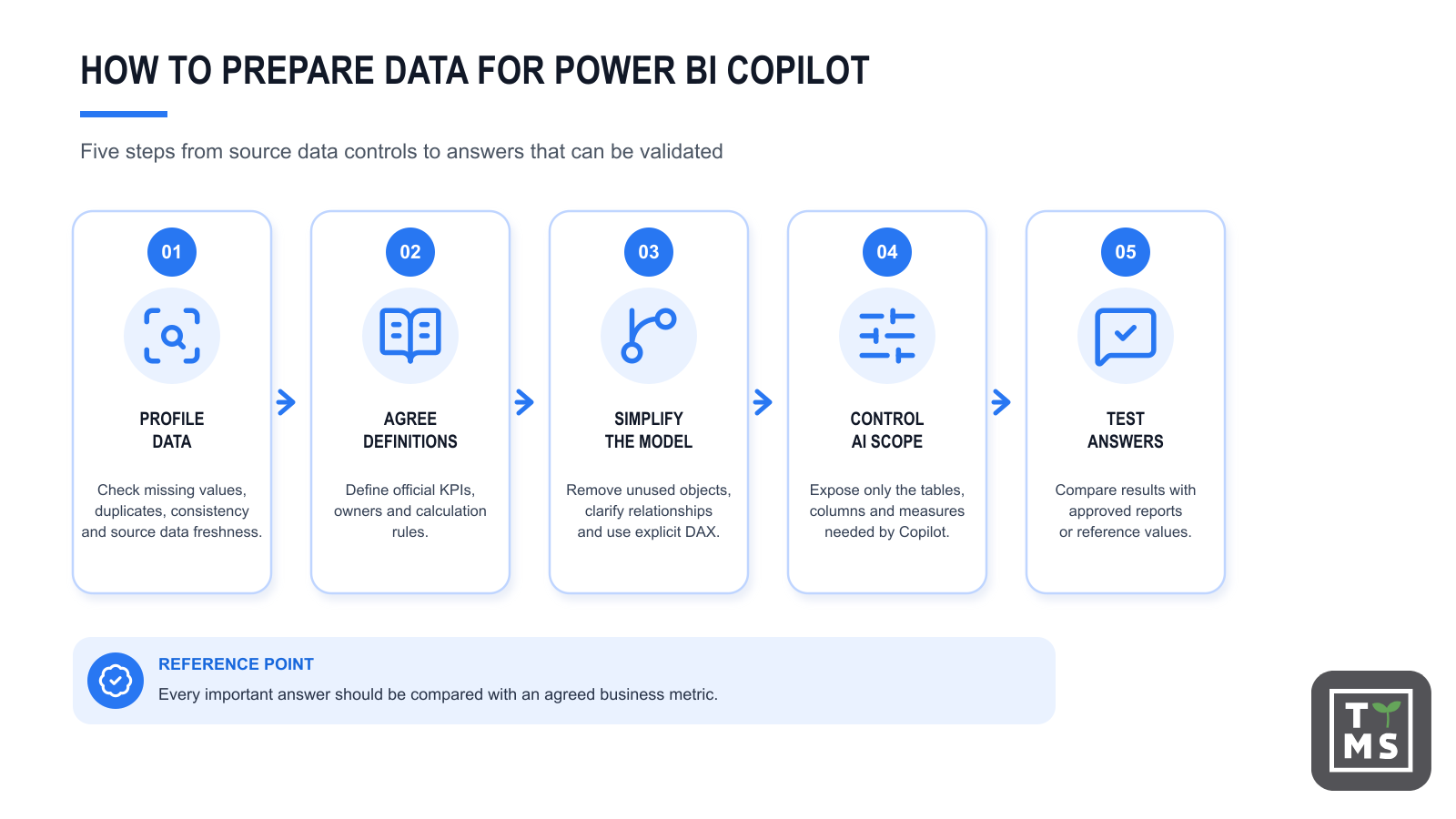
4. How to prepare data for Power BI Copilot
Data needs to be reliable before it reaches the model. Copilot will not repair missing records, incorrect customer mappings or inconsistent currency codes. It can, however, use faulty data to generate an answer that hides the problem behind a plausible explanation.
4.1 Source data quality
Start with data profiling and quality controls. Check completeness, uniqueness, consistency, freshness and compliance with business rules. These controls should be repeatable, not limited to the period before the first publication.
In practice, this includes:
- identifying missing keys and orphaned records;
- checking for duplicates in dimension tables;
- aligning time zones, calendars, currencies and units;
- confirming that status values have the same meaning across systems;
- assigning data ownership and a process for resolving quality issues;
- monitoring data freshness and failed refreshes.
Every official metric should have an identified source, owner, refresh frequency and calculation rule. This gives the organisation a reference value against which to test a Copilot answer, rather than judging the answer only by whether it sounds reasonable.
4.2 Names that match business language and stable definitions
Technical names such as fct_sales_hdr, cust_id and rev_net_adj make the model harder for people to use and make user intent more difficult to interpret. The semantic layer should use names that match the language of the organisation, such as Sales, Customer, Net Revenue and Sales Region.
Readable names alone are not enough. Margin remains ambiguous if the organisation uses margin amount, margin percentage, planned margin and adjusted margin. Each measure needs a precise name and definition. If one measure is official, the model should reflect that status through naming, its description, display folders and restricted visibility for supporting fields.
4.3 Correct data types and formats
The data type tells the model whether a value is a date, number, text or category. The format controls how the value is presented, for example as currency, a percentage or a decimal. An incorrect type can prevent valid grouping and calculations, while an ambiguous format can cause users to misinterpret the result.
Data categories should also be assigned where relevant, including for addresses, cities and geographic codes. The model needs to distinguish clearly between order, invoice, shipping and payment dates. A marked date table and explicit measures reduce the number of accidental interpretations.
5. A semantic model that Copilot can understand
Microsoft’s tutorial on preparing a semantic model for AI recommends practices that include star schema design, clear naming and reduced complexity. This does not require every model to look the same. The goal is to make relationships, table roles and measure definitions unambiguous.
5.1 Star schema
In a star schema, fact tables store events or numeric values and dimension tables provide context such as customer, product, time and region. This structure helps users and AI systems distinguish what is being measured from the dimensions used to break down the result.
A complex snowflake model, numerous helper tables and several possible filter paths may be technically justified, but they make interpretation more difficult. If the physical model cannot be simplified, use the AI data schema to narrow the part exposed to Copilot.
5.2 Relationships and filter direction
Relationships should reflect the actual data logic. Review their cardinality, active status and filter direction. Bidirectional relationships and multiple alternative paths can produce unexpected results, particularly when a question does not specify enough context.
Document inactive relationships and special rules used by selected measures. If analysing sales by shipping date requires different logic from analysing by order date, users need to know how to phrase the question and the model should provide clearly differentiated measures.
5.3 Explicit DAX measures
Explicit DAX measures place approved business logic in one location. They provide a safer basis for answers than ad hoc aggregation of numeric columns. Each measure should have a clear name, correct format, useful description and a business owner.
Before making a model available to Copilot, check:
- whether official KPIs are implemented as measures;
- whether similar or duplicate names remain in the model;
- whether the result format matches the business meaning;
- whether measures work correctly across filters and aggregation levels;
- whether technical fields and helper measures are hidden from users;
- whether results have been reconciled with reference reports.
6. Prep data for AI in Power BI
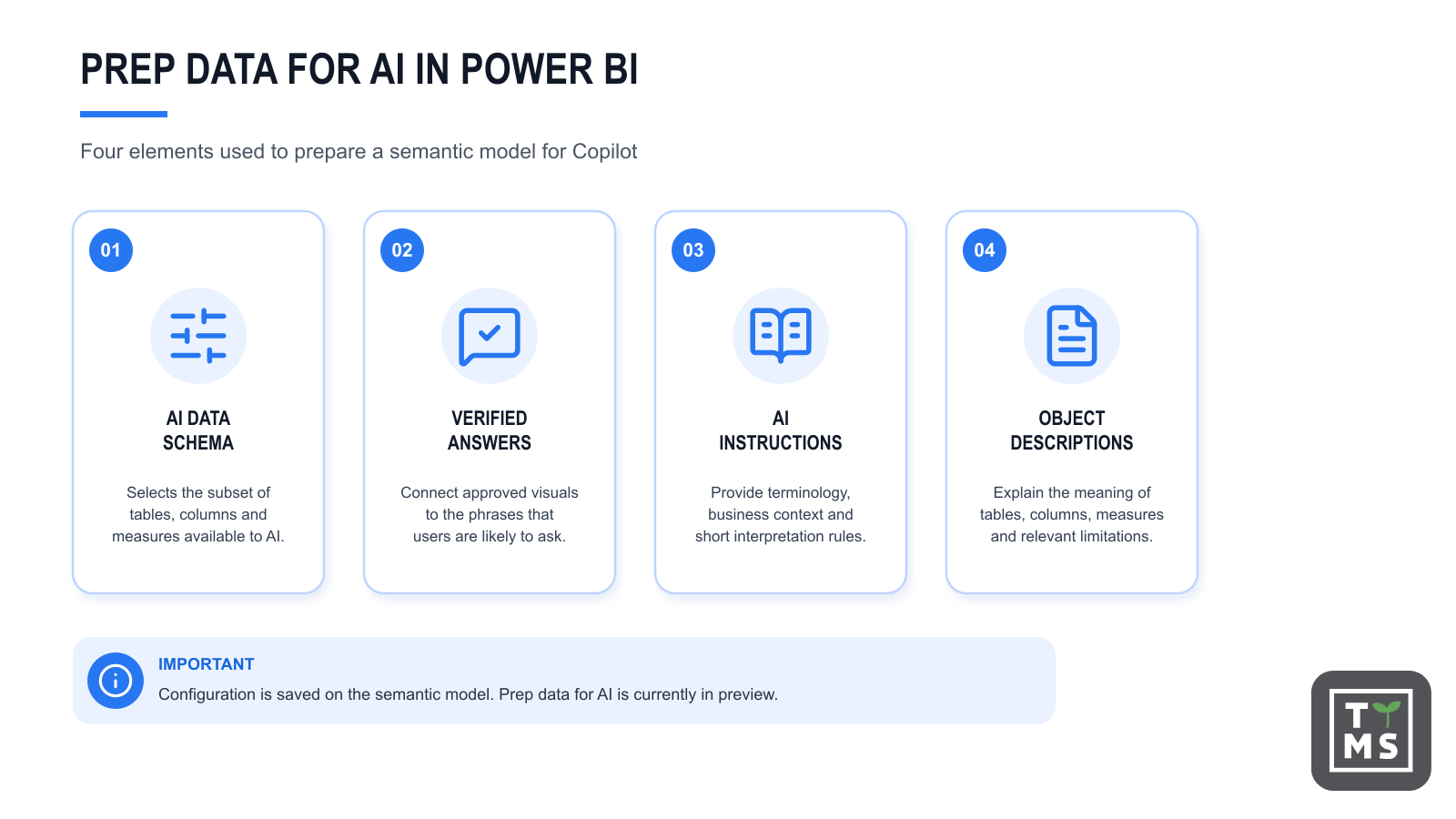
Prep data for AI is a collection of tools that saves configuration at semantic model level rather than on an individual report. This matters because one model can support multiple reports. A change to the AI schema or instructions may therefore affect more than one use case.
Microsoft describes four elements used to prepare a model for natural-language interaction: the AI data schema, verified answers, AI instructions and descriptions. These elements do not work in exactly the same way across every Copilot experience. Test the configuration in the same experiences that users will access.
| Mechanism | Purpose | When it is particularly useful | What it does not replace |
| AI data schema | Defines the subset of tables, columns and measures made available to Copilot | When a model is large or contains technical fields and similar measures | Data cleansing and correct relationships |
| Verified answers | Connect approved visuals to trigger phrases | For frequent or ambiguous questions that need a consistent interpretation | Source data testing and access controls |
| AI instructions | Provide rules, definitions and business context | When the organisation uses terms whose meaning cannot be inferred from field names | Official measures and an unambiguous model |
| Descriptions | Document the meaning of tables, columns and measures | When an object’s name does not fully explain its use | Instructions that cover rules across the domain |
6.1 AI data schema
The AI data schema limits the part of the model that Copilot considers when answering questions about data. Do not expose the entire schema by default. Technical tables, key fields, unused measures and objects created only to support a report increase the number of possible interpretations.
A well-designed AI schema should include official dimensions, approved measures and the fields required for common analyses. Review the scope with business process owners. A schema that is too narrow will prevent valid questions from being answered, while one that is too broad may increase ambiguity.
6.2 Verified answers
Verified answers connect an approved visual to defined trigger phrases. They are useful when users frequently ask about the same indicator or use several terms with a similar meaning.
Consider a question about sales by area. In one organisation, area may mean a geographic region; in another, it may refer to a product group. A verified answer can direct the relevant wording to a visual that has already been checked. The underlying measure, filters and permissions still need to be tested.
For each verified answer, record an owner, the supported questions, the metric source and the date of the latest review. A change to the indicator definition or report structure should trigger another validation.
6.3 AI instructions
AI instructions give Copilot context that the model structure alone cannot express easily. They can explain organisational terminology, preferred measures, rules for interpreting periods and relationships between concepts.
For example, an instruction may state that an active customer is one who purchased in the past 90 days and that peak season covers June to August. It should use the exact names of model objects and short, testable rules.
Instructions are not a security control and do not guarantee that every rule will be followed. Microsoft notes that the language model treats them as guidance. Important financial and operational definitions should still be implemented through measures, relationships and data governance processes.
6.4 Descriptions for model objects
Descriptions should explain an object’s meaning, intended use and relevant limitations. Instead of sales value, specify that the measure represents net revenue after discounts and returns, in the reporting currency and by invoice date.
According to Microsoft’s current documentation, descriptions do not affect every Copilot capability in the same way. They are used in selected search and DAX query scenarios. They are still worth maintaining because they improve model documentation and prepare the model for further development of AI features.
7. Business context for Copilot
A model can be technically correct and still fail to reflect the language used in the business. The sales team may use the term active customer, finance may refer to recognised revenue and operations may discuss a closed order. Each concept needs a definition and an owner.
A business glossary is a useful starting point. It should include:
- the term and its accepted synonyms;
- a definition approved by the business owner;
- the corresponding table, column or measure in Power BI;
- the applicable time, currency, scope and aggregation rules;
- exceptions and situations in which the metric should not be used;
- the person responsible for approving changes.
The glossary should not exist only outside Power BI. Transfer its most important information into names, descriptions, measures, AI instructions and verified answers. Otherwise, users and Copilot will continue to work with incomplete context.
8. Data security and governance
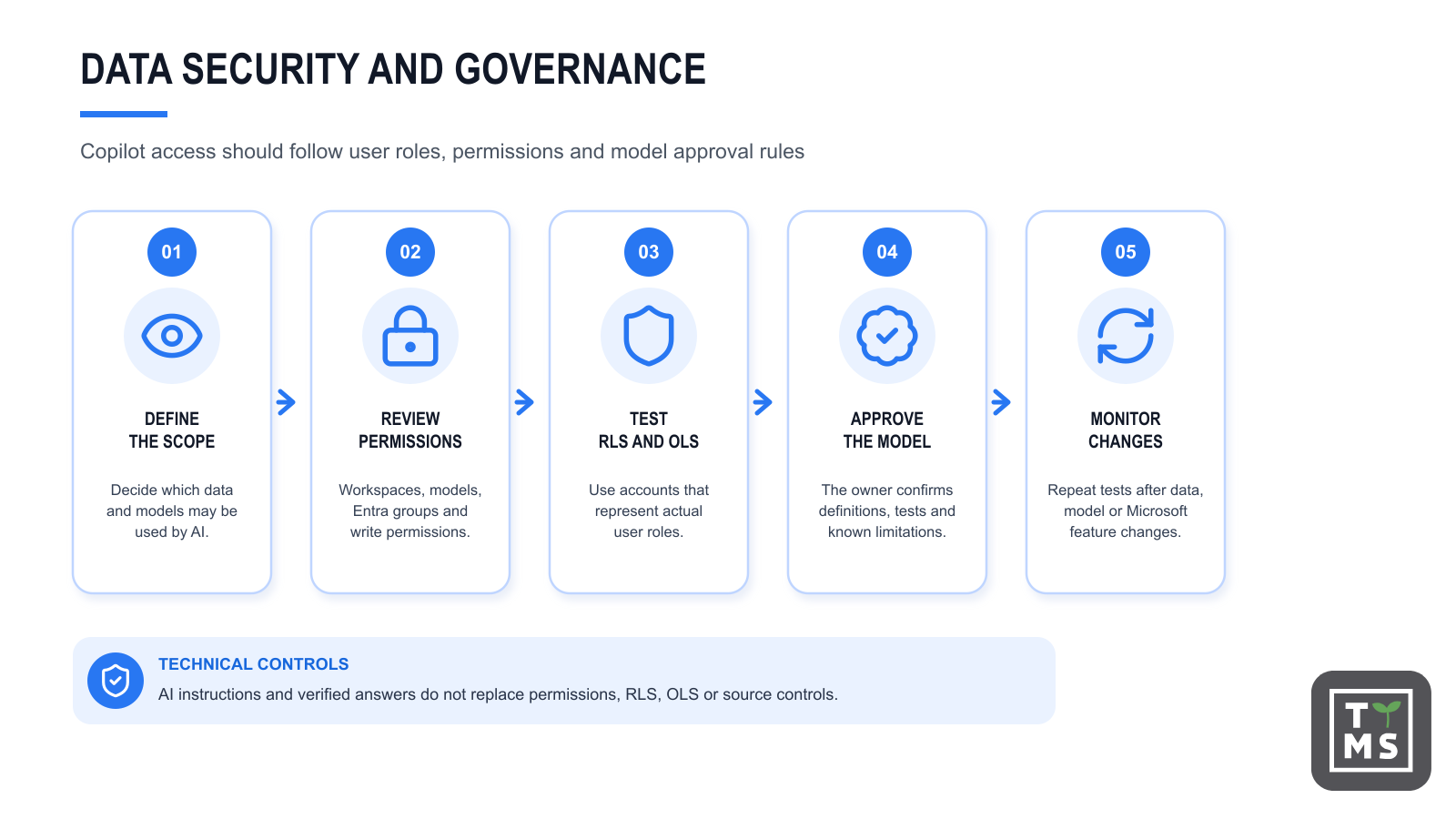
Copilot makes it easier to ask questions, but the core access principle remains the same: users should only have access to the data required for their role. Review workspace and model permissions, row-level security roles, object-level security, Microsoft Entra groups and the way reports and models are shared. The control design should also reflect Microsoft’s guidance on the privacy, security and responsible use of Copilot in Microsoft Fabric.
Write permissions require particular attention. In Power BI, the enforcement of row-level security depends in part on the user’s role and permissions for the model. Testing should use accounts that represent real user roles, not only an author or administrator account.
Check whether object names, descriptions and report metadata reveal information that a user should not see. Microsoft’s documentation on using Copilot with semantic models states that, in Power BI Desktop, metadata from the current report page may in some situations be used as grounding data and may contain data values. A security assessment should therefore cover both the records and the descriptive layer of the model.
Governance should define:
- who may prepare a model for AI use;
- who approves definitions and verified answers;
- which models may be marked as Approved for Copilot;
- how often regression tests are run;
- how incorrect answers are reported and analysed;
- when a model change requires renewed approval.
9. Testing Copilot answers
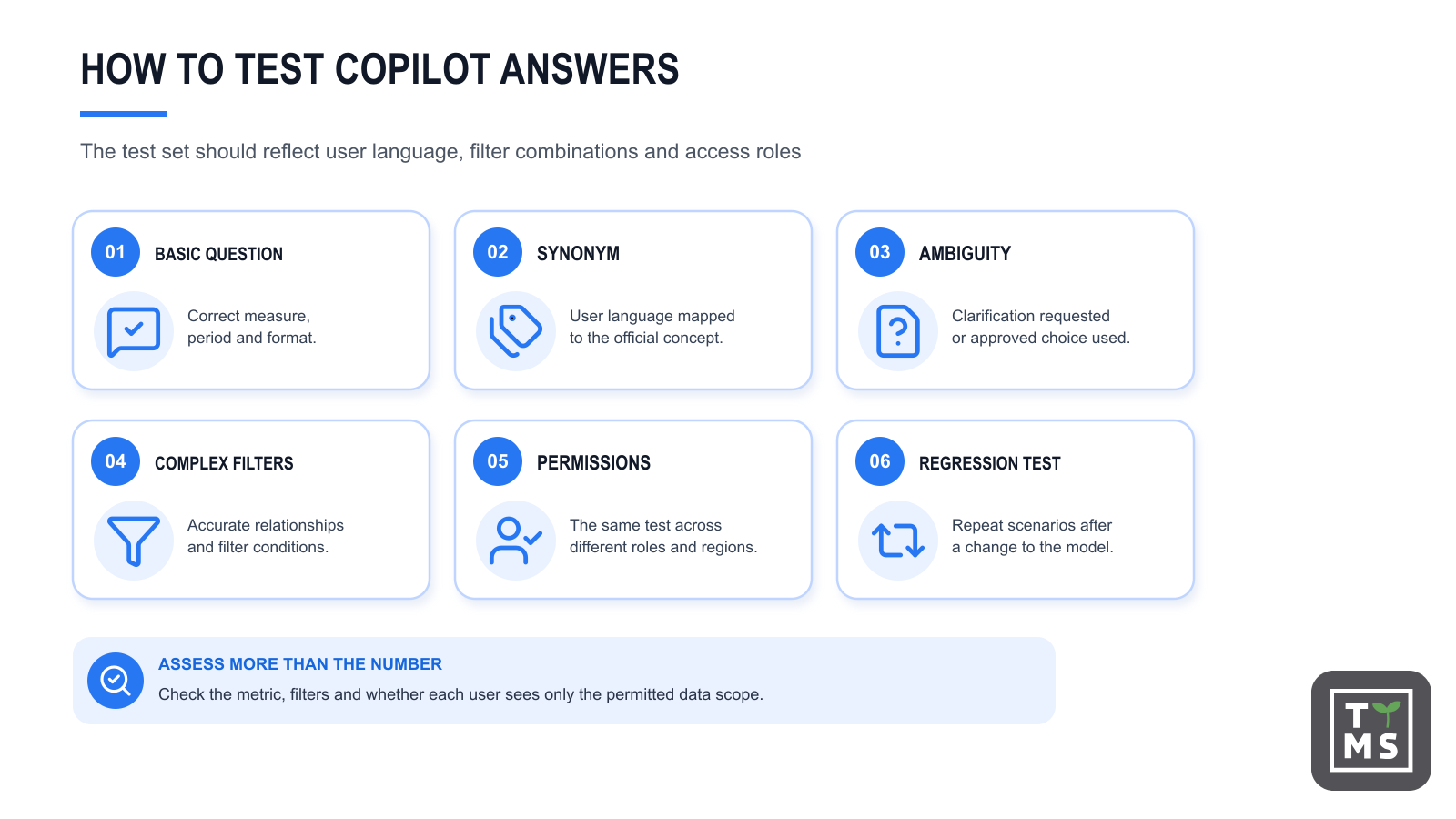
A test should involve more than one sample question. Build a set of scenarios that reflects the language and needs of users. For each question, define the expected measure, filter scope, source of the reference value and acceptable presentation.
| Test type | Example | What to assess |
| Basic question | What were net sales last month | Selection of the measure, period and value format |
| Synonym | Show turnover by region | Whether the user’s language maps correctly to the official concept |
| Ambiguous question | Show the result for each area | Whether Copilot asks for clarification or selects the approved interpretation |
| Complex filters | Sales to manufacturing customers in Poland last quarter | Accuracy of all filters and relationships |
| Permissions | The same question asked by users from different regions | Whether each user sees only the permitted data scope |
| Change resilience | Repeating tests after a measure or relationship changes | Whether the update has degraded previously correct answers |
Assessment should cover the numeric result and how Copilot arrived at the answer. Where available, diagnostic information about how Copilot created an answer can help with investigation. The explanation of the mechanism is not proof that the result is correct. The approved metric and controlled data set remain the reference point.
Copilot outputs are nondeterministic. The same prompt and grounding data can therefore produce different results. In some experiences, however, asking the same question within 24 hours while the model remains unchanged may return a cached answer. Testing is not intended to prove that every answer will always be identical. It should show that the model directs Copilot to the right data, common questions receive correct answers and users understand the known risks and limitations.
10. Common mistakes when preparing Power BI for AI
10.1 Enabling Copilot before cleaning up the model
The team focuses on licensing and settings but does not review names, relationships and measures. Copilot is enabled on a model that analysts already found difficult to use. The result is ambiguous answers and a rapid loss of user trust.
10.2 Exposing the entire schema
Every table and field is included in the AI data schema, including technical keys, helper measures and unused objects. More elements do not necessarily provide better context. In a large model, they can make it harder to select the correct field.
10.3 Treating AI instructions as a substitute for modelling
The instructions attempt to explain dozens of exceptions that should be implemented in measures and model rules. Such a document is difficult to test and maintain. The more important the rule, the stronger the case for enforcing it in the model or data process rather than describing it only in natural language.
10.4 No ownership of metrics
Analysts create verified answers without formal confirmation of which indicator definition is authoritative. When results differ, no one knows who can approve a change or which value should be used as the reference.
10.5 Testing only by model authors
Model authors know the names and data structure, so they ask questions that fit the design. Business users rely on abbreviations, synonyms and incomplete terms. Tests need to include real questions collected from intended users.
10.6 No regression testing after changes
A change to a measure definition, relationship, field name or report can affect earlier scenarios. Without regression testing, the organisation cannot know whether the model remains ready for Copilot.
11. Power BI Copilot readiness checklist
[ ] We have identified owners for data, models and key metrics.
[ ] Source data is subject to repeatable quality and freshness checks.
[ ] Official KPIs have unambiguous definitions and explicit DAX measures.
[ ] Table, column and measure names match the language used by the business.
[ ] Technical, unused and supporting fields are hidden or removed from the AI scope.
[ ] Data types, formats, categories and the date table are configured correctly.
[ ] Relationships use the correct cardinality and do not create ambiguous filter paths.
[ ] We have defined an AI data schema that includes only the required objects.
[ ] Common and ambiguous questions have verified answers where appropriate.
[ ] AI instructions explain terminology and rules that cannot be inferred from the model structure.
[ ] Tables, columns and measures have useful descriptions.
[ ] We have checked tenant settings, capacity, licensing and current feature limitations.
[ ] We have tested RLS roles, permissions and model access with test user accounts.
[ ] The test set covers basic questions, synonyms, ambiguity and complex filters.
[ ] Copilot results are compared with approved reports or reference values.
[ ] We have defined a process for reporting incorrect answers and revalidating the model.
[ ] If the organisation uses the Approved for Copilot setting, which is currently in preview, the model is marked only after testing is complete.
12. Preparing the organisation to use Copilot
Even a well-prepared model will not help if users do not know how to interpret the answers. Implementation should include short training, sample questions, an explanation of the data scope and rules for validating results. Make clear which scenarios provide decision support and which require review by an analyst or process owner.
A pilot based on one model with a clearly defined scope is a practical starting point. It allows the team to collect user questions, assess ambiguity and build a test set before extending the feature to other areas. The pilot should have completion criteria, such as correct handling of priority scenarios, approval from metric owners and no critical permission issues.
After launch, monitor usage, capacity cost, user reports and changes to Microsoft’s documentation. AI readiness requires ongoing monitoring and another round of testing after material changes.
13. Why TTMS
Preparing Power BI for Copilot requires skills in data integration, semantic modelling, Power BI, Microsoft Fabric, security and user adoption. Focusing only on the Copilot interface does not address problems in data sources, transformations and business definitions.
An engagement with TTMS can cover an assessment of existing model readiness, improvements to the data layer, changes to relationships and measures, and preparation of the test approach. Prep data for AI configuration should follow confirmation of the environment requirements and agreement on the scope of work. The engagement may focus on one pilot model or a programme spanning multiple domains and teams.
A practical engagement may include:
- An inventory of data sources, models, reports and user groups.
- An assessment of data quality, model architecture and the risk of ambiguous answers.
- Agreement on official metrics and a glossary of business concepts.
- Semantic model optimisation and configuration of the AI data schema, verified answers and AI instructions.
- Functional, regression, security and performance testing.
- Preparation of governance rules, documentation and user materials.
- Model maintenance and renewed validation after changes to data or Microsoft features.
The intended result is a model whose structure is clear to analysts and business users, with Copilot answers that can be assessed against approved definitions. The aim is to reduce ambiguity and establish a quality-control process. Even a well-prepared model cannot guarantee error-free generative AI output.
14. Discuss Power BI AI readiness
If your organisation uses Power BI and plans to make Copilot available, start with a review of the data and semantic models. TTMS can help define the pilot scope, identify gaps and prepare a roadmap from data sources through to user testing.
Contact TTMS to discuss preparing your Power BI and Microsoft Fabric environment for the secure use of AI capabilities.
15. FAQ
Who should own a Power BI semantic model prepared for Copilot?
A semantic model prepared for Copilot should have clearly assigned owners for data quality, KPI definitions and model maintenance. Ownership helps ensure that business terms, measures and AI configurations remain accurate as data sources, processes and reporting requirements evolve.
How large should the AI data schema be?
The AI data schema should include only the tables, columns and measures needed for common business questions. Exposing too many technical objects can increase ambiguity, while an overly restrictive schema may prevent Copilot from answering valid questions.
Can Power BI Copilot use business terminology that does not exist in the data model?
Copilot can better understand business terminology when organisations provide context through measure names, descriptions, AI instructions and verified answers. However, important business concepts should still be represented directly in the semantic model whenever possible.
When should a Power BI model be revalidated for Copilot?
A model should be revalidated after significant changes to data sources, KPI definitions, relationships, security settings, AI configurations or Microsoft Copilot features. Regular regression testing helps confirm that previously validated scenarios still return correct results.
Is preparing a model for Copilot a one-time project?
No. Copilot readiness should be treated as an ongoing governance process rather than a one-time implementation task. As data, business definitions and AI capabilities change, organisations need to review model quality, test key scenarios and update documentation on a regular basis.