How to Create an Online Course with AI: Training Automation Step by Step
Meta: Discover how AI training automation helps create online courses faster from documents, procedures, and expert knowledge – from source materials to LMS-ready training.
In most organizations, the knowledge required for training already exists. It is stored in procedures, manuals, PDF documents, presentations, compliance policies, and onboarding materials. The challenge is that this knowledge is rarely ready to be used directly as a course.
Before a document becomes a training program, someone has to analyze it, identify the most important information, organize it into a logical structure, prepare lesson content, create quizzes, and adapt everything to employees’ needs. In practice, this means many hours of work for subject matter experts, trainers, and L&D teams. This is why more and more organizations are looking for ways to create online courses faster and more efficiently.
AI training automation transforms this process into a more structured workflow. Instead of manually converting documents into training materials, organizations can use artificial intelligence to turn existing content into a course structure, modules, lessons, and assessment questions. This approach is fundamentally changing the way e-learning content is produced today.
In this article, we show step by step how to create an e-learning course with the help of AI – from uploading a document and analyzing its content to generating a ready-to-use course that can later be edited, reviewed, approved, and implemented within the organization.
How AI and Automation Training Changes Online Course Creation
In many organizations, the course creation process still follows a familiar pattern: the L&D team or trainer receives documentation and then manually turns it into an e-learning course. The problem is that most source materials were not created with training in mind.
Operational procedures, compliance documents, technical manuals, and onboarding PDFs usually contain a large amount of information, but they do not have an educational structure. To turn them into a ready-to-use course, someone first needs to analyze the content, identify the key information, and decide what should actually be included in the training.
And this is only the beginning of the process.
The next stage is dividing the material into modules, designing the learning sequence, and preparing lessons in a way that is clear and understandable for the learner. Then comes the creation of quizzes, knowledge checks, and summaries. In practice, this means many hours of manual work – especially when the documentation is extensive or changes regularly.
A typical workflow often looks like this:
Source document analysis
Selection of the most important information
Course structure creation
Lesson content writing
Quiz and test preparation
Review with domain experts
Corrections and publication in the LMS
Each of these stages involves different people – trainers, subject matter experts, instructional designers, or managers responsible for compliance. The larger the organization, the longer the entire process becomes.
Updates create an additional challenge. Even a small procedural change may require manual edits across many parts of the course, another round of review, and republication of the materials.
As a result, L&D teams often spend more time on the technical preparation of training materials than on designing the actual learning experience. This is exactly where more and more organizations are starting to use AI training automation.
How to Create an Online Course with AI-Driven Process Automation Training Methods
To show this process in practice, let’s imagine an organization that needs to train its employees on the AI Act. It is the first comprehensive EU law on artificial intelligence, based on a risk-based approach to AI systems. One of its important areas is also AI literacy, which means ensuring an appropriate level of AI knowledge and understanding among people who use AI systems or work with them on behalf of an organization.
In practice, this means that a company does not need one general training course for everyone. Senior leadership will need different information, managers responsible for processes will need a different perspective, legal or compliance teams will require another level of detail, and employees who use AI-based tools every day will need something else again. So the key question is not only: what should we teach? but also: who are we teaching, at what level of detail, and in what business context?
This is where an e-learning course generator can help. With this type of tool, a single document, for example a PDF with a regulation, procedure, or internal policy, can become the starting point for creating several different training courses tailored to specific employee groups.
Senior leadership needs a different course than the legal or compliance team, and operational employees need a different one again – focused only on the requirements that actually affect their daily work. AI 4 E-learning makes it possible to transform the same source material into training courses that differ in scope, level of detail, language, and learning objective.
Below, we show how quickly and easily such a course can be generated with the AI 4 E-learning application – from training configuration and the selection of goals and target audience to a ready-to-use e-learning material.
How to Create an Online Course Step by Step
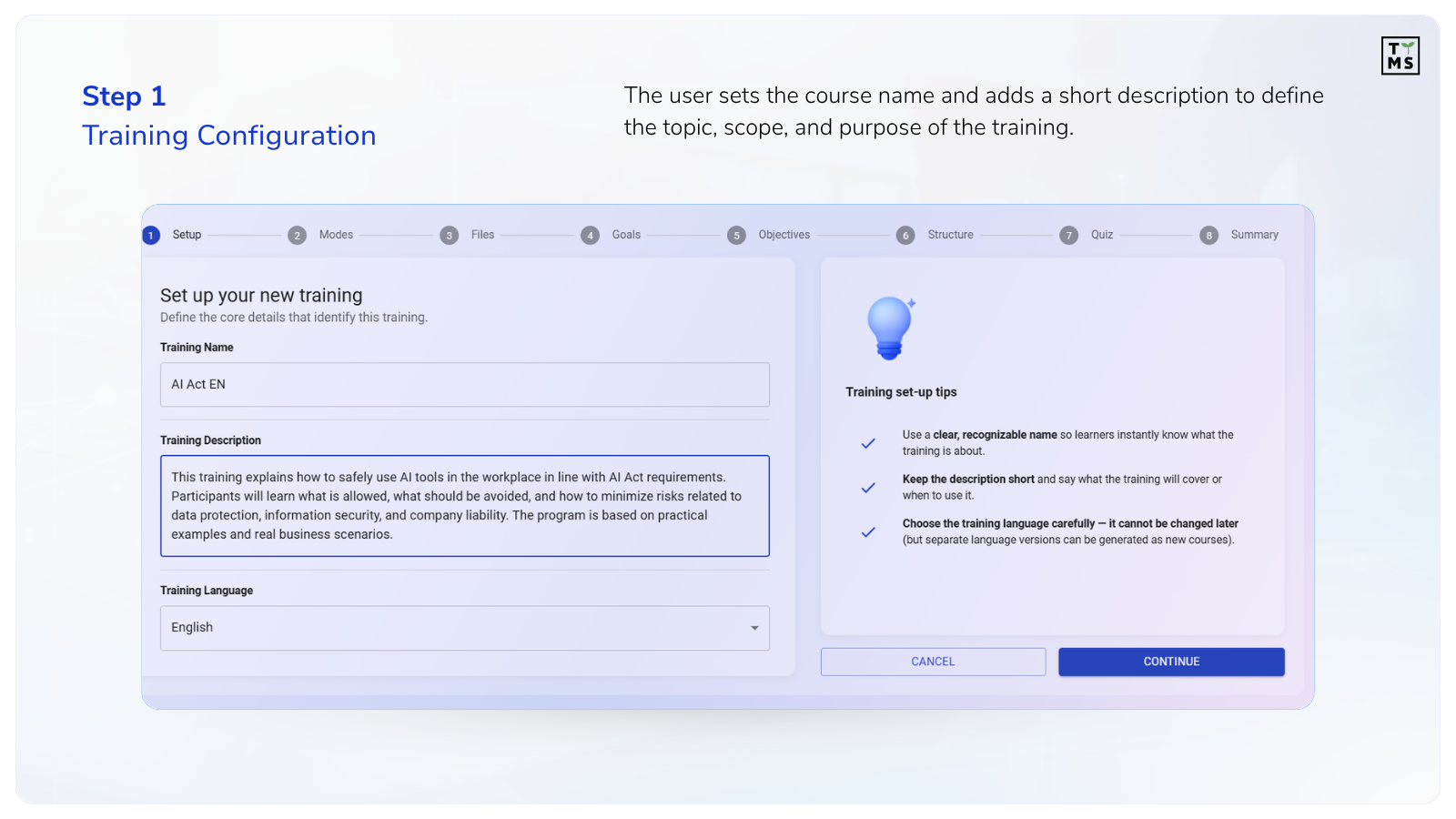
Step 1 – Training Configuration
At the beginning, the user configures the training by giving it a name and adding a short description. This stage helps the application understand the topic, scope, and purpose of the educational material.
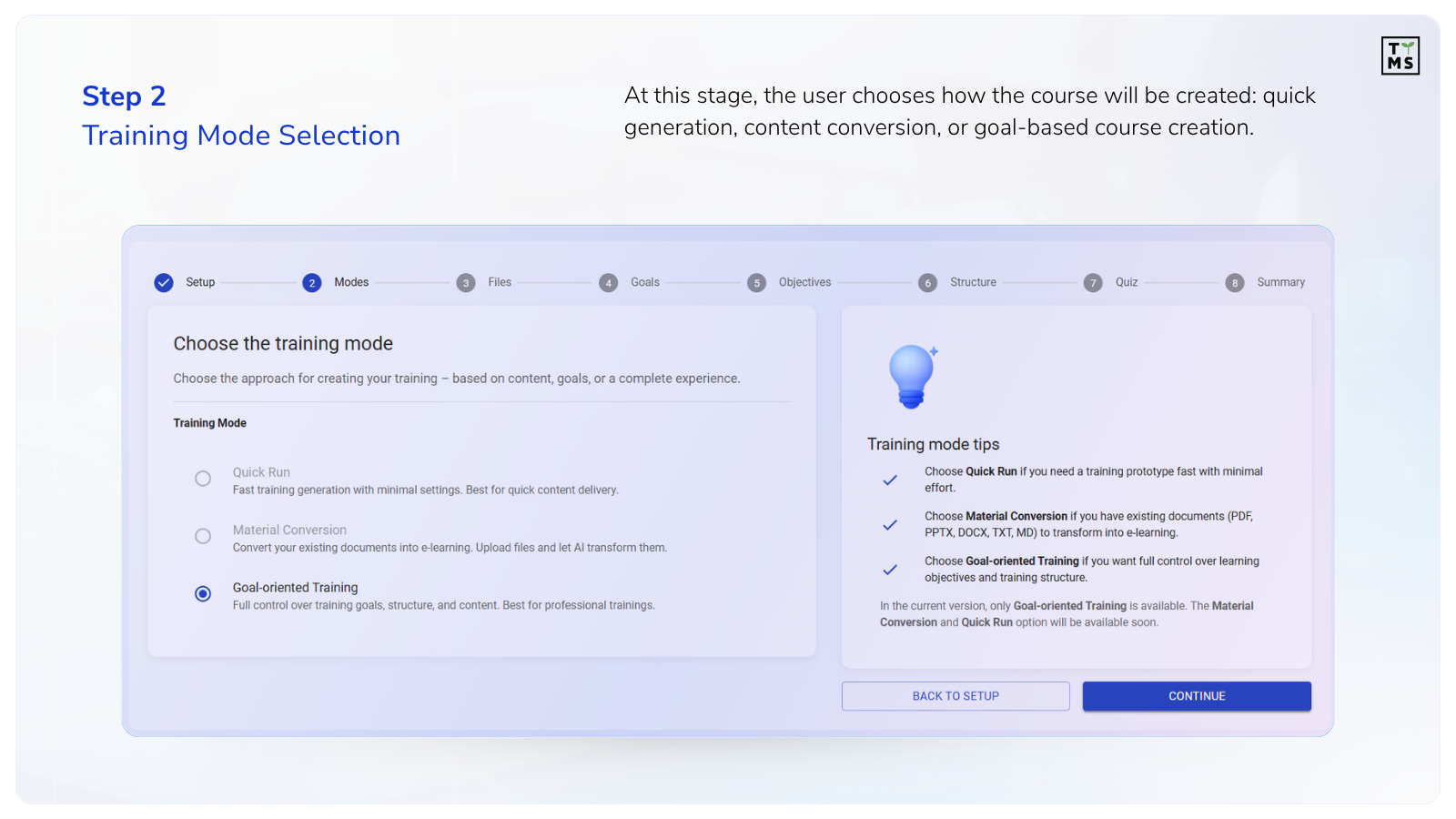
Step 2 – Selecting the Training Mode
The user chooses how the application should work:
quick training generation,
conversion of existing materials,
course creation based on learning objectives.
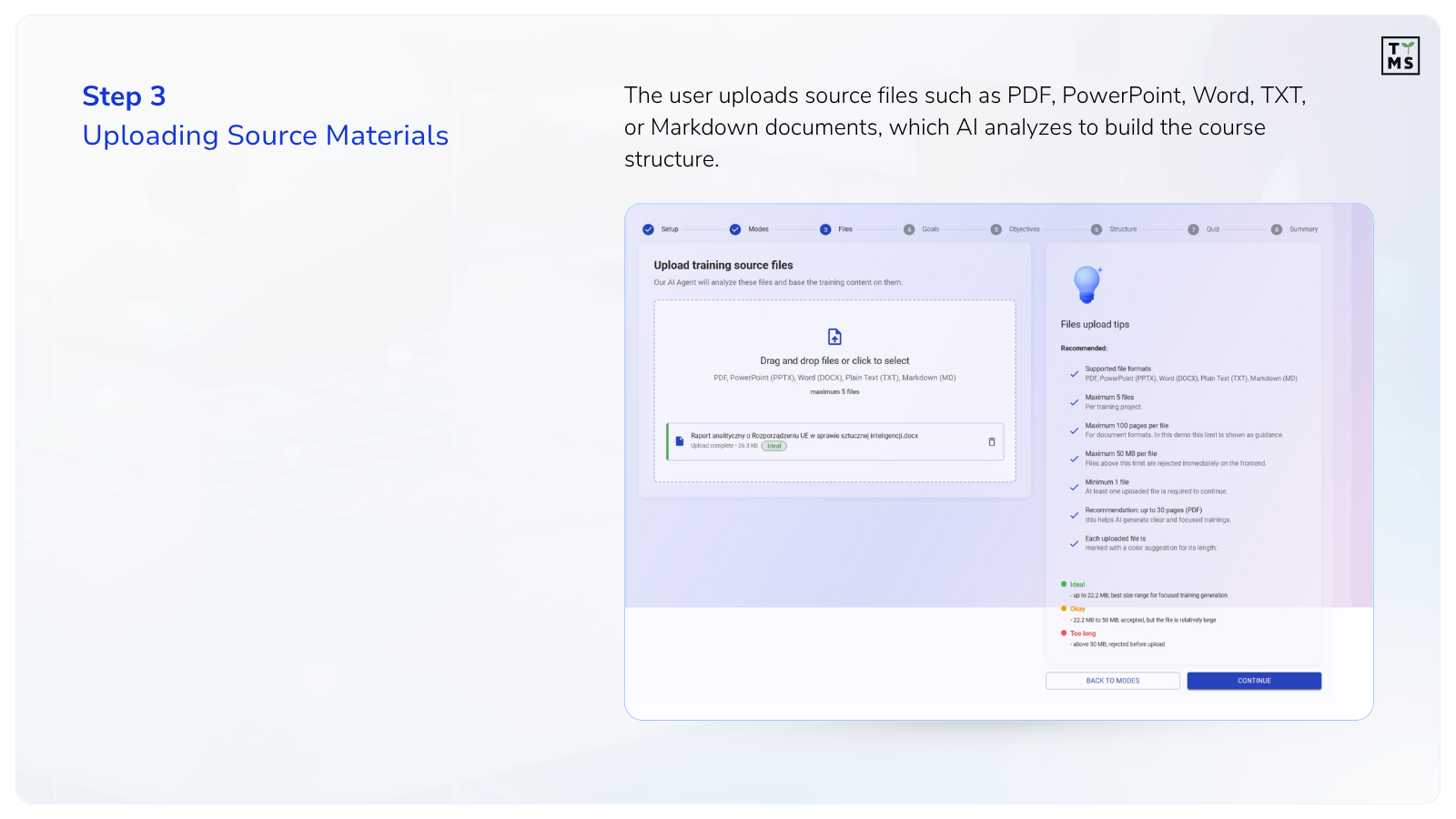
Step 3 – Adding Source Materials
At this stage, documents are uploaded to the system:
PDF,
PowerPoint,
Word,
TXT,
Markdown.
This is where the actual online course production begins, as AI analyzes the documents and prepares the training structure.
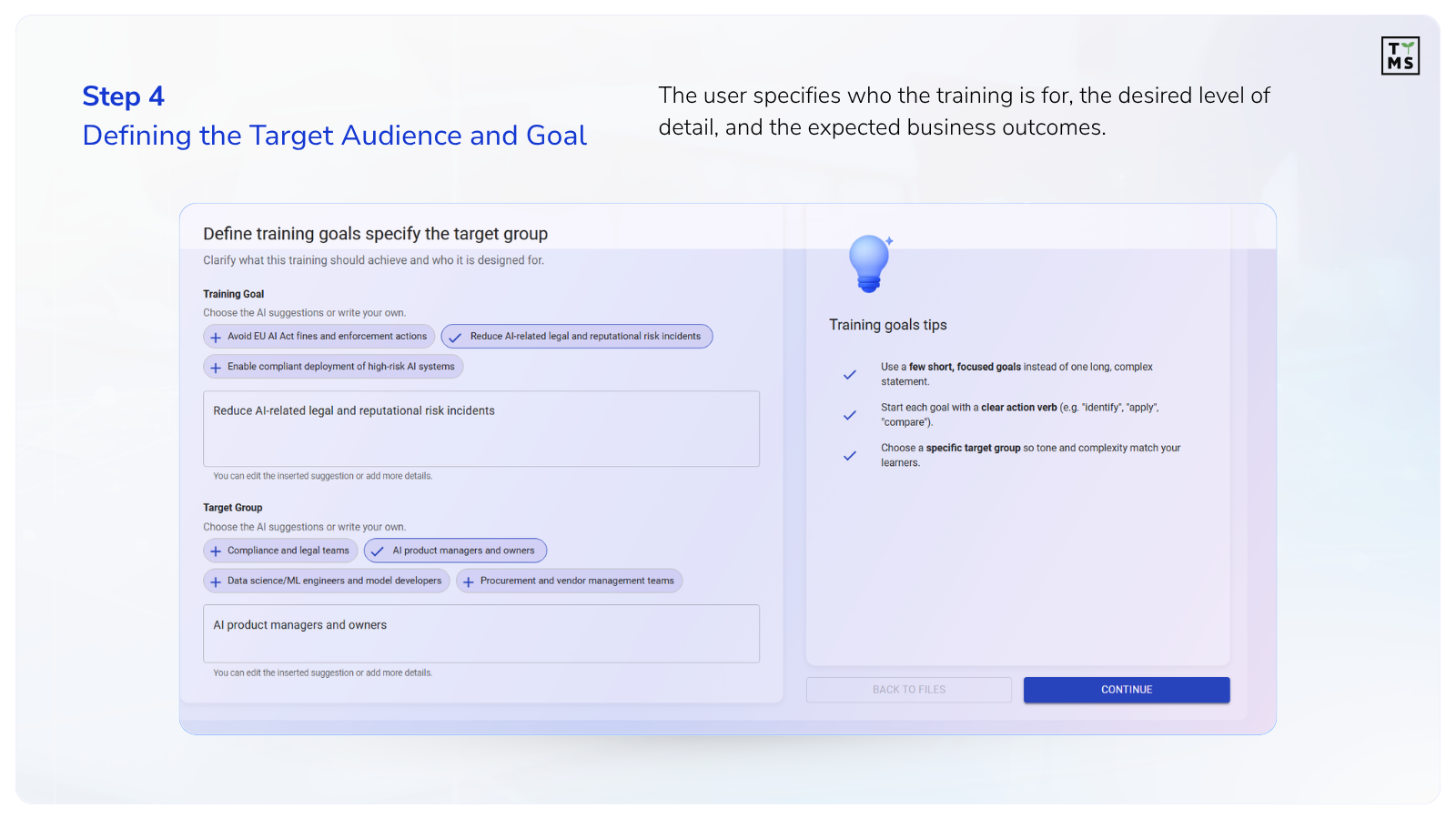
Step 4 – Defining the Target Audience and Goal
Here, the user defines:
who the training is for,
what level of detail it should include,
what business outcomes the course should support.
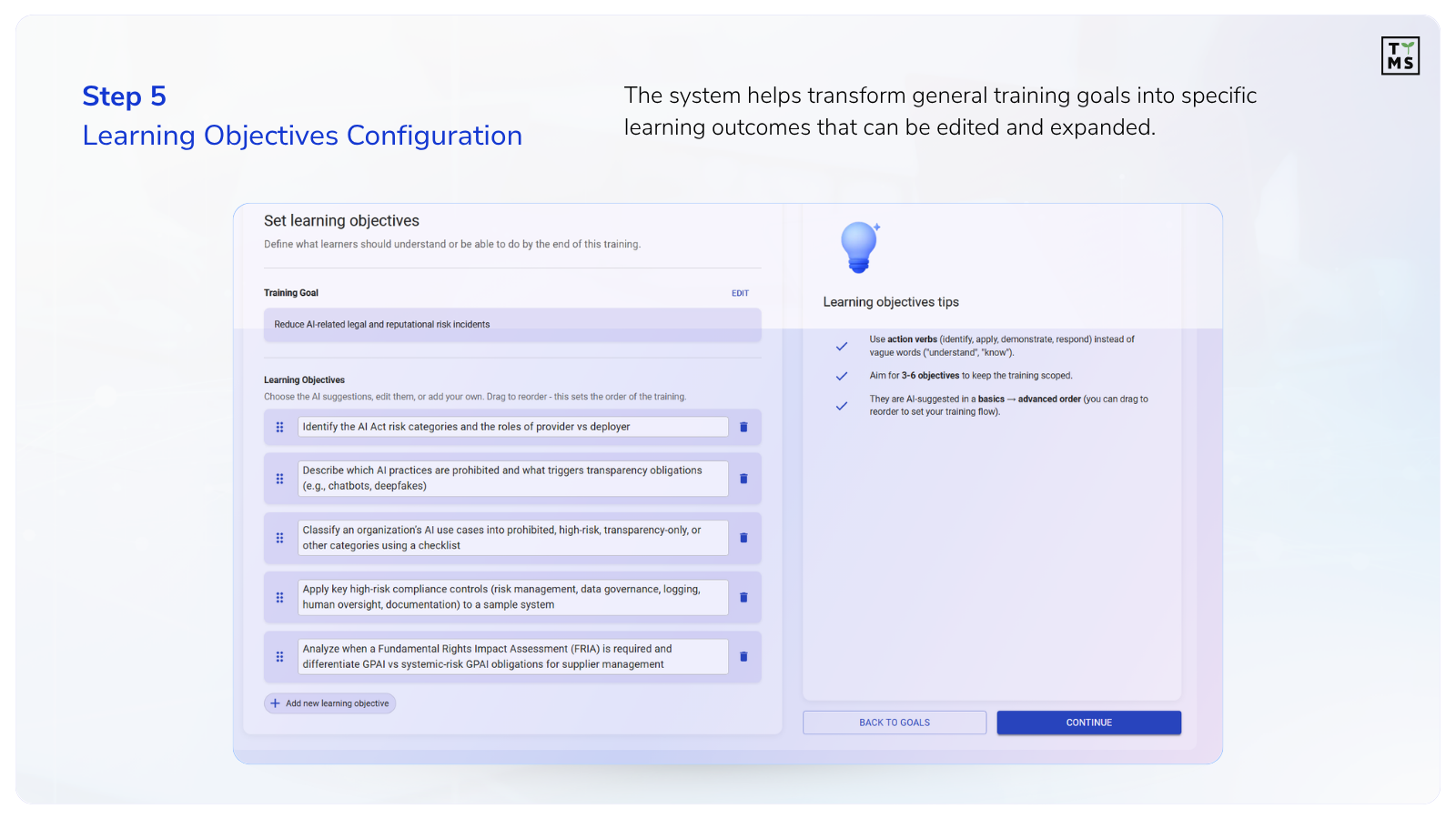
Step 5 – Configuring Learning Objectives
The system helps translate the general training goal into specific learning outcomes. The user can:
edit objectives,
change their order,
add custom elements.
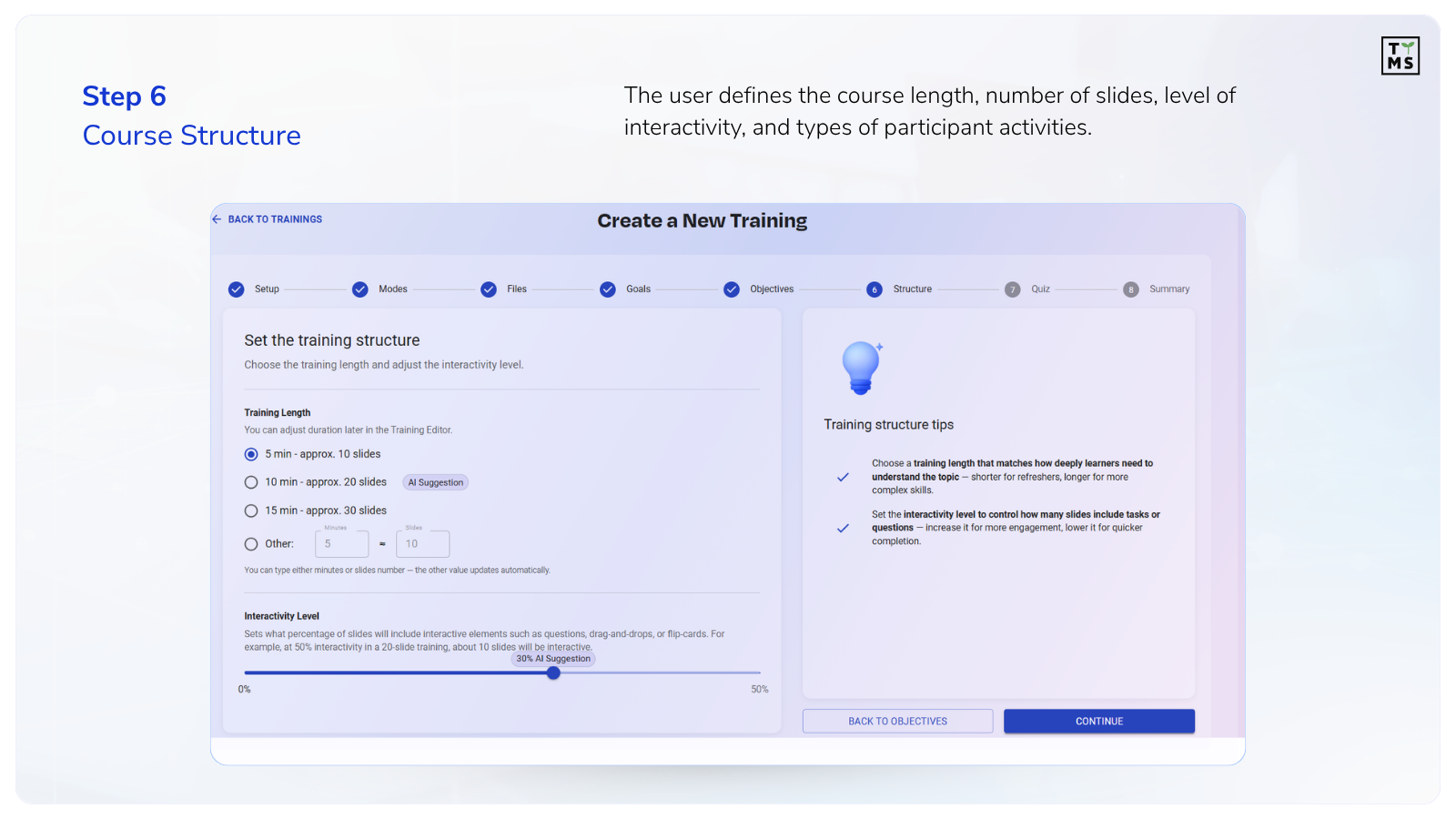
Step 6 – Course Structure
At this stage, the user defines:
training length,
number of slides,
level of interactivity,
types of activities for participants.
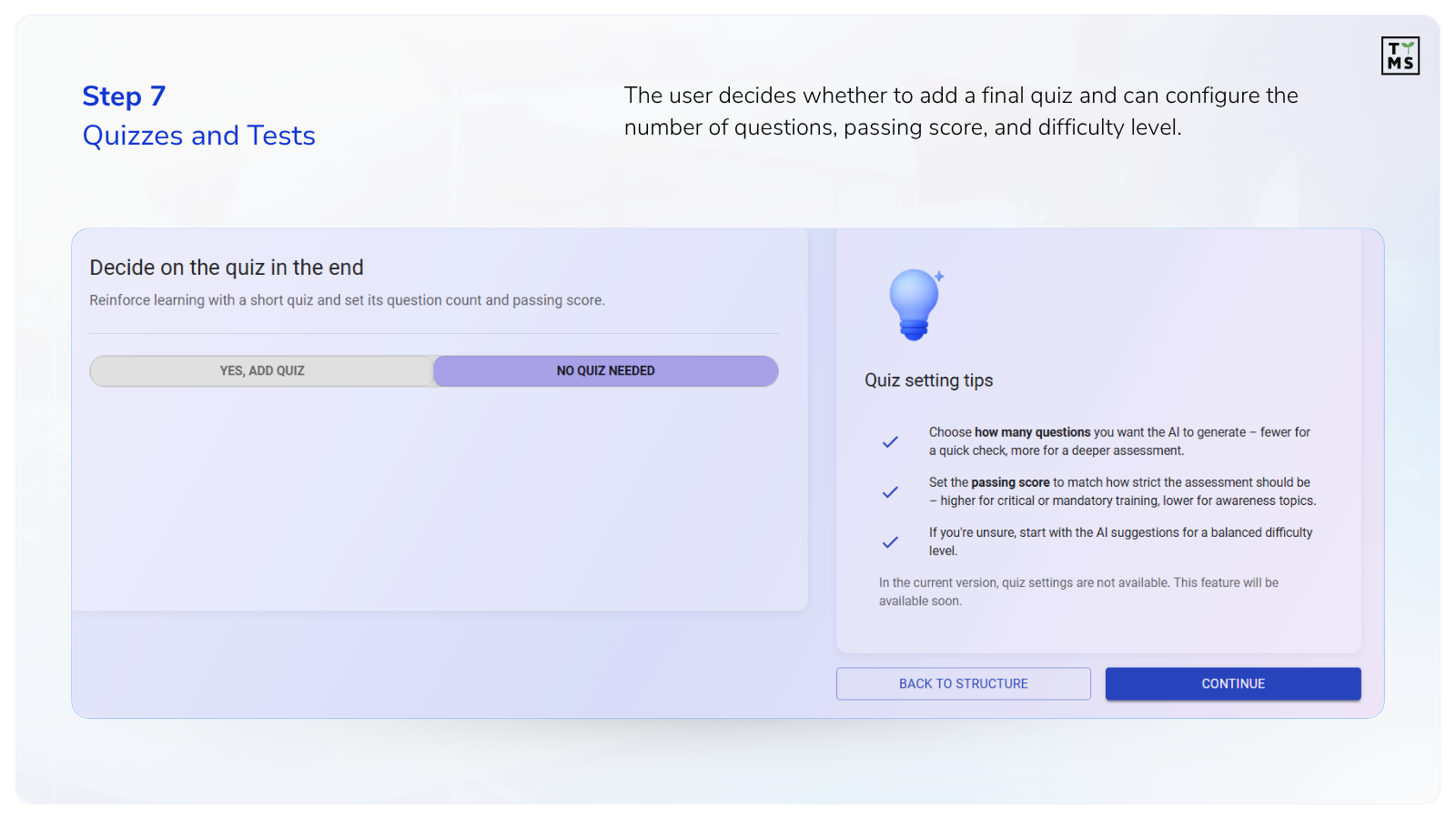
Step 7 – Quizzes and Tests
At this stage, the user decides whether the training should end with a short knowledge-check quiz. This element can help reinforce the most important information, verify understanding of the material, and make the training more engaging. The interface shows two options: adding a quiz or continuing without one.
The system can automatically generate a quiz to check participants’ knowledge. The user can define:
number of questions,
passing score,
difficulty level.
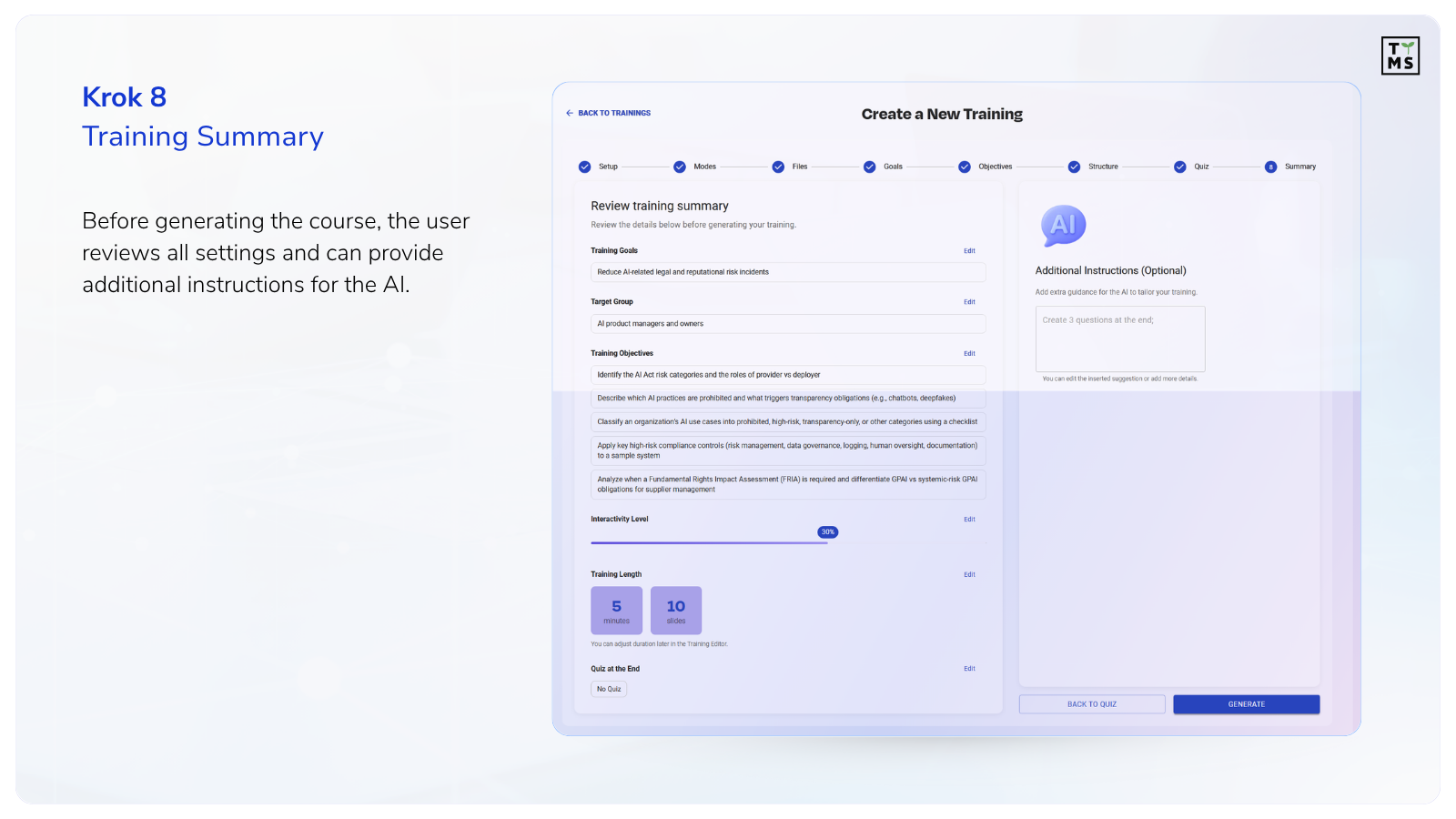
Step 8 – Training Summary
Before generating the course, the user receives a complete summary of the training configuration. In one place, they can verify all key course settings, such as:
target audience,
training goals,
detailed learning outcomes,
course length,
level of interactivity,
final quiz settings.
Each section includes a quick edit option, allowing the user to return directly to the stage that needs improvement – without having to go through the entire configuration process again.
Additionally, the system allows the user to provide custom instructions for AI before generating the course. The user can specify:
preferred communication style,
level of material difficulty,
stronger focus on practical examples,
simplified language for a selected audience group,
additional questions or engaging elements.
Step 9 – Ready-to-Review Course
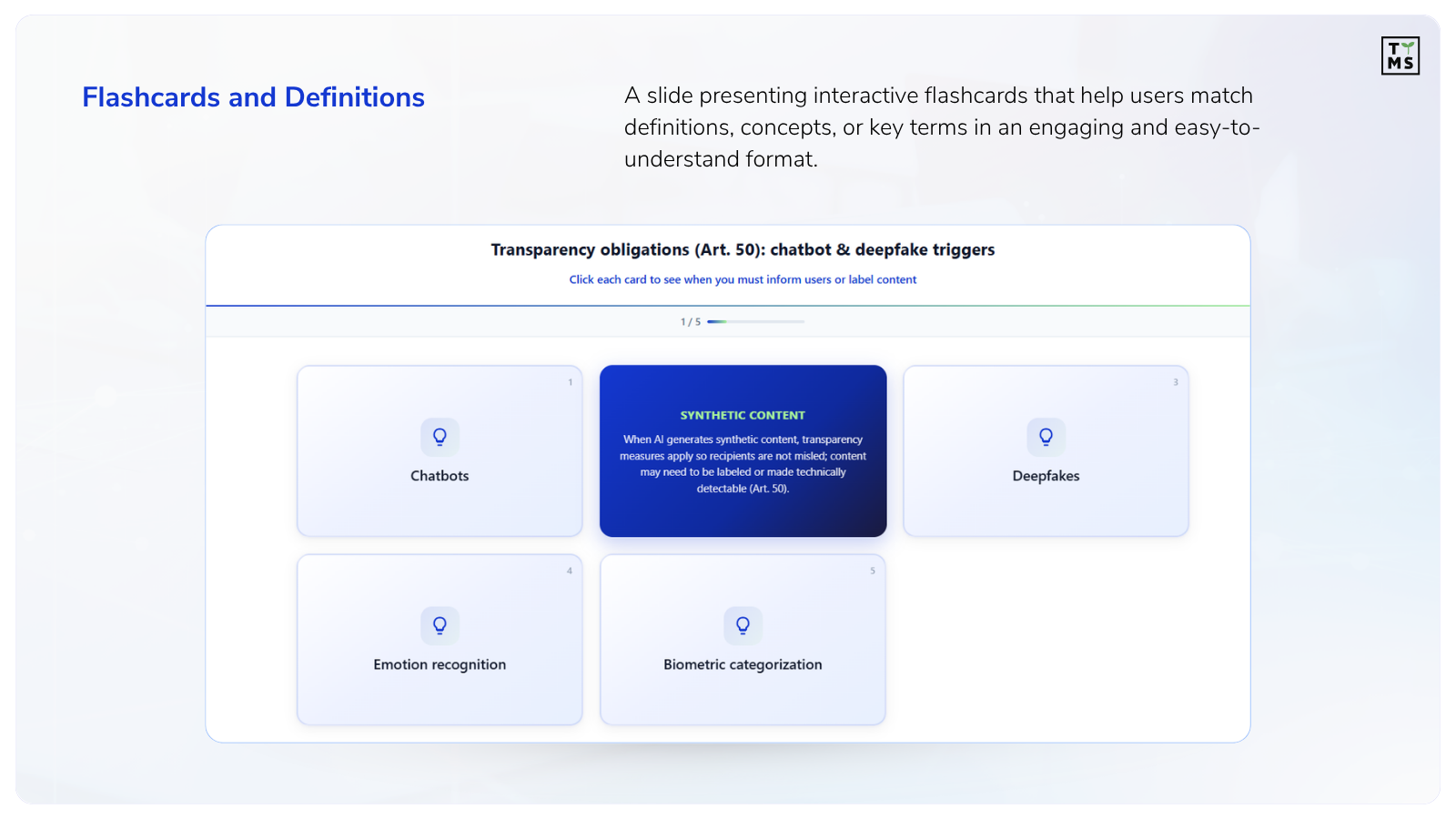
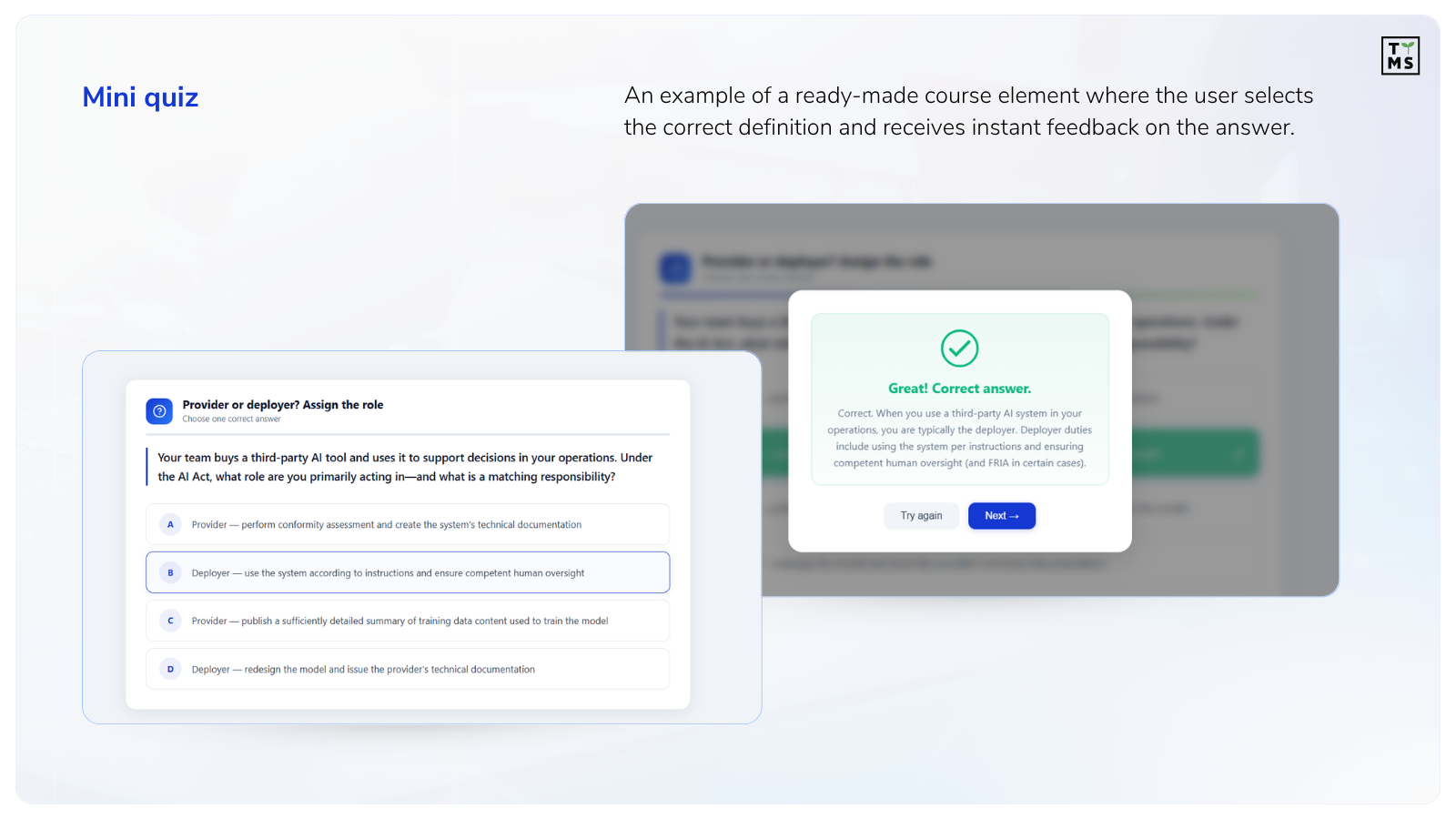
The result of the entire process is a ready-to-review e-learning course containing modules, lessons, quizzes, and summaries. The material can then be verified by the L&D team, compliance team, or a domain expert, and once approved, implemented within the organization.
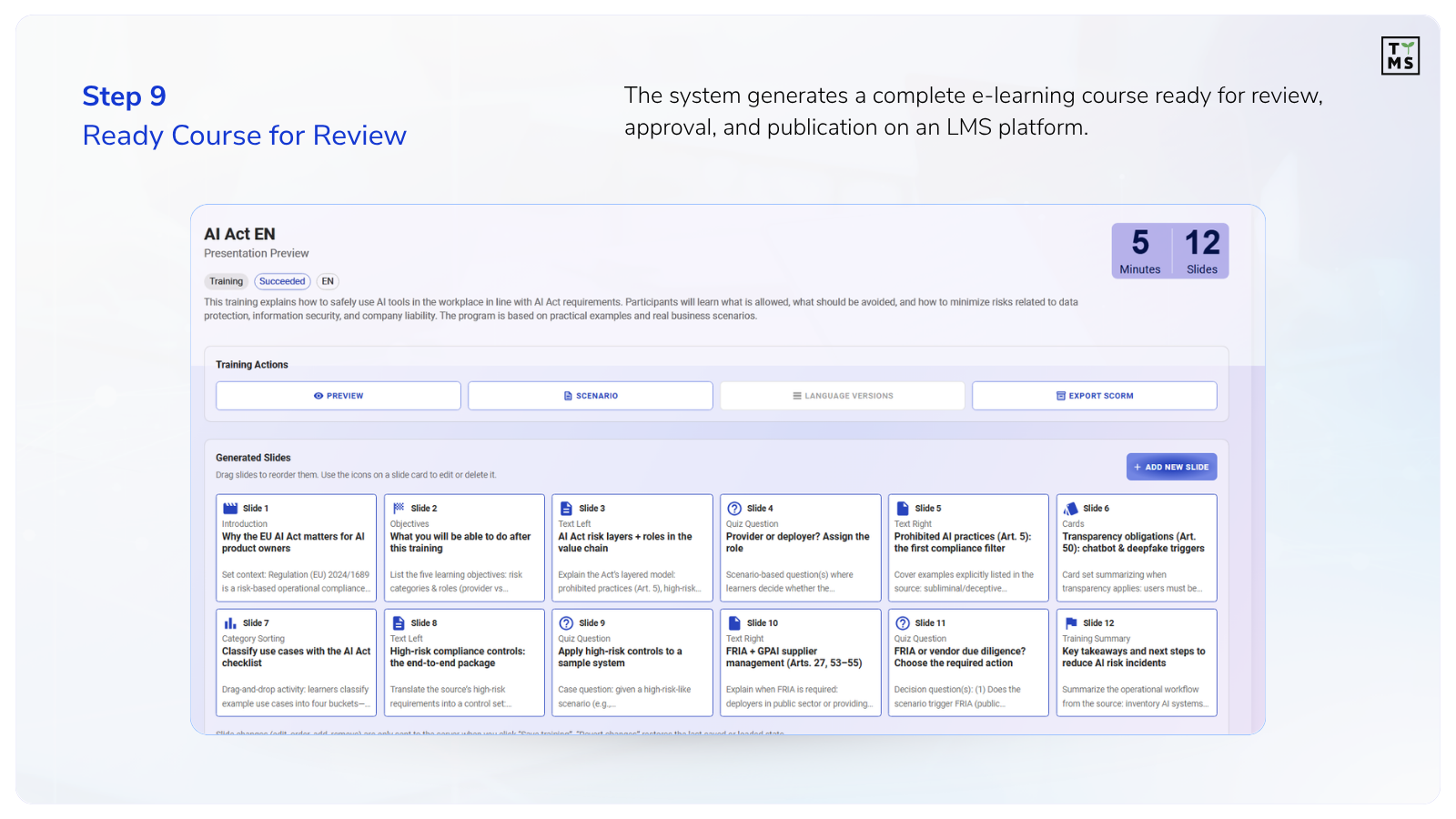
he final course is prepared in a format compatible with LMS platforms and modern e-learning solutions, so it can be quickly published and made available to employees. This makes ai automation online training easier to scale across departments, roles, and employee groups.
What Do Companies Gain from Automating Online Course Creation?
The biggest change companies notice after implementing AI Training Automation is not simply the “use of AI”. It is the reduction of time needed to prepare and update training courses, as well as the limitation of manual work for L&D teams, domain experts, and managers.
AI does not eliminate the review process or the role of experts. Especially in regulatory topics such as the AI Act, substantive verification and content compliance still require specialist involvement.
The key difference is that the expert does not start from a blank document. Instead, they receive a ready-made, structured e-learning course that can be reviewed, completed, approved, and implemented in the organization much faster.
In the traditional model, creating a single e-learning course may require the involvement of many people: instructional designers, trainers, graphic designers, subject matter experts, or compliance officers. The more specialized the topic, the more time is needed to analyze materials and prepare the first version of the training.
This directly affects costs. As we explain in the article How Much Does E-Learning Cost in 2025?, the price of preparing a professional online course depends on many factors: material length, level of interactivity, expert involvement, and the number of iterations and corrections.
AI Training Automation helps reduce part of these costs by automating the most time-consuming stages of work.
Shorter Course Production Time
Instead of starting the project from a blank document, the team receives a ready-made course structure, proposed modules, and draft lessons and quizzes.
This means:
less time spent analyzing materials,
faster preparation of the first course version,
shorter time-to-training,
the ability to create multiple training courses in parallel.
As a result, companies can build ai automation training courses faster and update them more efficiently when procedures change.
In practice, a process that previously took weeks can be shortened to days or hours – especially for training courses based on existing documentation.
Lower Update Costs
One of the biggest challenges in e-learning is not creating the course itself, but maintaining it.
Procedures change. Regulations are updated. New internal policies are introduced. In the traditional model, every change means manually reviewing the course and editing the content again.
AI Training Automation simplifies this process. After the source document is updated, the system can indicate which parts of the course need to be changed. As a result, the organization does not have to rebuild the entire training from scratch.
This is especially important in areas such as:
compliance,
cybersecurity,
onboarding,
operational procedures,
industry regulations,
product training.
Better Use of Experts’ Time
Domain experts often take part in training projects not because they want to create courses, but because they hold the knowledge the organization needs.
In a manual model, much of their time is spent on:
explaining documentation,
correcting drafts,
rewriting materials,
reviewing subsequent versions.
AI helps limit this work to reviewing and approving content. The expert does not start from scratch – they work with a ready-made draft generated based on existing documentation.
Faster Onboarding
Training automation also affects the speed of employee onboarding.
When an organization can turn procedures and operational knowledge into courses faster, it can:
onboard new employees more quickly,
update team knowledge more easily,
standardize processes across departments and countries,
respond faster to regulatory changes.
This is especially important in organizations where knowledge changes dynamically or is scattered across multiple documents and teams.
More Time for Real Learning Design
AI does not eliminate the role of L&D teams. However, it changes the balance of work.
Less time needs to be spent on the technical preparation of content, and more on:
designing the learning experience,
analyzing employee needs,
personalizing learning paths,
improving training effectiveness.
In practice, this means shifting work away from “content production” and toward real competency development within the organization.
Best Applications of AI in Online Course Creation
AI Training Automation works best in organizations that manage large volumes of documentation and need to turn that knowledge into employee training on a regular basis. This is one reason why many companies are looking for the best AI for training automation in education, corporate learning, and internal knowledge management. It is especially useful in areas that require frequent updates, process standardization, or fast onboarding.
Employee Onboarding
Companies can automatically transform onboarding procedures, handbooks, and HR documentation into ready-made training paths for new employees. This helps onboard teams faster and standardize the onboarding process across departments or locations.
Compliance and Regulations
This is one of the most natural use cases for AI Training Automation. Regulations such as the AI Act, AML, GDPR, or security procedures are often based on extensive documentation that must be regularly updated and translated into practical training for different employee groups.
Cybersecurity Awareness
Cybersecurity training requires frequent updates and adaptation to new threats. AI can more quickly turn security policies, procedures, and recommendations from security teams into short learning modules and scenario-based exercises.
SOPs and Operational Procedures
In operational organizations, a large part of knowledge is stored in SOPs, instructions, and process documentation. AI helps transform these materials faster into training for employees in manufacturing, logistics, retail, or customer support.
Product Training
With a large number of products or frequent offer changes, manually updating training materials becomes time-consuming. AI makes it possible to automatically generate training modules based on product documentation and sales materials.
Manufacturing and Technical Industries
In technical environments, training is often based on manuals, checklists, and process documentation. Automation helps create courses faster on safety, equipment operation, and operational standards.
HR and L&D
HR and Learning & Development teams can use AI to scale internal training programs without having to manually prepare every course from scratch. This is especially valuable for organizations operating globally or managing many training processes at the same time.
In summary, AI Training Automation works best wherever an organization regularly handles large amounts of knowledge stored in documents and needs to quickly pass it on to employees in a structured form. Regardless of the industry, the common denominator is the same problem: manually creating and updating training takes time, involves many people, and makes it harder to scale knowledge across the organization.
Automation does not eliminate the role of experts or L&D teams, but it significantly accelerates the preparation of materials and allows them to focus more on the quality of the learning experience than on manual content production.
Where AI and Automation Training Still Needs Human Expertise?
It is easy to imagine a scenario where a company uploads a document into a system, clicks “generate”, and a few minutes later, a ready-made training course is delivered to employees. No trainers, experts, or L&D teams involved. But the reality is different – and that is exactly why AI Training Automation works best when humans remain part of the process.
Because a document is not just text. Behind every procedure, regulation, or policy, there is context that AI does not know. It does not know the organization’s culture. It does not understand tensions between departments. It cannot see which processes exist only “on paper” and which ones actually work in everyday practice.
Take the AI Act as an example. The document itself may include hundreds of pages of interpretations, definitions, and obligations. AI can organize this knowledge, divide it into modules, and prepare a training draft. But it is the compliance expert who must decide which obligations actually apply to the organization. It is the managers who know which teams work with AI every day. And it is the L&D team that understands how to communicate knowledge in a way employees will actually remember.
This is where the most important difference appears.
AI does not replace experience. It does not replace responsibility. It does not replace business decisions. What it does is remove the most time-consuming parts of the work: analyzing documents, building the first draft of a course, rewriting content, or creating basic quizzes.
As a result, experts can focus on what truly requires a human perspective:
interpretation,
risk assessment,
adapting content to the organization,
quality of the learning experience,
real employee challenges.
This is also one of the reasons why more and more organizations are no longer treating AI in training as a threat to L&D teams. In practice, technology does not eliminate their role. On the contrary – it helps them regain time for the things that used to get buried under layers of manual work and content production.
Because the best training courses are still created by people. AI simply helps them create those courses faster.
Summary
Until recently, creating training courses from documents meant long hours of content analysis, manual course building, and endless corrections with every procedure update. Today, more and more organizations are approaching this process differently – as an area that can be structured and significantly accelerated with AI.
Especially in topics such as the AI Act, compliance, or operational procedures, what matters is not only the speed of course creation, but also the ability to regularly update knowledge and adapt it to different roles within the organization.
AI4E-learning was created with exactly these scenarios in mind – helping turn documents, procedures, and expert materials into ready-to-use training courses faster, more scalably, and with less workload for L&D teams.
To see what this process looks like in practice, ask for a demo of AI4E-learning and explore the entire workflow step by step.
Can AI completely replace humans in online course creation?
No. AI significantly accelerates the course creation process, but subject matter experts, L&D teams, and compliance specialists are still needed. Especially in the case of regulations and company procedures, content verification remains essential. AI mainly helps reduce manual work and prepare the first draft of the training faster.
How can you create an online course based on existing documents?
Modern AI tools allow users to upload documents such as PDFs, Word files, PowerPoint presentations, or company procedures and automatically transform them into an e-learning course structure. The system generates modules, lessons, quizzes, and summaries. The material can then be edited, approved, and implemented on an LMS platform.
Which companies most often use training creation automation?
These are most often organizations that have a large amount of documentation and regularly train employees. This includes companies in finance, manufacturing, IT, HR, compliance, and cybersecurity. Automation also works well for onboarding and product training.
Is the finished course compatible with e-learning platforms?
Yes. Finished courses can be prepared in a format compatible with popular LMS platforms and other e-learning solutions used by organizations. This allows the training to be quickly published and made available to employees without additional manual configuration.
What is the best AI for training automation in HR department?
The best AI for training automation in HR department is a solution that can transform internal documents, onboarding materials, procedures, and policies into structured online courses. It should help generate modules, lessons, quizzes, and summaries, while still allowing HR and L&D teams to review and edit the final content. The most effective tools do not replace experts, but reduce manual work and help HR departments scale employee training faster.
How does AI workflow automation training support L&D teams?
AI workflow automation training supports L&D teams by automating the most repetitive stages of course creation, such as analyzing documents, structuring content, preparing lesson drafts, and generating quizzes. This allows learning teams to spend less time on manual content production and more time on improving the learning experience. It is especially useful when training materials need to be updated frequently or adapted to different employee groups.
What are the biggest benefits of using AI in online course production?
The biggest benefit is reducing the time needed to create and update training courses. AI helps analyze documents, build course structures, and generate quizzes faster. As a result, organizations can reduce content production costs and respond more quickly to changes in procedures and regulations.