Companies that only a few years ago treated automation as a project “for the future” are now facing real competitive pressure. Platforms such as WEBCON BPS have ceased to be a niche solution for technology pioneers, and have become a proven tool for implementing AI and automating business processes on an organization-wide scale. The question is no longer “whether to automate”, but “where to start and how to do it effectively”.
In many organizations, the same scenario looks similar today: an invoice waits several days for approval, employees rewrite data between systems, and managers try to determine the status of a case based on emails and Teams messages. Very often, the problem is not the lack of systems, but the lack of intelligent flow of information between them.
This is where the combination of AI and workflow platforms is starting to play an increasingly important role. Artificial intelligence is no longer a separate technological experiment, and is becoming a layer supporting real business processes – from document analysis to automatic operational decision-making.
TTMS is an authorized implementation partner of WEBCON BPS. This article reflects our hands-on experience with platform implementations for pharmaceutical, financial and government customers.
1. Why AI and business process automation are a priority for companies in 2026
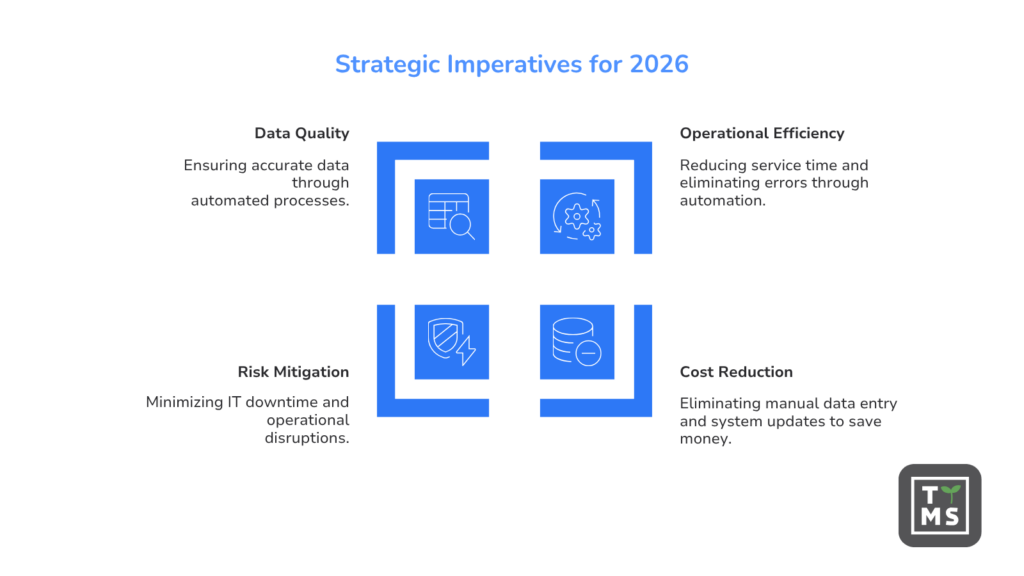
Companies today are under increasing pressure to operate faster, more efficiently and without unnecessary operating costs. That is why they are looking for solutions that allow them to reduce the time of handling cases, reduce the number of errors and relieve employees of repetitive, time-consuming tasks. It is also becoming increasingly clear that the combination of AI and business process automation is no longer a promise of the future, but a practical way to improve the efficiency of the organization.
1.1 Rising costs of manual processes – what a company loses without automation
Manual processes are not only slower work. It is also hidden costs that gradually burden the profitability of the organization. According to McKinsey estimates, automation can reduce operating costs in selected industries by 20-40%, primarily by reducing manual data entry, handling requests and updating information in systems. IDC, on the other hand, forecasts that automation technologies can bring savings of up to $6 trillion to organizations globally, which well illustrates the scale of losses resulting from inefficient, unautomated processes.
The problem is particularly evident in the financial sector. FinTech Global research shows that employees of operations departments spend up to 30-40% of their time manually reconciling data, handling exceptions and correcting errors. In addition, there is the risk of downtime and operational disruptions. According to the Ponemon Institute, a minute of IT downtime costs an average of $5,600, and organizations heavily reliant on manual procedures are 2.5 times more likely to experience delays and operational issues. Manual data entry also translates into lower quality information, which generates additional costs related to lost productivity and wrong business decisions.
1.2 How AI is changing the approach to workflow: from rules to smart decisions
Traditional workflow systems work on an if-then basis: defined rules guide the case through predetermined stages. AI introduces a completely different logic. Instead of executing human-written rules, the system learns from historical data and suggests optimal paths, detects deviations, and adjusts operations to real-world business patterns.
Deloitte’s State of AI in the Enterprise report indicates that 66% of organizations have seen an increase in productivity and efficiency thanks to the implementation of AI, and 40% have achieved measurable cost reductions. McKinsey, on the other hand, estimates that 60-70% of tasks performed in most professions have the technical potential to be automated, which means that companies still waste most of their employees’ time on activities that the algorithm could perform faster and error-free.
This is a fundamental change in the way workflow is designed. In classic processes, the system only executed predefined instructions. In the modern approach, AI becomes an additional layer of process intelligence that helps interpret data, understand business context, and support users in decision-making.
Thanks to this, the workflow ceases to be just a digital checklist, and begins to actively support the organization in its daily operational work.
2. WEBCON BPS as a platform for AI and business process automation
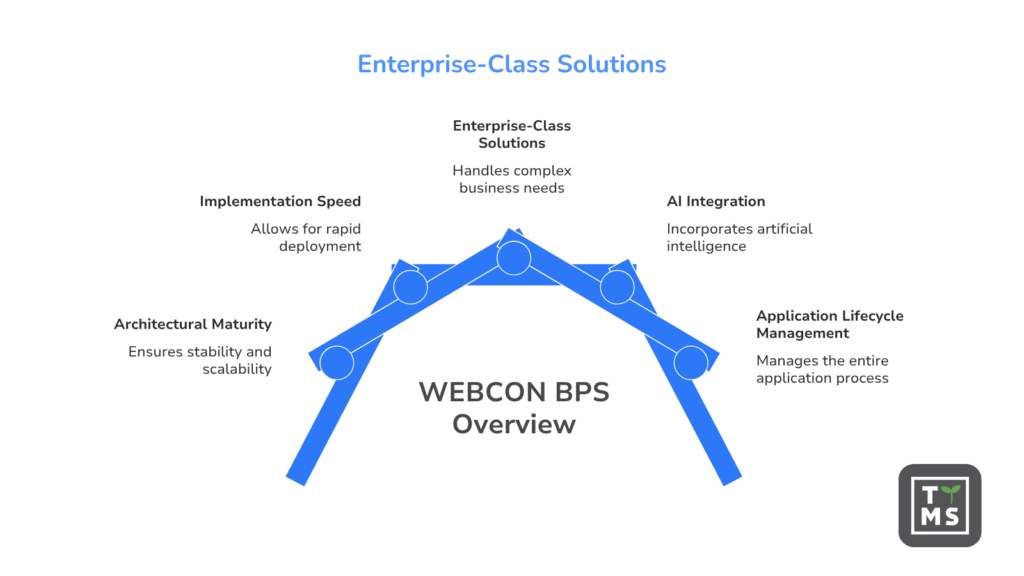
On the market of business process management platforms, WEBCON BPS stands out for its mature architecture and approach, which combines rapid implementation with the ability to create enterprise-class solutions. It’s not a tool for building simple forms, but a platform designed to handle complex, multi-step processes – with integrations, AI elements, and management of the entire application lifecycle.
2.1 What is WEBCON BPS and who is it for?
WEBCON BPS is a low-code business process automation platform that enables organizations to create process applications without having to write code from scratch. Employees of business departments, supported by IT or independently as so-called citizen developers, can design document workflows, forms, decision-making rules and integrations with external systems using graphical tools. The platform is designed for both large corporations and medium-sized companies that want to systematize their processes and introduce AI into their daily operational work. It has found its application in such industries as pharmaceuticals, public administration, manufacturing, finance and education, which WEBCON describes on the websites dedicated to individual sectors.
2.2 Low-code architecture: why speed of deployment matters
One of the key advantages of WEBCON BPS is that processes are built by drawing a graphical workflow diagram and then configuring form attributes and validation rules for each stage. Drag-and-drop replaces coding, which dramatically reduces deployment time. Research cited by Gartner’s Magic Quadrant for Low-Code Application Platforms indicates that low-code can speed up application development by up to ten times compared to traditional programming, and Forrester’s analysis states that platforms of this type can reduce software development time by 50-90%. Gartner also forecasts that by 2026, 75% of all new applications will be created in low-code environments.
What sets WEBCON BPS apart from its competitors is its approach to application lifecycle management. The entire application, including workflows, forms, reports, dashboards, data schemas and connections to external systems, is packaged as a single deployment unit. It can be moved and updated between dev, test, and production environments without manual component assembly, eliminating common problems for deployments in large organizations.
2.3 Measurable Results: ROI and Operational Savings Documented by Users
The most detailed evidence available of the platform’s effectiveness is a study conducted by Forrester on behalf of WEBCON. According to the Total Economic Impact of WEBCON BPS report, the financial sector organization achieved a 113% ROI over three years, with total benefits of $605,230 vs. costs of $284,175. The investment paid for itself in 25 months, process handling time was reduced by 87%, and the savings covered both internal processes and complex external processes involving multiple parties. More broadly, Forrester TEI’s end-to-end automation analyses indicate a three-year ROI in the range of 140-222% with a return on investment in less than a year.
As an authorized implementation partner of WEBCON BPS, TTMS observes similar performance patterns for clients in the pharmaceutical, financial and government sectors: reduced process handling time, reduced manual intervention volume, and business departments quickly take over autonomy. These results are consistent with Forrester data and confirm that the platform delivers real value regardless of the industry, provided that the right processes are selected to start with and a thoughtful approach to implementation.
3. AI features at WEBCON BPS – what the platform offers today
WEBCON BPS is not limited to static business rules. The platform integrates several layers of AI that work inside processes, enrich decisions, and relieve users of routine activities.
3.1 Intelligent document processing with OCR and AI
One of the most practical features is the combination of OCR with a trained neural network to extract data from documents such as cost invoices. The system automatically recognizes amounts, dates, tax identification numbers, bank account numbers, and other key fields from scanned or image-sent documents, and then fills in process forms with them. Massive, contactless document registration reduces manual data entry time by up to 90%, which directly speeds up financial and back-office processes and reduces human error.
For example, an invoice sent by e-mail can be automatically read by the system, assigned to the appropriate supplier, linked to the cost center and directed to the correct approval path – without manual transcription by a finance employee.
The effects of such implementations are in line with broader market trends. According to Deloitte research cited by Auxis, organizations using AI in document processing achieve an average of 35% increase in process efficiency and a 25% reduction in processing costs. Data from Paperwise’s report on AI in document management shows that implementing AI can reduce the percentage of invoices requiring manual review from 40% to just 4% in accounts payable processes.
3.2 Anomaly detection and automatic suggestions for users
WEBCON BPS applies machine learning to historical workflow data to detect irregularities in new cases. This could be an unknown payment amount, an unknown bank account number for a given contractor, or a potential duplication of a transfer. The system signals an anomaly early in the process before it reaches approval, which significantly reduces the risk of fraud and eliminates the need for additional layers of approvals.
The platform can also analyze historical process patterns and suggest or refine conditional rules based on this, for example, indicating what quota threshold should trigger a warning or which path to take a case with specific parameters. The results are more precise than manually configured rules and adapt to the organization’s real-world business patterns.
In practice, this means not only greater process security, but also a reduction in the number of manual checks performed by employees. An organization can handle a larger volume of cases faster without proportionally increasing its operational teams.
3.3 Generative AI and conversational AI in low-code processes
In a low-code WEBCON BPS environment, generative AI supports the creation and optimization of SQL queries and other pieces of application logic that are still needed for more advanced configurations. Citizen developers and developers can build applications faster, and their quality and maintainability are higher thanks to AI suggestions that eliminate common bugs and suboptimal patterns.
Increasingly, AI also supports the participants in business processes themselves. An employee can receive automatic suggestions for next steps, summaries of earlier stages of the process, or suggestions for responses based on the history of similar cases. This is especially important in organizations handling a large number of requests, documents, and procedural exceptions.
The platform also supports conversational AI: chatbots can communicate with users in natural language about ongoing processes, answer questions about the status of cases, or act as a process knowledge base. This approach fits into a broader market trend that analysts describe as a shift in conversational AI interfaces from the role of a secondary chat to the role of the main control layer of process automation. The low-code platform segment with embedded AI will grow at a rate of 25-33% CAGR, and process automation remains the leading application area.
3.4 Global Automations and Conditional Operators
AI in WEBCON BPS acts as an automation layer across the entire workflow framework, orchestrating LLM and AI agent models across multiple applications. All applications produce consistent, structured process data, which means that AI can be applied repeatedly across the organization rather than in isolated silos. An organization can build a set of reusable automations, such as document understanding or decision support, that work wherever work is done.
This is a direction that is increasingly referred to as agentic workflows – processes in which AI not only performs individual tasks, but actively supports the orchestration of activities between users, systems and workflow stages. In practice, this means moving from classic automation to intelligent processes capable of dynamically responding to the business context.
4. How WEBCON BPS automates key business processes
In practice, the greatest value of automation is felt by organizations not when they implement individual functions, but when they eliminate day-to-day operational frictions. Shortening the approval time, fewer emails, faster access to information and reduced manual data transcription very quickly translate into real relief for teams.
The platform works best when a company wants to automate end-to-end processes rather than just individual steps. The areas described below are most often implemented by TTMS customers and bring fast, measurable results.
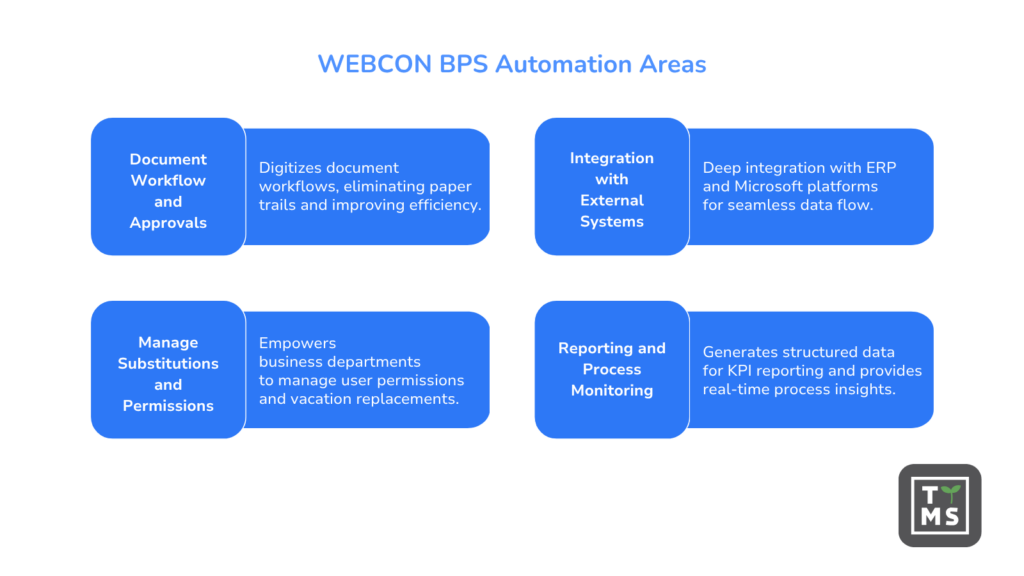
4.1 Document Workflow and Approvals – No More Paper Path
Digitizing document workflows and approval processes is one of the easiest entry points into automation. In WEBCON BPS, an invoice, leave request, contract or quality document goes through defined process stages, and the system automatically notifies the right users, keeps an eye on deadlines and escalates outstanding cases. The implementation eliminates paper paths, a shortcut to search in emails, and uncertainty about the current status of the document. BIOTON, a pharmaceutical manufacturer, has implemented WEBCON BPS precisely for the management of regulatory documentation, quality processes and change management, using the InstantChange function for fast workflow iteration.
4.2 Integration with external systems (ERP, SharePoint, ST Web Services)
One of the reasons why organizations choose WEBCON BPS over simpler tools is deep integration with ERP systems and the Microsoft platform. The platform can download and save data to ERP systems, automatically create documents in SharePoint, initiate banking transactions, or synchronize contractor data. As described in the WEBCON article on ERP integration, customers build dozens of applications annually covering HR, finance, sales, and operations, all connected to the ERP system as a source of truth.
4.3 Managing Substitutions and User Permissions Without IT
A good process automation tool should give business departments independence from IT in their day-to-day management. WEBCON BPS allows department administrators to configure vacation replacements, form permissions, and accesses on their own without having to involve the IT department for each change. This reduces operational bottlenecks and service call waiting times, which directly affects the workflow.
4.4 Reporting, process monitoring and automated documentation
Each workflow in WEBCON BPS generates structured process data that is the basis for KPI reporting and monitoring. Managers get a real-time view of the duration of cases, where delays arise and the workload of individual process participants. Automated documentation means that an organization always has a full history of a given case, which is essential for audit and compliance purposes, especially in regulated industries.
5. Building and maintaining applications in WEBCON BPS
Creating an app is one side of the coin. Equally important is whether the organization will be able to maintain and develop these applications without incurring rising IT costs and the risk of “freezing” systems.
5.1 Create forms, workflows, and business rules without coding
In Webcon BPS, the application building process is based on a graphical workflow designer in which you define statuses, transitions and process paths, and then configure forms and business rules for each stage. Intuitive building blocks and drag-and-drop make it easy for those without advanced knowledge are able to create and modify applications on their own. Forrester research indicates that 84% of enterprises have implemented low-code precisely to reduce IT burden, accelerate time to market and include business in the creation of digital solutions.
5.2 Application lifecycle management and uptime scaling
The InstantChange technology in WEBCON BPS allows you to modify workflow models, data schemas, form layouts, and data sources in real time, even for ongoing process instances. There’s no need to stop the system or manually migrate data with each update. This is a key advantage in keeping “live” applications that grow with the organization and its processes. As Gartner confirms, low-code platforms have moved from departmental tools to support mission-critical workloads in finance, manufacturing, and supply chain.
5.3 Mobile apps and work in Microsoft 365 / OneDrive
The application built once in WEBCON BPS can be run in the WEBCON BPS portal, SharePoint, Microsoft Teams, Microsoft Outlook, as well as on smartphones and tablets, with the same process and the same forms working in each channel. WEBCON BPS Portal can be run as a Microsoft 365 app or embedded directly in SharePoint and Teams sites, allowing you to build process apps that live in users’ native experiences, without having to switch context.
6. Who will WEBCON BPS work best for?
WEBCON BPS brings the greatest value to organizations that have sufficient process complexity to justify the implementation of an enterprise-class platform, while maintaining the agility and independence of business departments from IT.
6.1 Organization’s Ready-to-Deploy Profile
An organization ready for WEBCON BPS is one that manages many repetitive processes involving several parties, handles large volumes of documents or forms, requires integration with existing ERP or Microsoft 365 systems, and plans to scale the application portfolio over time. It doesn’t need to have a large development team: the platform is designed so that citizen developers and business analysts can make a real contribution to creating solutions. Among the implementations of WEBCON BPS, you can find both large industrial corporations and public institutions, which is confirmed, for m.in, by case studies collected by FeaturedCustomers.
6.2 Typical departments and usage scenarios: HR, finance, IT, operations
HR uses WEBCON BPS to manage leave requests, onboarding processes, and employee evaluations. Finance implements invoice workflow, payment approval processes, and monthly close automation. IT manages service requests, access management and change management through the platform. Operations digitize supplier management, quality processes, and contract workflows. The Municipality of Timișoara has improved the efficiency of municipal services thanks to WEBCON BPS, which shows that the automation of public processes is as achievable as in the private sector.
7. How to implement AI and process automation with WEBCON BPS – first steps
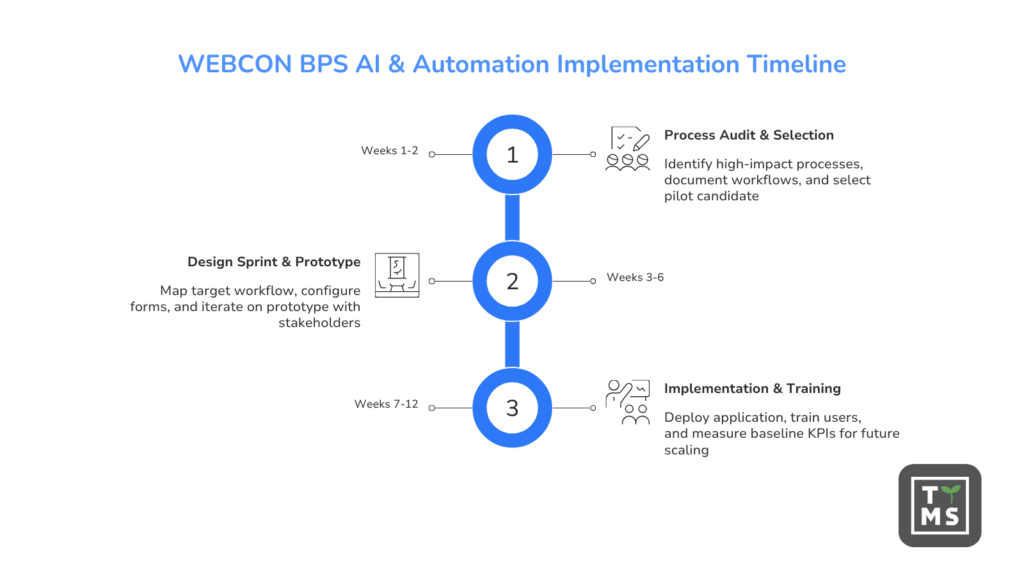
Implementation does not have to mean a multi-month transformation project. Most TTMS customers run the first automated process within 8-12 weeks, and subsequent processes of similar complexity within 2-6 weeks, which is consistent with a 50-90% reduction in production time for low-code platforms compared to traditional coding. TTMS recommends a three-phase approach that delivers value quickly and minimizes risk at every stage.
It is worth remembering that an effective implementation of AI does not start with the choice of a language model or a generative tool. The foundation is an orderly business process and access to qualitative process data. Organizations that digitize workflows first and only later develop the AI layer tend to achieve much better operational results.
Phase 1 (weeks 1-2): process audit and candidate selection. We identify processes with high volume, repetitive structure and many participants that generate the highest manual costs or risk of errors. The customer provides process documentation and appoints business owners. At the end of this phase, we indicate one priority process for pilot implementation and define success KPIs, such as case handling time, error rate, and transaction cost.
Phase 2 (weeks 3-6): design sprint, prototype and validation. TTMS maps the target workflow in the WEBCON BPS designer, configures forms, business rules and integrations with external systems. The prototype is presented to stakeholders in an iterative cycle, and the scope is adjusted based on their feedback before anything goes into production.
Phase 3 (weeks 7-12): implementation, training, and baseline KPIs. The application is deployed to production, platform administrators and key business users undergo training conducted by TTMS. We measure the underlying KPIs and document the results, creating the basis for the decision to scale to further processes. According to Deloitte, insufficient AI skills are the biggest barrier to integrating AI into existing processes, which is why knowledge transfer is an integral part of any implementation.
8. How TTMS can help your organization realize the full potential of Webcon BPS
Process automation and the use of AI in workflow should not start with the choice of features, but with understanding the real challenges of the organization. This is exactly what TTMS supports. We analyze processes, identify areas with the greatest potential for improvement and design solutions that can be developed along with the company’s needs.
As an experienced partner in the area of process automation and low-code implementations, we help organizations at every stage: from needs analysis, through the design and implementation of Webcon BPS, to integrations with Microsoft 365, ERP systems and AI solutions. Our goal is not to launch a single application, but to create a stable ecosystem of processes that really relieves teams and improves operational efficiency.
If you want to check which processes in your organization are worth automating first, let’s talk. We will help you assess the potential of Webcon BPS, identify quick areas for improvement, and plan your implementation focused on measurable business value.