
Microsoft 365 Copilot is an AI assistant embedded in workplace tools (including office applications, chat, and agents) that combines large language models with organizational context (content and metadata from resources available to the user) as well as security and compliance controls typical of enterprise environments. So what can Microsoft Copilot do in practice? In the sections below we present the most important Microsoft Copilot use cases and capabilities available in Microsoft 365.
For decision-makers, three implementation insights are particularly important. First, the value of Copilot increases with the quality and organization of data (permissions, labels, knowledge repositories), because the system operates within the user’s existing access rights. Second, real time savings and large-scale adoption are possible, but they require a structured change program (training, prompt libraries, agent governance) – something clearly visible in real-world customer implementations. Third, license costs and risks (oversharing, AI errors, phishing/prompt injection, agent costs) must be managed as part of a transformation program rather than treated as just a “plugin for Word”.
From a business case perspective, both concrete corporate examples (such as reported time savings) and TEI (Total Economic Impact) studies prepared by Forrester Consulting for Microsoft are available. These can serve as a useful framework for calculations, but they still need to be adapted to the realities of each organization (user profiles, processes, and data maturity).

1. Context and solution architecture
1.1 Where to start: distinguish Copilot Chat from licensed Copilot at work
In practice, organizations often encounter search queries such as “What Can Microsoft Copilot Do”, “what can you do with Microsoft copilot”, as well as SEO phrases like “Microsoft copilot use cases” or “Microsoft copilot uses”. In a corporate environment, it is useful to begin by distinguishing between the different layers of the solution.
Copilot Chat (in the web variant) is offered as a secure “enterprise-ready” chat experience for users with Microsoft Entra accounts and a qualifying subscription – as an “included / no additional cost” component. However, advanced features (such as deeper work grounding, selected capabilities inside applications, and some agents) may require a Microsoft 365 Copilot license.
1.2 How Copilot “sees” data and why permissions are critical
Copilot processes a prompt, enriches it with context (for example from workplace resources), performs responsible AI checks as well as security and compliance controls, and then generates a response. Importantly, Copilot operates within existing permissions (role-based access and access to Microsoft 365 resources). In other words, it only presents content that a given user already has access to.
As a result, the risk of data exposure largely shifts from the model itself to data hygiene. Excessive permissions in SharePoint or OneDrive, lack of segmentation, missing sensitivity labels, and disorganized repositories become the primary concerns. Microsoft explicitly states that the permission model within the tenant and semantic indexing mechanisms are designed to respect identity-based access boundaries.
1.3 Data, privacy, and residency
Microsoft states that data used to generate responses (prompts, retrieved data, and responses) remains within Microsoft 365 services, is encrypted at rest, and is not used to train the underlying LLM models used by Copilot.
Regarding data residency, Microsoft 365 Copilot is tied to commitments described in the Product Terms and DPA. For customers in the EU, the service is positioned within the EU Data Boundary, while outside the EU, queries may be processed in the United States, the EU, or other regions.
1.4 Extensibility: connectors, plugins, agents, and “per-execution” costs
Copilot can also use data outside Microsoft 365 through mechanisms such as Microsoft Graph connectors and plugins. Data retrieved through connectors can appear in responses as long as the user has permission to access it.
In the case of agents (for example those created in Copilot Studio), two business facts are important. First, the organization retains administrative control over which plugins and extensions are allowed. Second, the use of agents can be metered and may require an Azure subscription, which changes the cost model from purely “per user” to a mixed “per user + consumption” approach.

2. Copilot features and capabilities in Microsoft 365
Below is a summary of what typically constitutes “microsoft 365 copilot features”. The sections show the most practical Microsoft Copilot uses across different business functions. These elements most often determine the business value delivered in organizational processes.
- Copilot Chat (web and work-grounded): a chat interface for questions, summaries, and content creation. The web version is “included” for qualifying subscriptions, while the work-based version (grounded in organizational data and work context) is associated with a Microsoft 365 Copilot license.
- Work IQ and grounding responses in work context: a contextual layer designed to combine work data and relationships (such as metadata, collaboration context, and connector data) to deliver more relevant answers.
- Copilot in applications: support for creating, summarizing, editing, and analyzing content in applications such as Word, PowerPoint, Excel, Outlook, Teams, Loop, and others.
- Copilot Notebooks: a workspace designed for working with collections of materials (for example project plans, quarterly financial forecasts, or support ticket triage), enabling aggregation of sources and generation of responses based on that context.
- Agents (including Researcher and Analyst): advanced reasoning agents designed to create reports with cited sources by combining web data and workplace content accessible to the user, as well as agents that automate processes and perform tasks on behalf of users or teams.
- Copilot Studio and agent creation: building agents through no-code or low-code tools with administrative control and integrations (including SharePoint agents). Agent usage may be metered.
- Governance, security, and compliance: integration with auditing and retention mechanisms for Copilot interactions, along with a defense-in-depth approach to threats such as prompt injection.
- Adoption analytics (Copilot Analytics / Dashboard): reporting on usage and adoption (for example in the Microsoft 365 admin center and Copilot Dashboard), useful for managing change and measuring ROI.
2.1 Comparison table: features vs. business use cases
Legend of business functions (columns): HR (onboarding), SPR (sales), CS (customer service), IT (service desk), MKT (marketing), FIN (finance), PMO (project management), OPS (operations), LGL (legal/compliance), EXE (executive leadership).
| Capability / function | HR | SPR | CS | IT | MKT | FIN | PMO | OPS | LGL | EXE |
|---|---|---|---|---|---|---|---|---|---|---|
| Copilot Chat (web/work) | ✓ | ✓ | ✓ | ✓ | ✓ | ✓ | ✓ | ✓ | ✓ | ✓ |
| Copilot in applications (Word/Excel/PPT/Outlook/Teams) | ✓ | ✓ | ✓ | ✓ | ✓ | ✓ | ✓ | ✓ | ✓ | ✓ |
| Notebooks (working with “information bundles”) | ✓ | ✓ | ✓ | ✓ | ✓ | ✓ | ✓ | ✓ | ✓ | ✓ |
| Researcher / Analyst (deep reasoning) | ◐ | ✓ | ◐ | ◐ | ✓ | ✓ | ◐ | ◐ | ✓ | ✓ |
| Agents + Copilot Studio (automation, integrations) | ✓ | ✓ | ✓ | ✓ | ✓ | ◐ | ✓ | ✓ | ✓ | ◐ |
| Connectors / plugins for external data | ◐ | ✓ | ✓ | ✓ | ◐ | ✓ | ◐ | ✓ | ◐ | ◐ |
| Audit + interaction retention (Purview) | ✓ | ✓ | ✓ | ✓ | ✓ | ✓ | ✓ | ✓ | ✓ | ✓ |
| Copilot Analytics / Dashboard | ✓ | ✓ | ✓ | ✓ | ✓ | ✓ | ✓ | ✓ | ✓ | ✓ |
Note: “◐” means that the value depends on whether the organization has mature data and well-configured permissions in a given area, and in the case of agents – whether there is a sensible governance process and a clear integration prioritization approach.
3. Ten practical use cases in the organization
The following “Microsoft copilot use cases” are scenarios designed to: (1) be feasible with standard Microsoft 365 tools, (2) deliver quick wins, and (3) be measurable through adoption metrics and time savings. The common assumption is that Copilot works “within the boundaries of what the user has access to”, so its effectiveness depends on data hygiene and permissions.
3.1 HR: onboarding and a knowledge hub for new employees
Description: Build an onboarding assistant (Notebook + agent) based on policies, FAQs, process descriptions, and training materials; use Copilot in Teams and Outlook to shorten the “question-answer” path and prepare communication for new employees.
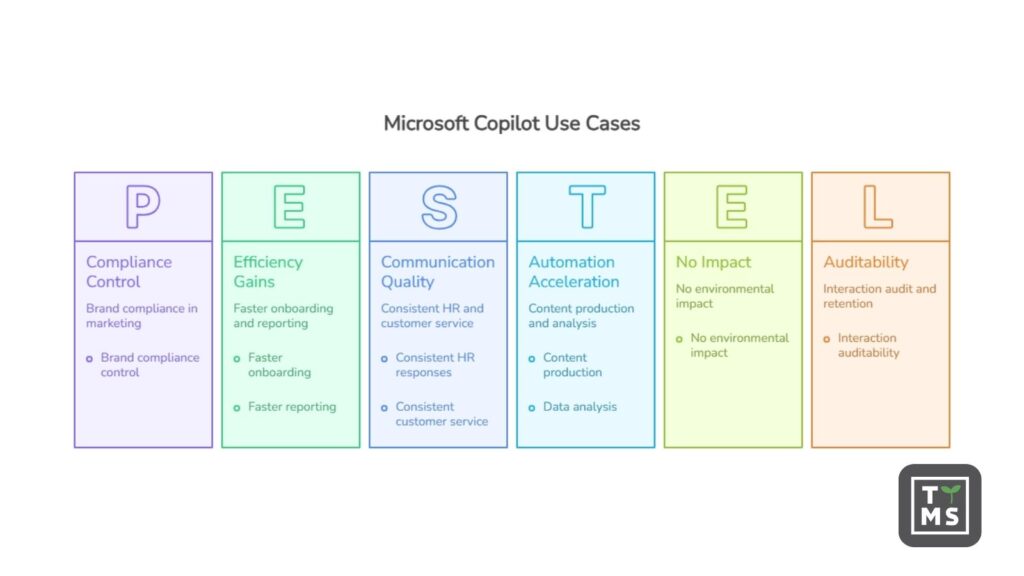
Benefits: faster onboarding, more consistent HR responses, fewer interruptions for experts, and better communication quality. TEI studies point, among other things, to an impact on HR efficiency and onboarding as one of the value areas (at the level of respondent declarations and the economic model).
Example workflow:
- HR creates a Notebook called “Onboarding – office roles” and adds policies, links, presentations, and checklists.
- It builds an “HR FAQ” agent with a limited scope (policies and handbook only) and distributes it in Teams.
- A new employee asks questions; the agent responds and points to sources where possible, while HR monitors the questions and expands the knowledge base.
3.2 Sales: meeting preparation and proposal standardization
Description: Use Copilot for quick catch-up (context recovery): summaries of email threads, meeting notes, and value proposition preparation; enable “proposal packs” (Notebook) and automatic creation of proposal versions in Word and PowerPoint based on templates.
Benefits: shorter proposal preparation time, more consistent messaging, and faster iteration cycles; TEI also showed a modeled impact on the speed of taking an offer to market (as a framework for your own calculations).
Example workflow:
- A salesperson launches Copilot in Teams after a meeting: summary of agreements + list of next steps.
- In Word, they create a draft proposal, referring to previous documents and templates.
- In PowerPoint, they generate a pitch deck from the proposal document, then refine the slides and tone.
3.3 Customer service: triage, response knowledge base, and correspondence quality
Description: In Notebooks, build a “knowledge pack” for ticket categories (procedures, response templates, product information). Use Copilot to summarize contact history and prepare responses aligned with the tone of voice.
Benefits: shorter response times, more consistent answers, and fewer escalations; TEI links Copilot to improvements in customer service in a model-based perspective.
Example workflow:
- An agent in Outlook receives a long thread – Copilot creates a summary and a draft reply.
- In the Notebook “Complaints – process”, the agent asks about the appropriate procedure and conditions.
- A manager reviews the quality of responses and updates the “patterns” in the repository.
3.4 IT: Service Desk and a first-line support assistant
Description: Create an “IT Helpdesk” agent that answers repetitive questions (VPN, password reset, devices, IT onboarding) based on an approved knowledge base, while routing more complex tickets to the right groups.
Benefits: fewer simple tickets, faster issue resolution, and greater standardization; additionally – better measurement of which ticket types dominate.
Example workflow:
- IT selects the agent distribution channel (e.g. Teams) and defines the scope of data (policies, KB, instructions).
- Administrators control allowed extensions/plugins and permissions.
- Analysis of audit logs and usage metrics: which questions keep returning and where materials are missing.
3.5 Marketing: content production and campaigns with brand compliance control
Description: Copilot in Word and PowerPoint accelerates the creation of a first draft (landing page, email, posts), while a Notebook can maintain a “brand pack” (tone of voice, persona, claims, regulations). Optionally, Researcher helps prepare market notes with cited sources.
Benefits: shorter time-to-market, better A/B testing, and less work “from scratch”; in TEI, marketing is one of the areas where organizations report and quantify impact.
Example workflow:
- Marketing creates a Notebook called “Q2 Campaign” with documents: brief, persona, claims, and links to research.
- Copilot generates email variants, headlines, and CTAs; the team selects and edits them.
- Researcher creates a summary of trends and competitors with source citations (for an internal note).
3.6 Finance: reporting cycle, management commentary, and variance explanation
Description: Use Copilot to summarize changes in data, prepare management commentary, create a report skeleton, and standardize variance descriptions (while maintaining verification and control policies). Notebooks are indicated as a tool for work on, among other things, quarterly forecasts.
Benefits: faster preparation of materials, reduced editorial work, and better report readability; TEI includes finance as an area of operational improvement.
Example workflow:
- Controlling prepares a set of files (data sources, KPI definitions, account mapping table) in a Notebook.
- Copilot generates a draft commentary: what increased, what decreased, and hypotheses about causes.
- A human verifies the numbers and sources; only approved conclusions go to publication (in line with the human oversight principle).
3.7 Project management: status updates, risks, documentation, and communication
Description: Copilot in Teams helps “close the context” after meetings (summaries, decisions, next steps), while Copilot Pages and Notebooks help organize project artifacts. In Word and PowerPoint, it speeds up the creation of plans, project charters, and status presentations.
Benefits: less administrative work, faster reporting, and fewer “status meetings for status meetings”.
Example workflow:
- After a meeting, Copilot in Teams creates a summary and a task list (this requires transcription/recording to be enabled for post-meeting content references).
- The PM maintains the project Notebook as a single source of truth: risks, decisions, and document links.
- Each week, Copilot generates a draft status update for stakeholders; the PM approves and publishes it.
3.8 Operations: standardizing procedures and “copilot quality” for instructions
Description: Operations teams can use Copilot to turn “tribal knowledge” into procedures: process descriptions, checklists, health and safety/quality instructions, and communication templates. Copilot in SharePoint (rich text editor) simplifies editing content on internal pages.
Benefits: fewer operational errors, faster training, and easier auditing of procedures.
Example workflow:
- A process expert records/writes notes; Copilot turns them into an SOP with steps, exceptions, and roles.
- The QA team adds requirements and controls, then publishes the final content in SharePoint.
- The “Procedures” agent answers employees’ questions and refers them to the source materials.
3.9 Legal and compliance: summarization, comparisons, and interaction auditability
Description: In legal/compliance, Copilot speeds up work on documents (summaries, proposed changes, comparisons) – while maintaining the verification principle and using audit/retention for interactions where required by the organization.
Benefits: faster work on document versions and a stronger evidence trail (where the organization has implemented audit and retention for Copilot/AI).
Example workflow:
- A lawyer asks Copilot to identify differences between contract versions and provide a list of risks (draft).
- The lawyer verifies clause references and sources; the result goes into the final document after review.
- In the event of an incident/investigation, the compliance team uses audit/retention if enabled for Copilot & AI apps.
3.10 Executive leadership: briefing and source-based decision-making
Description: For managers, the biggest lever is often the automation of “information overload”: thread summaries, meeting preparation, draft communications, and report structures. The Researcher agent is designed for multi-step research tasks with cited sources, which supports decision-making (while maintaining critical judgment).
Benefits: less time needed for preparation, greater consistency, and less “manual assembly” of information.
Example workflow:
- An assistant (Notebook) aggregates materials: strategy, KPIs, and notes from key meetings.
- Researcher prepares a report on “what has changed” (market/regulations/competition) with citations.
- The executive team makes decisions while maintaining human oversight and verification in sensitive areas.
4. Business value and market evidence
4.1 What can be measured
The most “management-level” KPIs for an implementation typically include adoption (percentage of active users), time savings in key activities (e.g. proposal preparation, reporting, responses), output quality (e.g. internal NPS, fewer revisions), and risks (data incidents, policy violations). Copilot analytics solutions are positioned as tools for measuring usage and adoption.
4.2 Implementation examples and real-world scenarios
- Lloyds Banking Group reported scaling deployment to tens of thousands of licenses and average time savings of 46 minutes per day per licensed employee; it explicitly pointed to a high active usage rate among licensed users.
- DLA Piper states in its customer story that operational/administrative teams save “up to 36 hours per week” in content generation and data analysis; it also describes a “coalition of the willing” approach and a repository of best practices in Teams.
- HUBER+SUHNER reports very high adoption in its pilot group (99% active users), as well as the use of analytics tools (e.g. Copilot Dashboard in the Viva context) to assess usage and acceptance; the case study strongly emphasizes the combination of technology and change management.
- Generali France describes an “AI at scale” approach: broad access to Copilot Chat, thousands of Microsoft 365 Copilot users, measured adoption, and the creation of dozens of agents using Copilot Studio and Azure OpenAI (in cooperation with an implementation partner).
It is also worth paying attention to “framework” studies and reports that help build a business case. In the TEI report (composite organization), among other things, ROI of 116%, NPV of USD 19.7 million, and a payback period of around 10 months were indicated, along with a description of the methodology (interviews + survey) and a clear statement that the study is sponsored and intended to serve as a framework for organizations’ own calculations.
5. Risks, limitations, and requirements
5.1 Limitations of the technology itself (AI)
Microsoft emphasizes in its transparency documentation that LLM systems are probabilistic and fallible; it points to risks such as ungrounded content, bias, and the need for human oversight (especially in sensitive and decision-making domains).
In management practice, this means two rules: (1) Copilot accelerates the creation of a “working draft”, but responsibility for the correctness and compliance of the output remains with the organization; (2) in sensitive processes, controls should be built in (peer review, source validation, comparison with system data).
5.2 Data security and prompt injection
Microsoft publishes security guidance for Microsoft 365 Copilot, including a defense-in-depth approach and mechanisms intended to limit prompt injection. Privacy documentation also points to classifiers for jailbreak and cross-prompt injection (XPIA) – with the caveat that not every scenario must support them.
From an organizational risk perspective, agents and integrations are particularly important: they increase productivity, but also expand the “attack surface” (e.g. social engineering, excessive permissions, misconfigured plugins). For example, scenarios of abuse involving Copilot Studio agents and phishing for OAuth tokens have been described – even if some attack vectors rely on social engineering.
5.3 Compliance, audit, retention
Microsoft Purview provides mechanisms for managing generative AI usage risks (including in areas such as DSPM for AI), and also documents auditing for Copilot interactions and the possibility of applying retention policies to prompts and responses (depending on configuration and products).
In addition, there are official descriptions of Copilot’s data protection architecture, including its interaction with sensitivity labels and encryption, as well as information about where interaction data is stored for audit and compliance scenarios.
5.4 Data residency and subprocessors
In the EU environment, it is important to understand the EU Data Boundary: the documentation indicates that additional safeguards apply to users in the EU, and EU traffic is intended to remain within the EU Data Boundary, while global traffic may be redirected to other regions for LLM processing (depending, among other things, on compute availability).
It is also worth following information about the AI supply chain: Microsoft states that data is not used to train base models, including those provided by Azure OpenAI, and the transparency documentation includes references to the use of OpenAI and Anthropic solutions in the context of training and RAI mechanisms.
5.5 Costs and licensing model
Implementation costs typically include per-user licenses (for example, Microsoft 365 Copilot for enterprise is presented in pricing as USD 30/user/month with annual billing), potential agent costs (metered) and integration costs (Azure), as well as change costs (training, governance, data cleanup).
It is worth remembering a limitation often overlooked in calculations: Microsoft indicates that there is no classic trial version for Microsoft 365 Copilot, although Copilot Chat can be tested if the organization has a qualifying subscription.
6. Implementation plan and checklist
6.1 Minimum technical and organizational requirements
The most “hard” starting requirements (in short) include:
- Base licenses and identity account: users must have the appropriate Microsoft 365/Office 365 subscription and identity in Microsoft Entra ID.
- Mailbox: Copilot is supported for the primary mailbox in Exchange Online (not, for example, archive or shared mailboxes in the context of grounding).
- Applications and privacy: Microsoft 365 Apps must be deployed; for Copilot in Office web apps, third-party cookies may be required; connected experiences settings are also important.
- Teams and meetings: for Copilot in Teams to reference meeting content after the meeting ends, transcription or recording must be enabled.
- Network: the organization should not block required endpoints; the documentation indicates, among other things, the need for WebSockets connectivity to
*.cloud.microsoftand*.office.com. - Mobile devices: minimum OS versions are described in the requirements (e.g. iOS/iPadOS 16+, Android 10+).
6.2 Checklist of steps for decision-makers
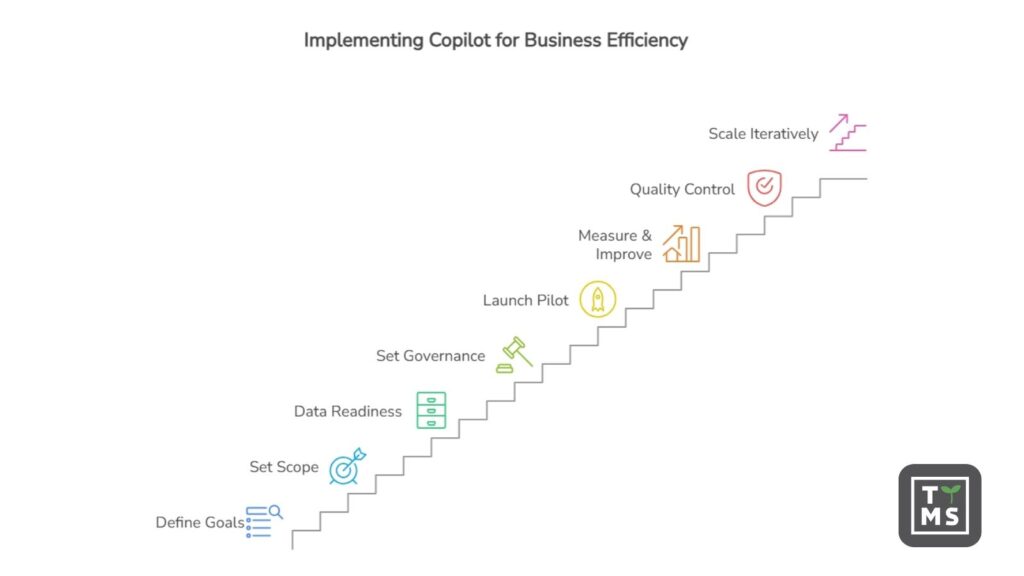
- Define business goals: which 3-5 processes should be shortened (e.g. proposal creation, reporting, customer service)? Attach KPIs (time, quality, adoption).
- Set the scope and Copilot version: distinguish Copilot Chat from full licensed features; count the user population that actually performs “text and analytical work”.
- Do “data readiness” before buying at scale: audit permissions, organize where knowledge lives, and implement sensitivity labels where justified.
- Set governance for agents and extensions: who can create agents, which integrations are allowed, and what the approval process looks like.
- Launch a pilot with a “coalition of the willing”: select enthusiasts and high-leverage roles, prepare a prompt library, verification rules, and a support channel.
- Enable measurement and a continuous improvement loop: adoption, top use cases, barriers; update the knowledge base and training.
- Build in quality control and compliance: audit, retention (if required), and procedures for incidents and AI errors.
- Scale in waves and iteratively: only after the pilot should you expand integrations and agents; remember metered costs and the risks of prompt injection/social engineering.
If time at work is a real cost in your organization, start with a pilot based on the scenarios above. Measure adoption, real time savings, and put data and permissions in order – then Copilot will become a predictable investment rather than just an interesting experiment.
7. Want to use Microsoft Copilot in your company?
If you want to see how Microsoft Copilot can realistically increase productivity in your organization, it is worth starting with a well-designed pilot. The TTMS team helps companies prepare their Microsoft 365 environment, organize data, and implement Copilot in key business processes. See how we approach Microsoft 365 AI implementation and solution development.

FAQ
Does Microsoft Copilot work in all Microsoft 365 applications?
Microsoft Copilot is integrated with many of the most widely used Microsoft 365 applications, such as Word, Excel, PowerPoint, Outlook, and Teams. In each of them it performs a slightly different role – in Word it helps create and edit documents, in Excel it analyzes data, in PowerPoint it generates presentations, and in Teams it summarizes meetings and conversation threads. In practice, this means Copilot works in the tools where employees already spend most of their time. However, the scope of features may vary depending on the application version, license, and configuration of the Microsoft 365 environment within the organization.
Does Microsoft Copilot have access to all company data?
No. Copilot operates within the user’s existing permissions. This means it can only access documents, messages, and resources that the employee already has permission to view in Microsoft 365. If a user does not have access to a specific file or folder, Copilot will not be able to use that information either. For this reason, many organizations review their permission structures, document repositories, and data classification before implementing Copilot to avoid unnecessary oversharing.
Which business processes are most often automated with Microsoft Copilot?
Copilot most commonly supports processes that involve working with information and documents. These include tasks such as preparing sales proposals, analyzing data in Excel, creating management reports, generating marketing content, or summarizing project meetings. Copilot can also assist with customer support by drafting replies to messages or help HR teams build onboarding knowledge bases. In many organizations, the greatest benefits appear in areas where employees spend a significant amount of time writing, analyzing, or summarizing information.
Does implementing Microsoft Copilot require organizational preparation?
Yes. Purchasing licenses alone is usually not enough to fully benefit from Copilot. Organizations typically need to prepare their data and processes first. This includes organizing documents, reviewing permissions, implementing security policies, and training employees on how to work effectively with AI tools. Many companies start with a pilot program in a few teams to test real use cases, measure time savings, and then scale the solution across the organization.
Can Microsoft Copilot make mistakes?
Yes. Copilot relies on large language models that generate responses probabilistically. As a result, it may occasionally produce imprecise interpretations of data or incomplete conclusions. For this reason, Copilot outputs should be treated as support for human work rather than automatic business decisions. In practice, Copilot is most effective when used to create initial drafts of documents, analyses, or summaries that are then reviewed and refined by users.