From customer service to decision support, AI systems are already woven into critical enterprise functions. Enterprise leaders must ensure that powerful AI tools (like large language models, generative AI assistants, and machine learning platforms) are used responsibly and safely. Below are 10 essential controls that organizations should implement to secure AI in the enterprise.
1. Implement Single Sign-On (SSO) and Strong Authentication
Controlling who can access your AI tools is the first line of defense. Enforce enterprise-wide SSO so that users must authenticate through a central identity provider (e.g. Okta, Azure AD) before using any AI application. This ensures only authorized employees get in, and it simplifies user management. Always enable multi-factor authentication (MFA) on AI platforms for an extra layer of security. By requiring SSO (and MFA) for access to AI model APIs and dashboards, companies uphold a zero-trust approach where every user and request is verified. In practice, this means all GenAI systems are only accessible via authenticated channels, greatly reducing the chance of unauthorized access. Strong authentication not only protects against account breaches, but also lets security teams track usage via a unified identity – a critical benefit for auditing and compliance.

2. Enforce Role-Based Access Control (RBAC) and Least Privilege
Not everyone in your organization should have the same level of access to AI models or data. RBAC is a security model that restricts system access based on user roles. Implementing RBAC means defining roles (e.g. data scientist, developer, business analyst, admin) and mapping permissions so each role only sees and does what’s necessary for their job. This ensures that only authorized personnel have access to critical AI functions and data. For example, a developer might use an AI API but not have access to sensitive training data, whereas a data scientist could access model training environments but not production deployment settings. Always apply the principle of least privilege – give each account the minimum access required. Combined with SSO, RBAC helps contain potential breaches; even if one account is compromised, strict role-based limits prevent an attacker from pivoting to more sensitive systems. In short, RBAC minimizes unauthorized use and reduces the blast radius of any credential theft.
3. Enable Audit Logging and Continuous Monitoring
You can’t secure what you don’t monitor. Audit logging is essential for AI security – every interaction with an AI model (prompts, inputs, outputs, API calls) should be logged and traceable. By maintaining detailed logs of AI queries and responses, organizations create an audit trail that helps with both troubleshooting and compliance. These logs allow security teams to detect unusual activity, such as an employee inputting a large dump of sensitive data or an AI outputting anomalous results. In fact, continuous monitoring of AI usage is recommended to spot anomalies or potential misuse in real time. Companies should implement dashboards or AI security tools that track usage patterns and set up alerts for odd behaviors (e.g. spikes in requests, data exfiltration attempts). Monitoring also includes model performance and drift – ensure the AI’s outputs remain within expected norms. The goal is to detect issues early: whether it’s a malicious prompt injection or a model that’s been tampered with, proper monitoring can flag the incident for rapid response. Remember, logs can contain sensitive information (as seen in past breaches where AI chat logs were exposed), so protect and limit access to the logs themselves as well. With robust logging and monitoring in place, you gain visibility into your AI systems and can quickly identify unauthorized access, data manipulation, or adversarial attacks.
4. Protect Data with Encryption and Masking
AI systems consume and produce vast amounts of data – much of it confidential. Every company should implement data encryption and data masking to safeguard information handled by AI. Firstly, ensure all data is encrypted in transit and at rest. This means using protocols like TLS 1.2+ for data traveling to/from AI services, and strong encryption (e.g. AES-256) for data stored in databases or data lakes. Encryption prevents attackers from reading sensitive data even if they intercept communications or steal storage drives. Secondly, use data masking or tokenization for any sensitive fields in prompts or training data. Data masking works by redacting or replacing personally identifiable information (PII) and other confidential details with fictitious but realistic alternatives before sending it to an AI model. For example, actual customer names or ID numbers might be swapped out with placeholders. This allows the AI to generate useful output without ever seeing real private info. Tools now exist that can automatically detect and mask secrets or PII in text, acting as AI privacy guardrails. Masking and tokenization ensure that even if prompts or logs leak, the real private data isn’t exposed. In summary, encrypt everything and strip out sensitive data whenever possible – these controls tremendously reduce the risk of data leaks through AI systems.

5. Use Retrieval-Augmented Generation (RAG) to Keep Data In-House
One challenge with many AI models is that they’re trained on general data and may require your proprietary knowledge to answer company-specific questions. Instead of feeding large amounts of confidential data into an AI (which could risk exposure), companies should adopt Retrieval-Augmented Generation (RAG) architectures. RAG is a technique that pairs the AI model with an external knowledge repository or database. When a query comes in, the system first fetches relevant information from your internal data sources, then the AI generates its answer using that vetted information. This approach has multiple security benefits. It means your AI’s answers are grounded in current, accurate, company-specific data – pulled from, say, your internal SharePoint, knowledge bases, or databases – without the AI model needing full access to those datasets at all times. Essentially, the model remains a general engine, and your sensitive data stays stored on systems you control (or in an encrypted vector database). With RAG, proprietary data never has to be directly embedded in the AI model’s training, reducing the chance that the model will inadvertently learn and regurgitate sensitive info. Moreover, RAG systems can improve transparency: they often provide source citations or context for their answers, so users see exactly where the information came from. In practice, this could mean an employee asks an AI assistant a question about an internal policy – the RAG system retrieves the relevant policy document snippet and the AI uses it to answer, all without exposing the entire document or sending it to a third-party. Embracing RAG thus helps keep AI answers accurate and data-safe, leveraging AI’s power while keeping sensitive knowledge within your trusted environment.
(For a deeper dive into RAG and how it works, see our comprehensive guide on Retrieval-Augmented Generation (RAG).)
6. Establish AI Guardrails for Inputs and Outputs
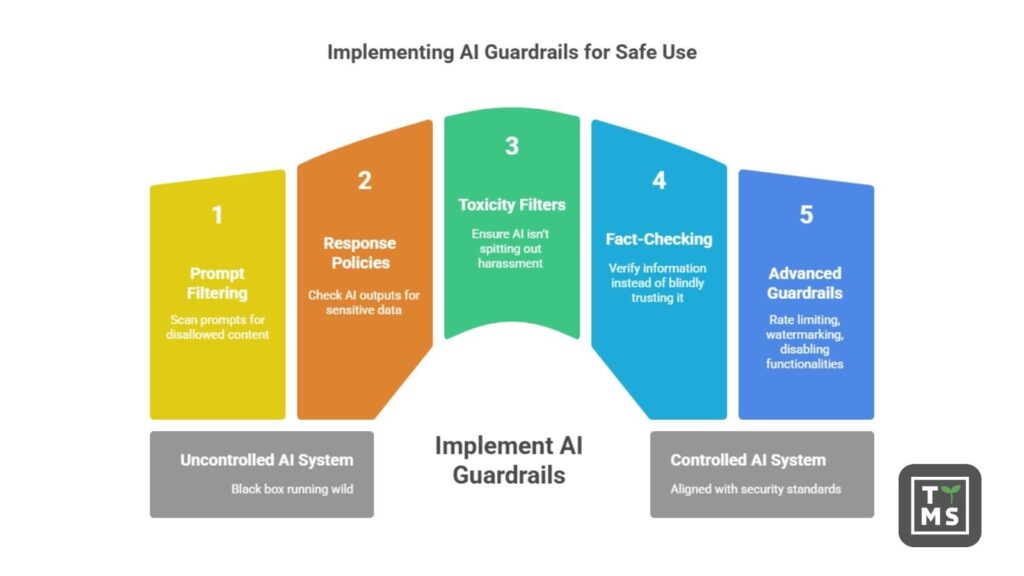
No AI system should be a black box running wild. Companies must implement guardrails on what goes into and comes out of AI models. On the input side, deploy prompt filtering and validation mechanisms. These can scan user prompts for disallowed content (like classified information, PII, or known malicious instructions) and either redact or block such inputs. This helps prevent prompt injection attacks, where bad actors try to trick the AI with commands like “ignore all previous instructions” to bypass safety rules. By filtering prompts, you stop many attacks at the gate. On the output side, define response policies and use content moderation tools to check AI outputs. For example, if the AI is generating an answer that includes what looks like a credit card number or personal address, the system could mask it or warn an admin. Likewise, implement toxicity filters and fact-checking for AI outputs in production – ensure the AI isn’t spitting out harassment, hate speech, or obvious misinformation to end-users. Some enterprise AI platforms allow you to enforce that the AI will cite sources for factual answers, so employees can verify information instead of blindly trusting it. More advanced guardrails include rate limiting (to prevent data scraping via the AI), watermarking outputs (to detect AI-generated content misuse), and disabling certain high-risk functionalities (for instance, preventing an AI coding assistant from executing system commands). The key is to pre-define acceptable use of the AI. As SANS Institute notes, by setting guardrails and filtering prompts, organizations can mitigate adversarial manipulations and ensure the AI doesn’t exhibit any hidden or harmful behaviors that attackers could trigger. In essence, guardrails act as a safety net, keeping the AI’s behavior aligned with your security and ethical standards.
7. Assess and Vet AI Vendors (Third-Party Risk Management)
Many enterprises use third-party AI solutions – whether it’s an AI SaaS tool, a cloud AI service, or a pretrained model from a vendor. It’s critical to evaluate the security posture of any AI vendor before integration. Start with the basics: ensure the vendor follows strong security practices (do they encrypt data? do they offer SSO and RBAC? are they compliant with GDPR, SOC 2, or other standards?). A vendor should be transparent about how they handle your data. Ask if the vendor will use your company’s data for their own purposes, such as training their models – if so, you may want to restrict or opt out of that. Many AI providers now allow enterprises to retain ownership of inputs/outputs and decline contributing to model training (for example, OpenAI’s enterprise plans do this). Make sure that’s the case; you don’t want your sensitive business data becoming part of some public AI model’s knowledge. Review the vendor’s data privacy policy and security measures – this includes their encryption protocols, access control mechanisms, and data retention/deletion practices. It’s wise to inquire about the vendor’s history: have they had any data breaches or legal issues? Conducting a security assessment or requiring a vendor security questionnaire (focused on AI risks) can surface red flags. Additionally, consider where the AI service is hosted (region, cloud), as data residency laws might require your data stays in certain jurisdictions. Ultimately, treat an AI vendor with the same scrutiny you would any critical IT provider: demand transparency and strong safeguards. The Cloud Security Alliance and other bodies have published AI vendor risk questionnaires which can guide you. If a vendor can’t answer how they protect your data or comply with regulations, think twice about giving them access. By vetting AI vendors thoroughly, you mitigate supply chain risks and ensure any external AI service you use meets your enterprise security and compliance requirements.
8. Design a Secure, Risk-Sensitive AI Architecture
How you architect your AI solutions can significantly affect risk. Companies should embed security into the AI architecture design from the start. One consideration is where AI systems are hosted and run. On-premises or private cloud deployment of AI models can offer greater control over data and security – you manage who accesses the environment and you avoid sending sensitive data to third-party clouds. However, on-prem AI requires sufficient infrastructure and proper hardening. If using public cloud AI services, leverage virtual private clouds (VPCs), private endpoints, and encryption to isolate your data. Another best practice is network segmentation: isolate AI development and runtime environments from your core IT networks. For instance, if you have an internal LLM or AI agent running, it should be in a segregated environment (with its own subnetwork or container) so that even if it’s compromised, an attacker can’t freely move into your crown jewel databases. Apply the principle of zero trust at the architecture level – no AI component or microservice should inherently trust another. Use API gateways, service mesh policies, and identity-based authentication for any component-to-component communication. Additionally, consider resource sandboxing: run AI workloads with restricted permissions (e.g. in containers or VMs with only necessary privileges) to contain potential damage. A risk-aware architecture also means planning for failure: implement throttling to prevent runaway processes, have circuit-breakers if an AI service starts behaving erratically, and use redundancy for critical AI functions to maintain availability. Lastly, keep development and production separate; don’t let experimental AI projects connect to live production data without proper review. By designing your AI architecture with security guardrails (isolation, least privilege, robust configuration) you reduce systemic risk. Even the choice of model matters – some organizations opt for smaller, domain-specific models that are easier to control versus one large general model with access to everything. In summary, architect for containment and control: assume an AI system could fail or be breached and build in ways to limit the impact (much like you design a ship with bulkheads to contain flooding).

9. Implement Continuous Testing and Monitoring of AI Systems
Just as cyber threats evolve, AI systems and their risk profiles do too – which is why continuous testing and monitoring is crucial. Think of this as the “operate and maintain” phase of AI security. It’s not enough to set up controls and forget them; you need ongoing oversight. Start with continuous model monitoring: track the performance and outputs of your AI models over time. If a model’s behavior starts drifting (producing unusual or biased results compared to before), it could be a sign of concept drift or even a security issue (like data poisoning). Establish metrics and automated checks for this. For example, some companies implement drift detection that alerts if the AI’s responses deviate beyond a threshold or if its accuracy on known test queries drops suddenly. Next, regularly test your AI with adversarial scenarios. Conduct periodic red team exercises on your AI applications – attempt common attacks such as prompt injections, data poisoning, model evasion techniques, etc., in a controlled manner to see how well your defenses hold up. Many organizations are developing AI-specific penetration testing methodologies (for instance, testing how an AI handles specially crafted malicious inputs). By identifying vulnerabilities proactively, you can patch them before attackers exploit them. Additionally, ensure you have an AI incident response plan in place. This means your security team knows how to handle an incident involving an AI system – whether it’s a data leak through an AI, a compromised API key for an AI service, or the AI system malfunctioning in a critical process. Create playbooks for scenarios like “AI model outputting sensitive data” or “AI service unavailable due to DDoS,” so the team can respond quickly. Incident response should include steps to contain the issue (e.g. disable the AI service if it’s behaving erratically), preserve forensic data (log files, model snapshots), and remediate (retrain model if it was poisoned, revoke credentials, etc.). Regular audits are another aspect of continuous control – periodically review who has access to AI systems (access creep can happen), check that security controls on AI pipelines are still in place after updates, and verify compliance requirements are met over time. By treating AI security as an ongoing process, with constant monitoring and improvement, enterprises can catch issues early and maintain a strong security posture even as AI tech and threats rapidly evolve. Remember, securing AI is a continuous cycle, not a one-time project.
10. Establish AI Governance, Compliance, and Training Programs
Finally, technical controls alone aren’t enough – organizations need proper governance and policies around AI. This means defining how your company will use (and not use) AI, and who is accountable for its outcomes. Consider forming an AI governance committee or board that includes stakeholders from IT, security, legal, compliance, and business units. This group can set guidelines on approved AI use cases, choose which tools/vendors meet security standards, and regularly review AI projects for risks. In fact, implementing formal governance ensures AI deployment aligns with ethical standards and regulatory requirements, and it provides oversight beyond just the technical team. Many companies are adopting frameworks like the NIST AI Risk Management Framework or ISO AI standards to guide their policies. Governance also involves maintaining an AI inventory (often called an AI Bill of Materials) – know what AI models and datasets you are using, and document them for transparency. On the compliance side, stay abreast of laws like GDPR, HIPAA, or the emerging EU AI Act and ensure your AI usage complies (e.g. data subject rights, algorithmic transparency, bias mitigation). It may be necessary to conduct AI impact assessments for high-risk use cases and put in place controls to meet legal obligations. Moreover, train your employees on safe and effective AI use. One of the biggest risks comes from well-meaning staff inadvertently pasting confidential data into AI tools (especially public ones). Make it clear through training and written policies what must not be shared with AI systems – for example, proprietary code, customer personal data, financial reports, etc., unless the AI tool is explicitly approved and secure for that purpose. Employees should be educated that even if a tool promises privacy, the safest approach is to minimize sensitive inputs. Encourage a culture where using AI is welcomed for productivity, but always with a security and quality mindset (e.g. “trust but verify” the AI’s output before acting on it). Additionally, include AI usage guidelines in your information security policy or employee handbook. By establishing strong governance, clear policies, and educating users, companies create a human firewall against AI-related risks. Everyone from executives to entry-level staff should understand the opportunities and the responsibilities that come with AI. When governance and awareness are in place, the organization can confidently innovate with AI while staying compliant and avoiding costly mistakes.
Conclusion – Stay Proactive and Secure
Implementing these 10 controls will put your company on the right path toward secure AI adoption. The threat landscape around AI is fast-evolving, but with a combination of technical safeguards, vigilant monitoring, and sound governance, enterprises can harness AI’s benefits without compromising on security or privacy. Remember that AI security is a continuous journey – regularly revisit and update your controls as both AI technology and regulations advance. By doing so, you protect your data, maintain customer trust, and enable your teams to use AI as a force-multiplier for the business safely.
If you need expert guidance on deploying AI securely or want to explore tailored AI solutions for your business, visit our AI Solutions for Business page. Our team at TTMS can help you implement these best practices and build AI systems that are both powerful and secure.

FAQ
Can you trust decisions made by AI in business?
Trust in AI should be grounded in transparency, data quality, and auditability. AI can deliver fast and accurate decisions, but only when developed and deployed in a controlled, explainable environment. Black-box models with no insight into their reasoning reduce trust significantly. That’s why explainable AI (XAI) and model monitoring are essential. Trust AI – but verify continuously.
How can you tell if an AI system is trustworthy?
Trustworthy AI comes with clear documentation, verified data sources, robust security testing, and the ability to explain its decisions. By contrast, dangerous or unreliable AI models are often trained on unknown or unchecked data and lack transparency. Look for certifications, security audits, and the ability to trace model behavior. Trust is earned through design, governance, and ethical oversight.
Do people trust AI more than other humans?
In some scenarios—like data analysis or fraud detection – people may trust AI more due to its perceived objectivity and speed. But when empathy, ethics, or social nuance is involved, humans are still the preferred decision-makers. Trust in AI depends on context: an engineer might trust AI in diagnostics, while an HR leader may hesitate to use it in hiring decisions. The goal is collaboration, not replacement.
How can companies build trust in AI internally?
Education, transparency, and inclusive design are key. Employees should understand what the AI does, what it doesn’t do, and how it affects their work. Involving end users in design and piloting phases increases adoption. Communicating both the capabilities and limitations of AI fosters realistic expectations – and sustainable trust. Demonstrating that AI supports people, not replaces them, is crucial.
Can AI appear trustworthy but still be dangerous?
Absolutely. That’s the hidden risk. AI can sound confident and deliver accurate answers, yet still harbor biases, vulnerabilities, or hidden logic flaws. For example, a model trained on poisoned or biased data may behave normally in testing but fail catastrophically under specific conditions. This is why model audits, data provenance checks, and adversarial testing are critical safeguards – even when AI “seems” reliable.