
Business productivity has changed completely. Companies don’t ask whether to use AI automation anymore, they ask how to do it right. Microsoft’s Copilot has grown from a basic helper into a full automation platform that’s changing how businesses handle routine tasks and complex workflows. This guide walks through real approaches to business automation with Copilot, helping you understand what’s possible in 2026 and how to build solutions that actually work.
1. What is Business Automation with Copilot?
Think of business automation with Copilot as AI meeting practical workflow optimization. Instead of forcing employees to learn programming or wrestle with complicated interfaces, people can just describe what they need in plain English. The Microsoft 365 Copilot ai assistant understands these requests and builds automated workflows that handle repetitive work, process information, and make routine decisions.
This technology operates on several levels simultaneously. It studies your existing processes to spot improvement opportunities, coordinates actions between different apps, and runs tasks on its own when that makes sense. What’s really different here is how accessible it is. Marketing teams build campaign workflows, finance departments create approval processes, and HR handles employee requests without touching code.
Companies using this see real improvements in both speed and accuracy. The system picks up on patterns in how work gets done, recommends better approaches, and handles unusual situations intelligently. You get this continuous improvement loop where automation becomes smarter over time.
2. Core Copilot Automation Capabilities in 2026
The Microsoft 365 Copilot capabilities have grown significantly, giving organizations a complete toolkit for tackling all kinds of automation challenges. These features work together to create a comprehensive ecosystem that actually fits how businesses operate.
2.1 Natural Language Workflow Creation
Describing workflows in normal conversation has removed the old barrier between what business people need and what tech people can build. Someone might say, “When a customer sends a support ticket, check if it’s urgent, tell the right team, and set up a follow-up for tomorrow.” The system turns this into a working workflow complete with decision points, notifications, and scheduling.
This opens up innovation across every department. Sales teams create lead nurturing sequences, operations managers build inventory monitoring, and customer service reps design response workflows. Implementation speed jumps dramatically when the people who actually know the work can build solutions themselves.
The interface gives you real-time feedback, showing how it interprets your instructions and suggesting tweaks. You refine workflows through conversation, trying different approaches until the automation does exactly what you want.
2.2 AI-Powered Process Intelligence
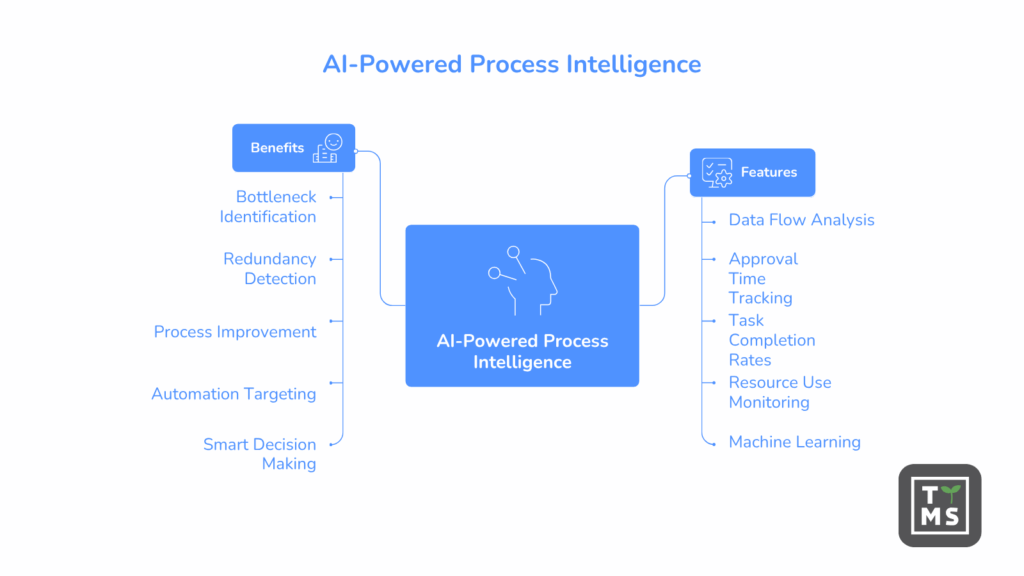
Process intelligence features analyze how work moves through your organization, finding bottlenecks, redundancies, and places to improve. The system looks at patterns in data flow, approval times, task completion rates, and resource use. These insights show you the gap between how processes should work and how they really function.
Machine learning spots problems and predicts issues before they hurt operations. If expense report approvals suddenly slow down, the system flags the change and looks for causes. When certain customer requests always take longer, it highlights patterns that might signal training gaps or process problems.
You can use these insights to make smart decisions about where to focus automation efforts. Rather than automating everything, teams can target processes that have the biggest impact on productivity, costs, or customer satisfaction.
2.3 Cross-Application Orchestration
Modern businesses run on dozens of specialized apps, which creates information silos that kill productivity. Cross-application orchestration tears down these barriers, letting data and workflows move smoothly between systems. One workflow might grab customer data from your CRM, update project management tools, send notifications through communication platforms, and log everything in business intelligence systems.
When a sales opportunity hits a certain stage, the system automatically creates project folders, schedules kickoff meetings, assigns tasks, and updates forecasts across multiple tools. Information flows where it needs to go without manual copying or data entry. This orchestration goes beyond Microsoft 365 AI features to include third-party applications through connectors and APIs, so automation adapts to your existing tech stack instead of forcing you to change everything.
2.4 Autonomous Task Execution
AI agents now handle pretty sophisticated tasks with very little human oversight. These agents don’t just follow rigid scripts but make smart decisions based on data, historical patterns, and your business rules. They prioritize work, handle exceptions within guidelines, and escalate issues when human judgment is needed. Routine scenarios get managed effectively, though complex edge cases that need nuanced thinking still benefit from human oversight.
Take expense report processing. An autonomous agent reviews submitted reports, checks receipts, verifies policy compliance, routes approvals to the right managers, and processes reimbursements. It handles standard submissions automatically while flagging weird stuff for human review, learning from each decision to get more accurate.
This autonomous execution cuts the time employees spend on routine tasks way down, freeing teams to focus on strategic work, complex problem-solving, and activities that need human creativity. The consistency of automated processing also improves quality by reducing errors that happen with manual work.
3. Microsoft 365 Copilot for Workflow Automation
Microsoft 365 Copilot plugs directly into the productivity tools you already use, bringing automation capabilities right into your daily workflows. This tight integration means people can use automation without switching contexts or learning new interfaces.
3.1 Automating Document Processing and Approvals
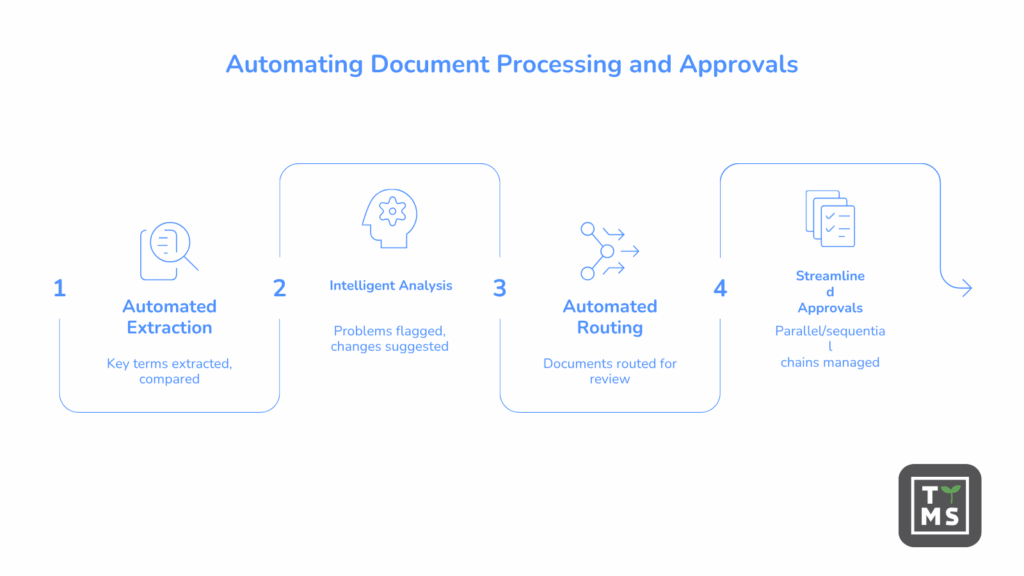
Document workflows usually involve lots of manual steps that slow down decisions and create bottlenecks. Copilot automation transforms these processes by handling routine document tasks automatically. When contracts come in, the system extracts key terms, compares them to templates, routes them for review based on complexity, and tracks approval status.
The technology does more than simple routing. It analyzes document content, flags problems, suggests changes, and drafts responses based on similar previous documents. Legal teams get contracts pre-analyzed with risk factors highlighted. Finance departments receive purchase orders with automatic compliance checks done. HR teams process employee documents with information automatically pulled out and filed.
Version control becomes automatic, with the system tracking changes, notifying people who need to know, and keeping complete audit trails. When approvals need multiple reviewers, Copilot manages parallel and sequential approval chains, sending reminders and giving real-time status updates. Industry data shows that organizations putting in document automation see big reductions in approval cycle times, with processes that used to take days finishing in hours.
3.2 Email and Communication Workflows
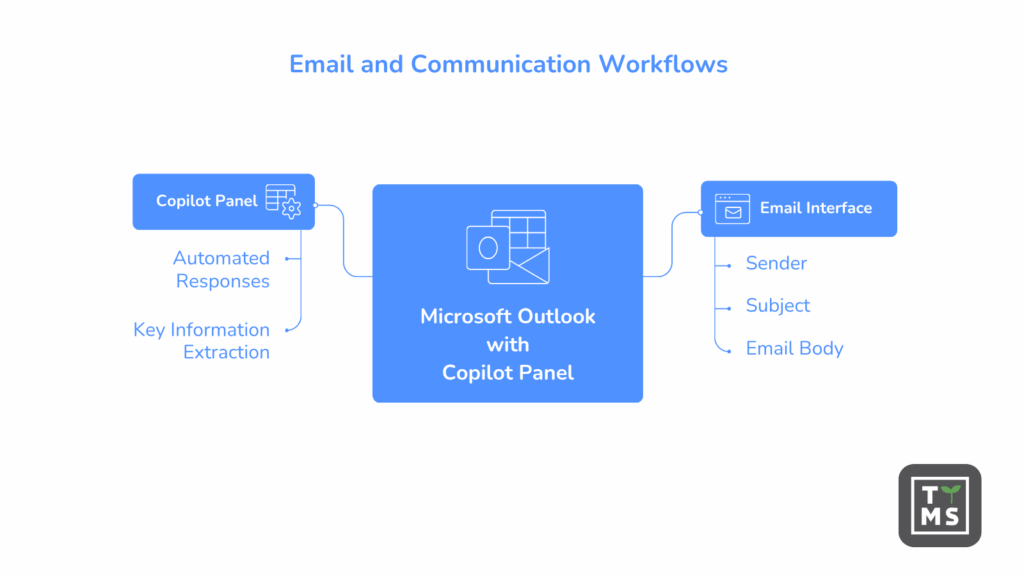
Email stays central to business communication but often crushes productivity. Copilot automation brings intelligence to email management, helping teams stay responsive without constantly watching their inbox. The system can sort incoming messages, draft replies to routine questions, schedule follow-ups, and route requests to the right team members.
Priority detection makes sure important communications get immediate attention while less urgent messages get batched for efficient processing. The assistant learns individual communication patterns, understanding which messages typically need quick responses and which can wait. It extracts action items from email threads, creates tasks automatically, and tracks commitments made in conversations.
For customer-facing teams, automated responses handle common questions with personalized replies that match your brand voice. The system accesses knowledge bases, previous interactions, and customer data to provide relevant, accurate information. Complex questions get escalated to human agents with context already gathered, cutting resolution time.
3.3 Meeting and Calendar Automation
Calendar management eats up a surprising amount of time as teams coordinate schedules and organize meetings. Copilot streamlines this through intelligent scheduling that considers preferences, time zones, and availability across your organization. When someone needs to schedule a meeting, the system suggests optimal times, sends invitations, prepares agendas, and sends reminders.
Pre-meeting prep becomes automated. The system gathers relevant documents, summarizes previous discussions on related topics, and gives participants the context they need. During meetings, it can take notes, capture action items, and track decisions. Post-meeting follow-up happens automatically, with action items becoming tasks assigned to responsible parties and meeting summaries sent to participants and stakeholders.
4. Power Automate with Copilot Integration
Power automate with Copilot combines a powerful low-code automation platform with AI assistance. This integration makes sophisticated workflow creation accessible while providing the depth needed for complex automation scenarios.
4.1 Building Flows Using Copilot Assistance
The Copilot and Power automate integration turns flow creation from a technical task into a guided conversation. You describe what you want to accomplish, and the system generates flows with appropriate triggers, actions, conditions, and error handling. The assistant explains each step, suggests improvements, and helps troubleshoot problems.
This cuts development time dramatically. What might take hours of setup happens in minutes through natural language interaction. The system recommends relevant connectors, suggests efficient logic, and applies best practices automatically. The guided experience includes learning opportunities, with the assistant explaining why certain approaches work better than others, building your understanding of automation principles.
4.2 Process Mining with Copilot
You need to understand existing processes before automating them. Process mining capabilities analyze actual workflow execution, showing how processes truly operate rather than how documentation says they work. The system examines timestamps, user actions, data changes, and system interactions to reconstruct complete process maps.
These visualizations highlight variations, bottlenecks, and inefficiencies that might not be obvious from just watching. Copilot interprets process mining results, giving you actionable recommendations instead of raw data. It suggests specific automation opportunities, estimates potential time savings, and helps prioritize improvements based on impact.
4.3 Desktop Flow Automation
Not all business processes happen in cloud applications. Many organizations depend on desktop software, legacy systems, and specialized tools that don’t have modern APIs. Desktop flow automation bridges this gap, enabling automation of tasks that happen on local machines.
This capability is especially valuable during digital transformation initiatives. You can automate processes involving older systems while gradually moving to modern platforms. Recording features make desktop automation accessible to non-technical users, with the system watching as someone performs a task manually, capturing each action and converting it into an automated flow. This approach extends the reach of Microsoft Copilot studio beyond web applications to cover the full range of business software.
5. Limitations and Considerations
While Copilot automation delivers real benefits, you should understand realistic expectations and constraints before jumping in. These considerations help set appropriate goals and avoid common mistakes.
Implementation typically takes 3-6 months for meaningful adoption, with costs varying based on your organization’s size and complexity. Microsoft 365 Copilot licensing is a per-user investment, and complex integrations might need additional development resources. Budget for training time, since effective automation requires employees to learn new skills and adjust workflows.
AI accuracy varies by use case. Simple, rule-based scenarios work reliably, while processes needing contextual judgment or handling unusual variations need human oversight. Start with straightforward automation before tackling complex scenarios, letting teams build confidence and expertise gradually.
Copilot automation isn’t right for every situation. Processes that happen rarely, change constantly, or require significant human judgment often don’t benefit from automation. Organizations with limited Microsoft 365 adoption or those using mainly non-Microsoft tools might find other solutions more suitable. Security-sensitive processes need careful governance design to make sure automation doesn’t create compliance risks.
Success depends on organizational readiness. Companies with poor process documentation, unclear workflows, or resistance to change often struggle with automation adoption regardless of how good the technology is. Address these foundation issues before implementation to increase your chances of positive outcomes.
6. Common Challenges and Solutions
Implementing automation always presents challenges. Organizations that expect these obstacles and develop strategies to handle them get better results than those that approach automation without preparation.
6.1 Overcoming User Adoption Barriers
Technology adoption fails when people don’t see value or feel overwhelmed by change. Successful automation initiatives address these concerns head-on through clear communication about benefits, thorough training, and ongoing support. You should emphasize how automation removes tedious work rather than replacing jobs.
Starting with quick wins builds confidence and shows value. Instead of launching complex enterprise-wide automation, identify genuinely painful processes, automate them successfully, and celebrate results. These early successes create advocates who encourage broader adoption.
Provide multiple learning paths to accommodate different preferences. Some people want hands-on workshops, others prefer self-paced tutorials, and many learn best from peer mentoring. Creating communities where users share tips and solutions reinforces learning and builds enthusiasm.
6.2 Managing Automation Complexity
As organizations automate more processes, managing the resulting ecosystem becomes challenging. Workflows connect in unexpected ways, dependencies create fragility, and documentation falls behind reality.
Governance frameworks help maintain control. Establish standards for naming conventions, documentation, testing, and change management. Regular reviews identify outdated automation, consolidate redundant flows, and ensure continued alignment with business needs.
Modular design principles make automation easier to maintain. Rather than building huge flows that handle every scenario, create reusable components that can be combined flexibly. This approach simplifies troubleshooting and makes automation more adaptable to changing requirements.
6.3 Handling Edge Cases and Exceptions
Automated processes encounter situations that fall outside normal patterns. How automation handles these edge cases determines whether it’s a reliable tool or a source of frustration.
Build robust error handling into workflows to prevent minor issues from causing major disruptions. Automation should detect problems, log relevant details, and take appropriate action rather than failing silently. Provide clear escalation paths so edge cases get human attention when needed, with the system gathering context and explaining what it couldn’t handle and why.
7. Getting Started with Copilot Automation Today
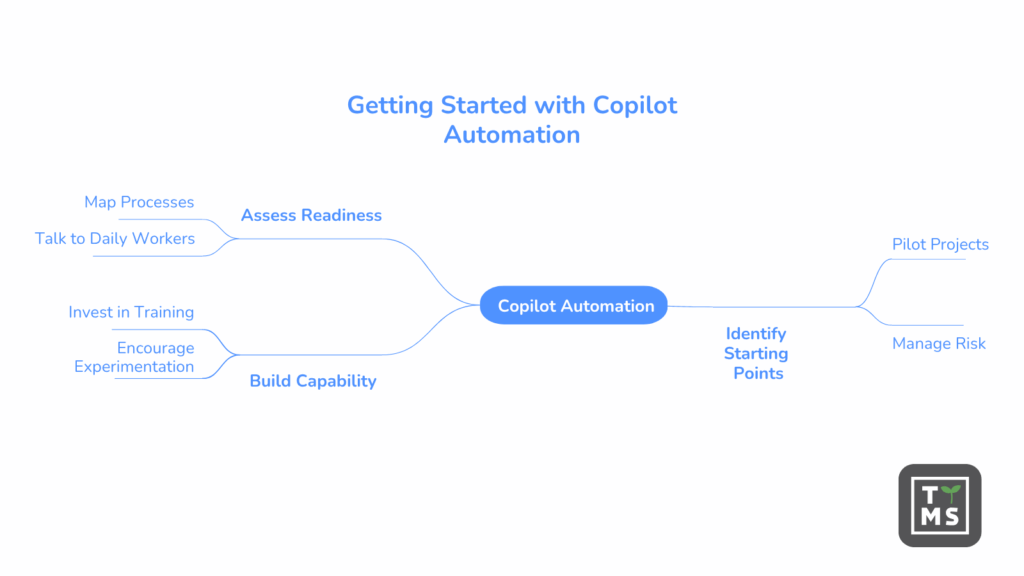
Beginning an automation journey requires thoughtful planning rather than rushing to automate everything. You should assess your readiness, identify appropriate starting points, and build capability systematically.
Start by mapping current processes to understand where time gets spent and what creates the most friction. Talk to people who do the work daily to identify pain points that might not be visible to management. These conversations reveal automation opportunities that deliver genuine value.
Pilot projects provide learning opportunities with limited risk. Pick processes that are important enough to matter but not so critical that failures cause serious problems. These initial projects help teams develop skills, understand what works well, and identify potential challenges before tackling larger initiatives.
Building internal expertise ensures long-term success. While outside consultants can speed up initial implementation, sustainable automation requires knowledgeable internal teams who understand both the technology and the business. Invest in training, encourage experimentation, and create time for people to develop automation skills alongside their regular work.
8. How TTMS Can Help You Start Using Copilot Safely and Securely in Your Organization
TTMS brings deep experience in AI implementation and process automation to help organizations navigate their Copilot adoption journey. As certified Microsoft partners, TTMS understands both the technical capabilities and the business transformation needed for successful automation initiatives.
Working mainly with mid-market and enterprise organizations across manufacturing, professional services, and technology sectors, TTMS has guided companies through Copilot implementations that balance ambition with practicality. Security and compliance concerns often slow automation adoption, especially in regulated industries. TTMS helps organizations put in place appropriate controls, establish governance frameworks, and maintain compliance while getting the productivity benefits Copilot offers, including designing data handling protocols, setting up access controls, and ensuring audit capabilities meet regulatory requirements.
The managed services model TTMS offers provides ongoing support beyond initial implementation. As business needs change and Microsoft 365 AI features expand, TTMS helps organizations adapt their automation strategies. This partnership approach means companies can focus on their core business while counting on TTMS to handle the technical complexities of maintaining and optimizing automation solutions.
TTMS customizes solutions to specific organizational contexts rather than applying cookie-cutter approaches. Whether integrating Copilot with existing Salesforce implementations, connecting automation to Azure infrastructure, or building custom solutions through low-code Power Apps, TTMS designs systems that fit how organizations actually work. This customization ensures automation enhances existing processes rather than forcing artificial changes to accommodate technology limitations.
Training and change management support from TTMS helps organizations overcome adoption barriers. Instead of just providing technical documentation, TTMS works with teams to build genuine understanding and capability, ensuring automation initiatives succeed long-term and creating organizations that can continuously improve their processes as needs change and technology evolves. Interested? Contact us now!
FAQ
What is the difference between Microsoft 365 Copilot and Power Automate Copilot?
Microsoft 365 Copilot focuses on assisting users directly within productivity tools like Word, Excel, Outlook, and Teams by generating content, summarizing information, and supporting day-to-day tasks. Power Automate Copilot, on the other hand, is designed specifically for building and managing workflows. It helps users create automation flows using natural language, define triggers and actions, and connect systems across the organization. In practice, Microsoft 365 Copilot enhances individual productivity, while Power Automate Copilot enables end-to-end process automation at scale.
How much does Copilot automation cost?
The cost of Copilot automation depends on several factors, including licensing, the number of users, and the complexity of workflows being implemented. Microsoft 365 Copilot is typically licensed per user, while automation scenarios built in Power Automate may involve additional costs related to premium connectors, API usage, or infrastructure. Beyond licensing, organizations should also consider implementation costs such as process analysis, integration work, and employee training. While the initial investment can be significant, many companies see a return through time savings, reduced manual errors, and improved operational efficiency.
Can Copilot automate workflows without coding?
Yes, one of the core advantages of Copilot is its ability to enable no-code or low-code automation. Users can describe workflows in natural language, and the system translates those instructions into structured automation processes. This significantly lowers the barrier to entry, allowing business users – not just developers – to build and manage workflows. However, while simple and moderately complex processes can be automated without coding, advanced scenarios involving custom integrations, complex logic, or strict compliance requirements may still require technical support.
What types of business processes work best with Copilot automation?
Copilot automation is most effective for processes that are repetitive, rule-based, and involve structured data or predictable workflows. Examples include document approvals, invoice processing, employee onboarding, customer support ticket routing, and email management. These processes benefit from automation because they follow consistent patterns and require minimal subjective judgment. In contrast, highly dynamic processes, tasks requiring deep contextual understanding, or decisions involving significant risk may still require human involvement or hybrid approaches combining automation with manual oversight.
How does Copilot automation compare to traditional RPA tools?
Copilot automation differs from traditional Robotic Process Automation (RPA) tools by introducing natural language interaction, AI-driven decision-making, and deeper integration with modern cloud ecosystems. While RPA tools typically rely on predefined scripts and rigid rules to mimic user actions, Copilot can interpret intent, adapt to variations, and improve over time based on data patterns. This makes it more flexible and accessible for business users. However, RPA still plays an important role in automating legacy systems and highly structured tasks, so in many organizations, Copilot and RPA are used together as complementary technologies rather than direct replacements.