How can ChatGPT integrations with business applications simplify everyday work in 2026? Here is a simple example: a client emails us asking for a project status update. At this point, we face half an hour of clicking between Google Drive, Slack, Asana and the CRM system. What if ChatGPT could collect information from all these sources in a single conversation and immediately prepare a summary, response or plan for the next steps?
In this article:
- we examine 15 ChatGPT integrations with popular business applications that can make the scenario described above part of a company’s everyday workflow,
- we explain the differences between apps, integrations, plugins, GPTs and MCP servers,
- we present specific business use cases and highlight what should be checked before implementation, including permission scopes, data security, availability and costs.
How do business application integrations extend ChatGPT’s capabilities?
In the client enquiry scenario described above, the right set of integrations could work as follows: ChatGPT would find documents in Google Drive, summarise conversations in Slack, check task statuses in Asana and analyse the client’s data in the CRM system. Individual integrations may be available in ChatGPT as apps, connectors or MCP-based solutions. They make it possible to use data and selected functions from external services without leaving the conversation, and then prepare an up-to-date summary, a response for the client or a plan for the next steps.
The available capabilities depend on the specific solution. Some integrations are more “passive” and are used mainly for searching and reading data. More “active” integrations support creating, updating and sending data.
GPTs, apps, connectors, plugins and MCP – how do these concepts differ?
The terminology surrounding ChatGPT extensions includes several related concepts. In our previous article, we described the ecosystem of the most useful ChatGPT plugins. In this comparison, we use the term “ChatGPT integrations” as an umbrella term for the different ways of connecting ChatGPT to business applications, their data and their functions.
| Concept | Proposed definition |
|---|---|
| ChatGPT integration | An umbrella term for connecting ChatGPT to an external application, its data or its functions. An integration may be implemented as an app, connector, plugin, MCP server or GPT Action. |
| App | A function of an external service available directly in ChatGPT, sometimes with an interactive interface. |
| Connector | A ready-made connection that gives ChatGPT access to the data or functions of a specific service. Depending on the solution, it may support search, synchronisation or actions. |
| MCP server | A layer that gives ChatGPT access to selected tools, data and operations from an external system in accordance with the Model Context Protocol standard. |
| Plugin | An installable package that extends ChatGPT or Codex and may include instructions, skills, an MCP connection and an optional interface. |
These concepts describe different elements of the same ecosystem and are not always completely separate. Integration is the umbrella term for connecting ChatGPT to an external service. It may be available as an app, use a connector or MCP server, while a plugin may combine several of these elements into a ready-made workflow.
How do you connect an app to ChatGPT step by step?
- Define the task the integration should perform.
- Open the app or plugin directory in ChatGPT.
- Select the appropriate service and start the connection process.
- Sign in to the external application and approve the required permissions.
- Open a new conversation and select the connected app.
- Test the integration using a limited dataset before deploying it across the entire team.
How did we select 15 ChatGPT integrations with business applications?
This comparison covers integrations that support recurring business processes and are available directly in ChatGPT or through documented MCP-based solutions. We considered five criteria:
- Frequency of use: the tool stores data or supports tasks performed by teams every day.
- Value of context: the connection gives ChatGPT access to information that significantly improves the quality of its output.
- Scope of actions: the integration supports searching, analysing, creating or updating data.
- Access control: the provider describes authentication, user permissions or administrative controls.
- Usefulness across multiple roles: the solution can support sales, marketing, operations, IT, product development or knowledge management.
The availability of individual features depends on the ChatGPT plan, the external service plan, the country, workspace settings and administrator decisions. The catalogue and permission scopes should be checked immediately before implementation.
15 ChatGPT integrations with business applications in 2026
1. Google Drive integration with ChatGPT – searching and analysing company documents
The Google Drive integration with ChatGPT enables users to work with materials stored in Drive, Docs, Sheets and Slides. Users can search for files, combine information from several documents, analyse spreadsheets and use existing materials as sources for a new report, brief or presentation. It provides the greatest value to teams with well-organised folders and consistent document naming conventions. ChatGPT can then locate the correct versions of proposals, reports, meeting notes and project materials more quickly.
- Best use case: preparing a project summary based on documents, a results spreadsheet and a status presentation.
- Example prompt: “Find materials in Google Drive related to Project X from the last 30 days and prepare a summary of decisions, risks and next steps.”
The video shows how to connect Google Drive to ChatGPT, create an SEO-optimised blog post and save it as a document in Google Drive. It also highlights the importance of detailed prompts for improving the quality of generated content.
2. SharePoint integration with ChatGPT – access to organisational knowledge, procedures and files
SharePoint is a natural source of information for organisations using Microsoft 365. It stores documents, intranet pages, procedures, policies and project materials. The SharePoint integration with ChatGPT enables users to find these resources and use them when preparing responses or documents. It is particularly useful in larger organisations where knowledge is distributed across sites, document libraries and teams. The SharePoint permission structure continues to determine which information is available to each employee.
- Best use case: finding current policies, instructions, templates and project documentation.
- Example prompt: “Based on the current procedures in SharePoint, prepare an onboarding checklist for a new supplier.”
3. Box integration with ChatGPT – secure analysis of company documents
Box combines content management with access controls and is often used by organisations working with confidential documents. The Box integration with ChatGPT can retrieve data on demand or synchronise selected content. On-demand access retrieves the required information while a prompt is being processed, while synchronisation indexes approved resources in advance and speeds up searches across large repositories. The choice of access mode should take into account data classification, retention requirements and the expected response time.
- Best use case: analysing contracts, project materials, client documentation and approved company resources.
- Example prompt: “Find the current versions of documents for Client X in Box and identify discrepancies in the project scope.”
4. Gmail integration with ChatGPT – summarising correspondence and preparing replies
The Gmail integration with ChatGPT enables users to search for messages, summarise long threads and prepare draft replies based on their email history. Gmail in ChatGPT is useful in sales, customer service, recruitment and day-to-day coordination when important decisions are distributed across multiple messages. To help the Gmail connector return an accurate result, specify the relevant period, senders, subject and expected outcome. ChatGPT can then find the appropriate messages and turn them into a summary, list of decisions or ready-to-use draft reply.
- Best use case: summarising an email thread, preparing a follow-up and identifying the commitments made by each party.
- Example prompt: “Summarise the correspondence with Company X from the last two weeks. List the agreed actions, deadlines and questions that still require a response.”
The video shows how to connect Gmail to ChatGPT step by step using the official app. Once the Gmail integration with ChatGPT has been configured, users can search for messages, summarise long threads, find important information and prepare draft replies directly within the conversation.
5. Outlook Email integration with ChatGPT – analysing messages in Microsoft 365
The Outlook Email integration with ChatGPT enables users to find messages, analyse long email threads and prepare replies that take the conversation history into account. Outlook in ChatGPT is particularly useful for organisations using Microsoft 365. If ChatGPT is also connected to SharePoint and Microsoft Teams, it can combine email discussions with documents and team conversations. The Outlook Email integration operates only within sources approved by the organisation and available to the individual user.
- Best use case: preparing a client response based on email history and current project materials.
- Example prompt: “Find the latest email thread about renewing the contract with Company X and prepare a draft reply that addresses the outstanding issues.”
6. Slack integration with ChatGPT – summarising team conversations, decisions and actions
The Slack integration with ChatGPT gives the model access to context from messages, files, channels and team member profiles. Slack in ChatGPT helps reconstruct the history of decisions, prepare project status updates and identify recurring problems in team conversations. The Slack MCP server also supports selected actions, such as sending messages and creating or viewing Canvas documents. The Slack integration with ChatGPT only uses channels available to the authenticated user and operates according to the rules configured by the administrator.
- Best use case: preparing a weekly status update covering decisions, blockers, owners and open questions.
- Example prompt: “Review the project channel from Monday onwards and prepare a status update covering completed actions, risks, decisions and tasks for the coming week.”
7. Microsoft Teams integration with ChatGPT – analysing conversations, meetings and tasks
The Microsoft Teams integration with ChatGPT enables users to search and analyse messages from individual chats, group conversations and channels available to them. Microsoft Teams in ChatGPT can also work with Microsoft Planner plans and tasks. When the relevant actions are enabled, it can create chats and channels, as well as send messages and replies. On the Enterprise plan, the integration can also retrieve transcripts from scheduled meetings if the user has the appropriate permissions. Files shared in Teams channels are usually stored in SharePoint, so analysing them requires an additional connection between ChatGPT and SharePoint.
- Best use case: finding decisions in team conversations and turning them into summaries, tasks and status materials.
- Example prompt: “Review the conversations in the project channel from the last five days and prepare a list of decisions, open questions, responsible individuals and deadlines.”
8. Notion integration with ChatGPT – creating and updating company knowledge
The Notion integration with ChatGPT enables users to read, create and update content on Notion pages directly from a conversation. Notion in ChatGPT can support product documentation, campaign plans, knowledge bases, feature specifications and implementation checklists. The Notion MCP server operates within the permissions of the signed-in user. A person with broad access to the workspace gives the integration an equally broad scope of data and operations, so it is worth beginning the implementation with clearly limited use cases and accounts with appropriately assigned roles.
- Best use case: transforming notes and analysis results into structured pages, databases and action plans.
- Example prompt: “Create a feature specification in Notion based on these notes. Add objectives, requirements, acceptance criteria, risks and open questions.”
The video shows how to connect Notion to ChatGPT and work with content stored in a workspace. The Notion integration with ChatGPT enables users to search for information and create or update pages directly from a conversation.
9. Atlassian Rovo integration with ChatGPT – working with Jira, Confluence and Bitbucket
The Atlassian Rovo integration with ChatGPT connects the model to Jira, Jira Service Management, Confluence and Bitbucket. Jira and Confluence content can be searched and summarised in ChatGPT, while users can also create and update tasks, tickets and pages using natural language commands. The Atlassian Rovo MCP server supports software development, ticket management, change management and documentation processes. OAuth 2.1 authentication preserves existing user roles and permissions, while actions affecting data should be subject to approval and monitoring.
- Best use case: creating tickets from meeting notes, updating statuses and connecting Confluence documentation with Jira tasks.
- Example prompt: “Based on this specification, create five Jira tasks with descriptions, acceptance criteria and priorities. Show me the proposed tasks before saving them.”
10. Asana integration with ChatGPT – creating tasks and managing projects
The Asana integration with ChatGPT provides information about projects and portfolios, and allows users to create and assign tasks, set up new projects and monitor progress. Asana in ChatGPT can turn decisions made during a conversation into a structured plan saved directly in the work management system. The Asana integration with ChatGPT is useful for planning campaigns, implementations, product launches and cross-departmental initiatives. The integration produces the most accurate results when projects, owners and custom fields have clear and consistent names.
- Best use case: creating a project plan and turning decisions into assigned tasks.
- Example prompt: “Create a plan in Asana for launching a new product page. Divide the work into stages, tasks, dependencies and responsible team members. Show me the proposed structure for approval before saving it.”
11. HubSpot integration with ChatGPT – CRM analysis and record updates
The HubSpot integration with ChatGPT provides information about contacts, companies, sales opportunities, tickets and customer interaction history. HubSpot in ChatGPT can analyse the sales funnel, campaign results and customer activity, as well as create and update selected records and log activities. The HubSpot integration with ChatGPT is one of the most extensive solutions available to sales and marketing teams. The quality of its results depends on the completeness of CRM data, consistently defined funnel stages and correctly assigned permissions.
- Best use case: preparing an account brief, analysing the pipeline, updating an opportunity and creating a follow-up.
- Example prompt: “Analyse the sales opportunities in HubSpot that have had no activity for 14 days. Identify the priorities and prepare a plan for the next contact.”
12. Salesforce Agentforce Sales integration with ChatGPT – opportunity analysis and CRM management
The Salesforce Agentforce Sales integration with ChatGPT combines information about customers, sales opportunities and the pipeline with analysis and planning capabilities. Salesforce in ChatGPT allows sales representatives to prioritise opportunities, prepare account plans, update records and run Agentforce actions directly from a conversation. The Agentforce Sales app for ChatGPT is currently available through the Open Beta programme to eligible customers using the required Agentforce add-ons. Before implementation, organisations should verify their Salesforce edition, access requirements and regional availability.
- Best use case: preparing a sales representative for a meeting, prioritising opportunities and updating the CRM after a client conversation.
- Example prompt: “Show me five Salesforce opportunities that require attention this week. Include their value, stage, most recent activity, risk and recommended next step.”
13. GitHub integration with ChatGPT – analysing code, issues and project changes
The GitHub integration with ChatGPT gives the model access to context from repositories, code, issues, proposed changes and automated test results. GitHub in ChatGPT can help analyse code changes, organise issues, prepare documentation and identify dependencies between project components. Administrators can specify which repositories the GitHub integration with ChatGPT can access and which operations it can perform. This makes it possible to test the integration on a small number of selected projects before gradually making it available to additional teams.
- Best use case: analysing proposed code changes, organising issues, reviewing automated test results and preparing change documentation.
- Example prompt: “Review the open pull requests in the mobile application repository. Identify risks, missing tests and issues blocking the release.”
The video shows how to connect GitHub to ChatGPT and give the integration access to selected repositories. The GitHub integration with ChatGPT enables users to explore project structures, analyse code and documentation, and summarise changes, commits and pull requests directly within a conversation.
14. Canva integration with ChatGPT – creating and editing visual content
The Canva integration with ChatGPT enables users to search and summarise existing materials, as well as create, edit and display designs directly within a conversation. Canva in ChatGPT is useful for preparing presentations, social media posts, documents and other visual materials. Designs created through the Canva app for ChatGPT remain editable in Canva, allowing the team to continue refining their content and appearance. The best results can be achieved by specifying the intended audience, objective, format, source materials and brand requirements.
- Best use case: presentations, social media content, sales documents and visual summaries.
- Example prompt: “Create a presentation in Canva for the management team based on this report. Use eight slides, concise conclusions and one chart on the results slide.”
15. Adobe integration with ChatGPT – editing photos, videos, graphics and PDF documents
Adobe for ChatGPT is a package that brings together features from Adobe applications, including Photoshop, Premiere, Firefly, Express and Acrobat. It supports photo editing, consistent batch processing, preparation of social media formats, video shortening, work with PDF documents and searches across Creative Cloud assets. The solution supports workflows intended to produce a finished file. For example, a workflow may begin with a set of employee photos, include lighting correction and consistent cropping, and finish with the export of materials ready for publication.
- Best use case: repeatable photo editing, adapting content for different channels, working with PDF documents and quickly creating designs from templates.
- Example prompt: “Standardise the lighting and colours in these photos, apply consistent cropping and prepare versions for employee profiles on the company website.”
15 ChatGPT integrations with business applications – comparison table
| No. | ChatGPT integration | Area | Best use case | Primary type of work |
|---|---|---|---|---|
| 1 | Google Drive | Documents and knowledge | Analysing files from Drive, Docs, Sheets and Slides | Search, reading and analysis |
| 2 | Microsoft SharePoint | Organisational knowledge | Working with controlled Microsoft 365 resources | Search, reading and analysis |
| 3 | Box | Content management | Secure work with company files and folders | On-demand access or synchronisation |
| 4 | Gmail | Summarising email conversations and preparing replies | Search, analysis and drafting | |
| 5 | Outlook Email | Microsoft 365 email | Analysing email in a business environment | Search, analysis and drafting |
| 6 | Slack | Team communication | Finding decisions and summarising channels and messages | Search, reading and actions |
| 7 | Microsoft Teams | Collaboration | Analysing conversations, meetings and team context | Search and summarisation |
| 8 | Notion | Knowledge and documentation | Creating and updating pages, databases and plans | Real-time reading and writing |
| 9 | Atlassian Rovo | Projects and IT | Working with Jira, Confluence, Jira Service Management and Bitbucket | Search, creation and updates |
| 10 | Asana | Work management | Managing project portfolios and creating tasks | Analysis and project actions |
| 11 | HubSpot | CRM, marketing and sales | Analysing customers, the sales funnel and contact history | Analysis, record creation and updates |
| 12 | Salesforce Agentforce Sales | Enterprise sales | Prioritising opportunities, planning accounts and updating the CRM | Analysis and sales actions |
| 13 | GitHub | Software development | Working with repositories, issues, proposed changes and automated tests | Search, analysis and issue organisation |
| 14 | Canva | Design and communication | Creating editable presentations and marketing materials | Search, generation and editing |
| 15 | Adobe | Creative work and documents | Photos, videos, social media content, PDF files and Creative Cloud assets | Search, generation, editing and export |
Security of ChatGPT integrations in a business environment
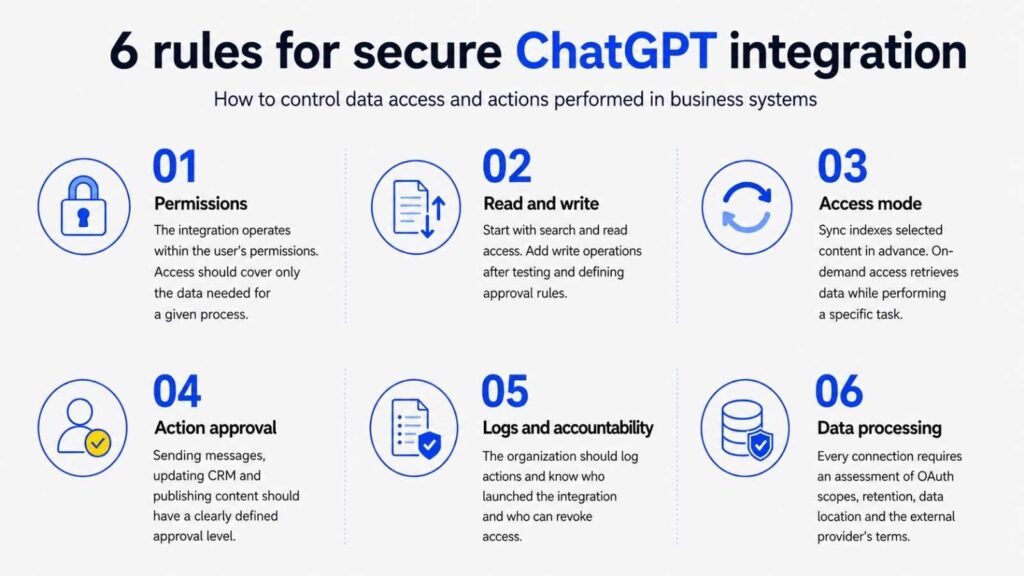
Secure integration of ChatGPT with company systems requires appropriate permission management, separation of read and write operations, selection of the right data access method, approval of actions and operation logging. Data processing terms, OAuth scopes, retention and data residency requirements should also be reviewed for every connected service. In ChatGPT Business, Enterprise and Edu plans, data retrieved through integrations is not used to train OpenAI models.
When is it worth building a custom ChatGPT integration?
Ready-made ChatGPT integrations cover popular business applications and common use cases. A custom integration becomes justified when critical data is stored in an internal system, the process requires specific logic or the organisation needs greater control over its architecture and information flows.
The most common reasons include:
- a private API, legacy system, internal database or on-premises solution;
- a workflow involving several systems and rules specific to the organisation;
- requirements concerning data residency, auditability and approval of operations;
- the need to combine RAG-based search, business logic and actions performed in external systems;
- a regulated environment requiring risk assessment, documentation and controlled implementation;
- a scale at which a custom integration simplifies access and cost management.
Such a solution may use a dedicated integration, MCP server, GPT Actions, API layer or an architecture combining several approaches. The starting point should be a specific process, a clearly identified data owner and the expected business outcome.
ChatGPT integrations as part of a secure enterprise AI ecosystem
ChatGPT integrations provide the greatest value when the connection supports a real process, respects user roles and produces an output that is ready to use. For one organisation, this may mean faster knowledge retrieval. For another, it may involve CRM updates, document automation or a controlled process spanning several systems.
Transition Technologies MS designs and implements AI solutions for business tailored to an organisation’s data, architecture, security requirements and operating model. The scope of a project may include API and MCP integrations, RAG solutions, action automation and a model for managing access, risk and accountability. Our approach to AI has been confirmed by ISO/IEC 42001 certification for our Artificial Intelligence Management System (AIMS). TTMS was the first company in Poland to obtain accredited certification for compliance with this standard and is among the first organisations in Europe operating within its framework. This means that we deliver AI projects according to structured principles covering security, accountability, documentation and risk management.

TTMS also develops proprietary AI products that support specific business processes:
- AI4Content analyses documents and creates structured reports;
- AI4Knowledge helps employees use company knowledge more effectively;
- AI4E-learning transforms source materials into editable online training courses;
- AI4Localisation supports the translation and adaptation of content for different markets;
- AI4Legal automates document analysis and selected legal processes;
- AML Track supports customer verification, risk monitoring and compliance with AML obligations;
- AI4Hire structures application analysis and supports the initial assessment of candidates;
- QATANA uses AI to create test cases and manage the software testing process.
This expertise allows us to combine integration, product and regulatory experience. We can help organisations establish a single connection to a company data source or design a solution spanning several systems, access controls and end-to-end process automation.
FAQ: Frequently asked questions about ChatGPT integrations
Can ChatGPT use multiple connected apps in a single task?
Yes. Supported ChatGPT environments can use several approved sources within a single task. For example, a workflow could collect project decisions from Slack, retrieve a report from Google Drive and prepare an action plan in Asana. Availability depends on the ChatGPT plan, the interface or mode being used and the workspace configuration. The prompt should clearly identify the required sources, expected result and point at which ChatGPT should request approval. The organisation should also define which types of data may be combined in a single output.
Does an integration give ChatGPT access to all of a user’s data?
The scope of access depends on the permissions granted to the integration and the user’s role in the source system. Many integrations respect existing permissions for folders, channels, repositories and CRM records. An administrator account may therefore expose significantly more data than an employee account assigned to a specific team. During configuration, review the OAuth scopes, user roles and options for restricting access to selected resources. A pilot should ideally use an account with permissions corresponding to the intended user role.
Can ChatGPT send messages and modify data in external applications?
Selected apps, integrations and MCP servers support write actions such as sending messages, creating tasks, updating CRM records or adding pages. The available actions vary by provider, subscription plan and integration version. Some tools show the proposed change and request confirmation before completing it. Administrators may also restrict an integration to read-only access or allow only selected operations. Actions affecting customers, financial data, publications or regulated processes should always have clearly defined human approval requirements.
Do I need a paid ChatGPT plan to use integrations?
Not always. A limited selection of apps may also be available on the free ChatGPT plan, although search and analysis features may have lower usage limits. Broader access, including data synchronisation and custom MCP-based integrations, usually requires a paid plan such as Plus, Pro, Business, Enterprise or Edu. Availability may also depend on the user’s region, administrator settings and subscription to the external service. The current requirements for a specific integration should be checked directly in the ChatGPT app or plugin directory.
Can ChatGPT be connected to a company’s internal system?
Yes. An organisation can build a custom MCP server, dedicated integration or API connection that gives ChatGPT access to selected data and actions. A private system may remain behind a firewall or operate on-premises if the architecture uses a secure tunnel and controlled authentication. The project should define tool schemas, roles, logging, action approvals, error handling and protection against prompt injection. Before production deployment, the integration should be tested using valid requests, edge cases and tasks that it is expected to refuse.
How do you connect an app to ChatGPT?
First, define the task the integration should perform and the data required to complete it. Then open the app or plugin directory in ChatGPT, select the appropriate service and start the configuration process. Sign in to the external application, carefully review the requested permissions and approve only the access that is necessary. Once configuration is complete, open a new conversation, select the connected app and test it using a limited dataset. In a business environment, it is best to begin with a pilot for a small group of users before making the integration available to the wider organisation.
Can a company administrator restrict access to apps in ChatGPT?
Yes. A workspace administrator can decide which apps and plugins are available within the organisation, who may use them and which actions they can perform. For example, the administrator may allow read-only access while blocking message sending or CRM record updates. In managed workspaces, access can also be assigned according to user roles and groups. Integrations continue to respect permissions in the source system, so users should not gain access through ChatGPT to information they cannot view in the connected application.
Does ChatGPT store copies of data retrieved from connected systems?
It depends on how the integration works. With on-demand access, data is retrieved when a specific request is processed and is not indexed in advance. Integrations that use synchronisation may create an indexed copy of selected content to speed up searches and improve response quality. Disconnecting an app prevents further access, while its synchronised index is scheduled for deletion from OpenAI systems, typically within 30 days. Information previously used in conversations may remain in chat history, so removing it may also require deleting the relevant conversations and saved memories.